March 12, 2026
Foundry Virtual Tabletop - Version 14 - User Testing 1 Release Notes

Hello, Foundry friends! The V14 User Testing phase is now upon us with the release of Foundry Virtual Tabletop Version 14 User Testing 1 (Build 356)! This is the first V14 release that we would like to encourage any curious experienced Foundry VTT users to install and check out.
In the User Testing phase, we focus less on new features and more on refinement and stability. The primary goal for this release is to gather feedback and testing from actual users (without add-on modules enabled, please). We look forward to hearing everyone's thoughts!
WARNING: This is a Testing update intended for experimenting with the new features in V14, not for running actual campaign sessions.
Our community developer friends will also be happy to know that the V14 API documentation is now also live at https://foundryvtt.com/api/v14.
How to test out the V14 User Testing 1 release
The best way to check out non-Stable builds of Foundry VTT is to use separate Foundry VTT installations and a different User Data folder. For Windows users, you can easily do this by downloading and installing the V14 Windows Portable Build. As always, be sure to backup all your important worlds first!
To test V14, you will also need to use a compatible game system such as our own Crucible system. The latest publicly released version of D&D 5E, 5.2.5, is not compatible with V14. However, you can test V14 by installing version 5.3 with this Manifest URL: https://github.com/foundryvtt/dnd5e/releases/download/release-5.3.0/system.json.
If you are planning on testing V14 using a Node.js dedicated server, please be aware that V13 and V14 require mutually exclusive versions of Node.js. V13 is not compatible with Node.js 24, and V14 requires it.
V14 Update Highlights: The Story So Far
Although this is our first Testing build in the Version 14 development cycle, it is actually our 6th V14 release overall. If you're just starting to tune in now, here are some combined highlights from these previous releases.
- Scene Levels
-
The V14 Scene Levels feature pushes the limits of what was previously possible with traditional top-down battlemaps. You can use new features to put entire multi-level castles or dungeons into a single Scene for your players to explore, and even handle tricky situations like snipers on balconies or hiding from your enemies beneath a bridge.
To show what is possible and to illustrate how this all works, we collaborated with the excellent Tom Cartos to release a free multi-level battlemap demonstration module, The Restored Keep.
- Pop-out Applications
- Foundry Virtual Tabletop now has built-in support for rendering dialogs in a separate browser window! Learn more here.
- This popular feature was the winner of our Version 14 Patreon Feature Vote.
- The Placeables Palette and Placeables sidebar tab
-
To set up a Scene, GMs interact heavily with "placeable objects" that you can add to the canvas like Walls and Ambient Light Sources. V14 brings two powerful new tools to help with this:
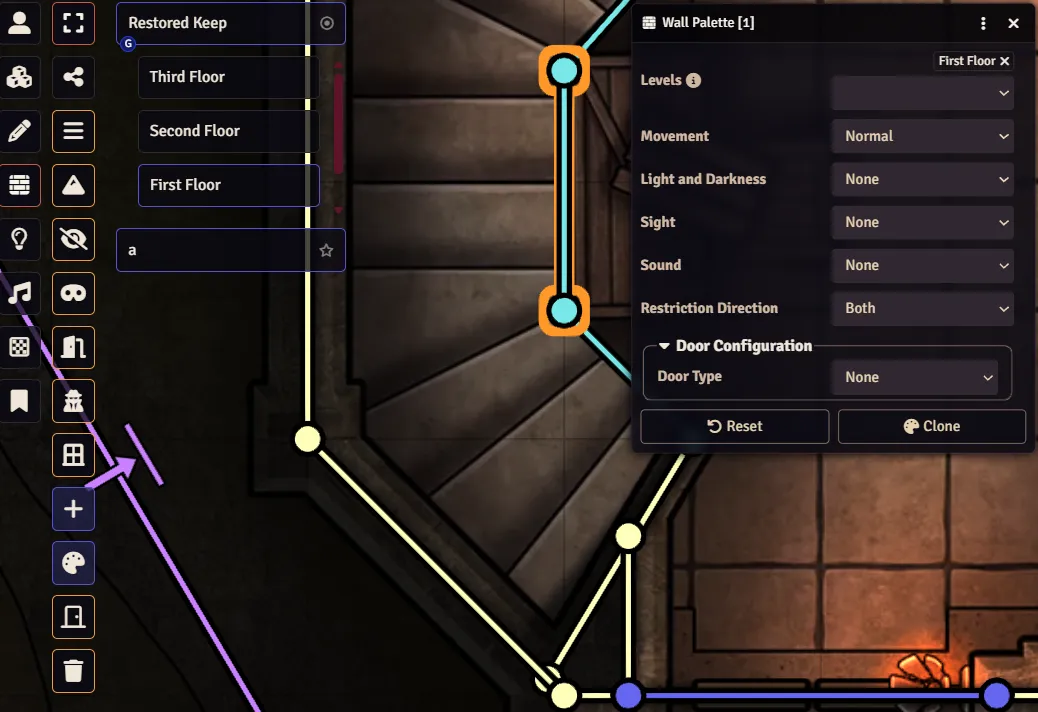
- Placeables Palette: This powerful tool is available through a new control button ( ) in every layer (except Tokens). You can use it to bulk edit a group of selected objects all at once! It also is helpful while creating new objects. Learn more here.
- Placeables Sidebar Tab: There can be many placeable objects in a Scene, especially if it has more than one Level. The new Placeables sidebar tab ( ) adapts to the current layer (Tokens, Walls, etc.), listing all objects of that type and allowing you to conveniently view, filter, and interact with them. Learn more here.
- Active Effects V2
-
Active Effects are already powerful tools that allow you to modify Actors. V14 expands their powers significantly by adding greater control over their expiration, expiration events, and even the ability to alter the Actor's Token!
This means that it's now possible to add an effect that lasts until combat ends or to automate the light from torches. You could create goggles that grant a new vision mode, a mask that disguises your Token with a new image, and so much more. Some of the improvements made so far can be found here and here.
- Out with Measured Templates, in with Template Regions
-
Measured Templates are gone! This marks the first time that we have ever eliminated one of the fundamental types of data that Foundry VTT uses (called a "Document"). Scene Regions have been improved and expanded so that they can now do everything Templates used to do and much, much more.
These new Region-based templates have a new user interface, the ability to add Behaviors, and can even be attached to Tokens! We look forward to seeing what the community does with this power. Learn more here.
- Scene Configuration and Shared Fog of War Exploration
-
While adding Scene Levels to Foundry VTT, we wanted to take care to not make the already-robust Scene Configuration dialog too complex. To accomplish this goal, we added Level-related information to its own tab, made sure you could still create simple scenes without caring about Levels at all, and reorganized a number of commonly used settings into the new Basics tab.
We also added some new options like the ability to have "shared fog-of-war exploration." This new fog exploration mode reveals an area for the entire group if any one member saw it... even for players who missed the session. This is ideal for "region maps" or hexcrawling.
- Shiny New Animations + Scene Transitions
-
When you change scenes, a subtle transition effect now displays as a new Scene renders. It's subtle but pleasant, and you can now also choose from several other less-subtle transition effects as well. Learn more here.
Additionally, we've added API to make it easy to create a dramatic Screen Shake effect, and an entire particle generation engine to create a huge variety of light-weight visual effects right inside Foundry VTT. Learn more here.
- Performance Improvements
-
"Under the hood," Foundry VTT relies heavily on a small set of classes and functions to create the basic structure for data, save changes centrally, and also ensure that it is accurate for all connected clients. In V14, we've made some fundamental improvements to some critical components of this to be more performant and robust. Additional technical details can be found here. Our preliminary testing showed performance improvements ranging from 3% to 25% for commonly performed operations and may be higher for certain edge cases.
We are quite proud of V14 so far and we look forward to your feedback to help make it even better!
V14 Development 1 Update Highlights
Testing builds are primarily focused on bugfixes and API improvements, and this release features plenty of both. In addition to all that, there are also several notable improvements that we'd like to call out.
"Grid Shape" regions and templates
Scene Regions use something called Shapes to define the area in the map that they affect. Traditional Shapes like rectangles, ellipses, and cones were already available, but V14 brings an innovative addition: the Grid Shape (GridShapeData). This new Shape type consists of any arbitrary set of grid squares/hexes, as defined by their grid offset. Like any other Shape type, it can be used with both template and non-template Regions.
We are still workshopping what the best user interface for this new Shape should be, so for now this Shape can only be placed using the API.
The macOS universal build
Due to an upstream issue with one of our software dependencies, macOS users with Apple Silicon hardware have experienced abnormally slow performance. We've now managed to work around this issue by providing a new "universal" macOS build that will allow all macOS users to enjoy the expected level of performance.
This new universal macOS build is now automatically provided when you install the macOS version of Foundry VTT 14.356 (or newer) from our website. Even better, we also went ahead made this fix available for users of the latest Stable version of Foundry VTT, 13.351. If you are an affected macOS user on the latest Stable version, you can now uninstall and reinstall Foundry to take advantage of this improvement immediately.
A new Visual Effects API Framework?? What?
Yep! We're happy to announce that this release includes the first iteration of our experimental new Visual Effects (VFX) framework. This new addition to our API allows the definition, orchestration, and playback of complex canvas animations right inside the Foundry VTT canvas. The abstraction layers that it provides allow systems and modules to create timeline-driven and composable animations to add visual splash to projectile attacks, spell effects, and more. However, because the VFX framework is still so experimental, currently each module or system that wants to use the VFX framework must first "opt in" by specifically enabling it.
To power this new VFX framework, we added a lightweight core dependency, the animejs library (https://animejs.com/). When enabled, the new VFX framework is exposed under foundry.canvas.vfx and the entire animejs library is exposed as globalThis.animejs. For full technical details, please see the VFX Framework API documentation.
We are extremely excited to see what our community can do with these new tools, and we'd especially like to thank community member Codas for their help with ideation and preliminary development of VFX framework concepts.
Polishing the Placeables sidebar tab
We're steadily improving the new-to-V14 Placeables Sidebar tab by adding advanced filtering customized for every type of placeable object. With this release, we added two new filters for Tiles and also several powerful new filters for Ambient Light sources, allowing you to filter lights by their color, animation type, and more.
Ongoing betterment of Scene Levels and Active Effects
While we provided a great many bug fixes and API improvements in the release, many of them were focused on the new V14 Scene Levels feature and the overhaul of Active Effects.
This release brings improved occlusion handling, redesigned logic for detecting Tokens on other levels, and an improved icon to mark them. Multiple Active Effect-related bugs were also squashed (thanks for the testing feedback!).
New Features
Architecture and Infrastructure
- Provided native Apple Silicon support via a universal macOS build. (6538)
- Added the ability for the Foundry VTT server to listen on a Unix socket instead of a TCP port. (9170)
Documents and Data
- Changed
RegionDocument#attachedTokentoRegionDocument#attachment.tokenso that we can potentially add additional options that affect attachments in the future. (13927) - Added options to
TokenDocument#getTestPointsto make the function return suitable test points for occlusion testing. (13834)
Applications and User Interface
- Improved visibility when the Token layer is not active by occluding all foreground textures and surfaces in the level. (13855)
- Added a control to the User Management view to login directly as a given user. (13898)
- Unified the styling of custom elements that include a button used to select a value. (13769)
- Clicking the button of a filepath field now opens the filepicker interface in the same (detached) window. (13889)
- Removed the Foreground Layer toggle button from the Tile layer controls. (13922)
- Prevented a confirmation dialog from displaying for regions without behaviors. (13924)
- Non-GMs can no longer drag locked placeables. Additionally, when the game is paused they can no longer drag any placeables, or place new regions (including templates). (13926)
- Implemented high-level token placement API (
TokenLayer#placeTokens). (13932) - Added two new advanced filters to the Tiles version of the Placeables sidebar tab to allow filtering based on occlusion mode and weather/light restriction. (13933)
- Added several new advanced filters to the Ambient Lights version of the Placeables sidebar tab. You can now filter based on color, animation type, darkness source status, and whether the ambient light source is constrained by walls or provides vision. (13934)
- Removed the "Informational Drawing" toggle in the Drawings layer in favor of using the Placeables Palette. (13938)
- Introduced a dedicated VFX module specialized in the definition, orchestration, and playback of canvas animations using
animejsas an underlying library with Foundry-specific abstraction layers. (13944)
API Improvements
Documents and Data
- Added the
sideoption toScene#testSurfaceCollision, essentially allowing them to only block checks that originate from above them or below them depending on the value set, much like a horizontal one-way wall. (13897) - Added a new type of (Region) Shape,
GridShapeData. This new Shape type consists of any arbitrary set of grid squares/hexes, as defined by their grid offset. (13930) - Flipped the meaning of
onMove/onRotatereturn values inRegionLayer#placeRegionfor consistency with general conventions. (13936) - Changed the default Visibility (
RegionDocument#visibility) of non-template Regions to "Only on Region layer when unlocked" (LAYER_UNLOCKED). (13937)
Applications and User Interface
- Changed the access modifier of
Canvas#_onDragCanvasfrom@internalto@public. (13919) - Added object iterator helpers that are more performant than their eager counterparts,
Object.entries,Object.keys, andObject.values. These new helpers should be preferred in cases where there are no side-effects expected from reading individual object properties. (13899)
The Game Canvas
- Provided API improvements so that intermediate waypoints can now be included in the rendered path of
TokenRuler. (13417) - Added support for the configuration of terrain options for token movement. (13140)
- Added the
attachToTokenoption toRegionLayer#placeRegionto make attaching regions to tokens easier. (13892) - Added support for placing multiple shapes via a single call to
RegionLayer#placeRegion. (13900) - Added support for
SceneManagerinstances inCONFIG.Canvas.managedScenes. (13904) - Measurement options are now passed to
Token#findMovementPathandToken#constrainMovementPath. (13918) - Deprecated
Tile.createPreviewwithout replacement because it was unused. (13921) - Added the
tMinandtMaxoptions toPointSourcePolygon#testCollisionandScene#testSurfaceCollisionto provide control over collision detection at specified elevations. (13925) - Added the
onChangeoption toRegionLayer#placeRegion. This is called when at least one shape of the placed Region has changed. (13928) - Improved line-of-sight testing of Tokens in other Levels and added a new
DetectionMode._testCollision. (13929)
Bug Fixes
Architecture and Infrastructure
- Resolved an issue where a black dot could appear in the center of tokens when the dynamic token ring was enabled for a small subset of users. (12887)
- Resolved extremely poor macOS performance on Apple Silicon in Electron 35+ via a universal macOS build. (12431)
Documents and Data
- Improved
ObjectFieldcleaning so that it now guards against infinite recursion. (13797) - Fixed a bug where Active Effect expiry could throw errors when deleting multiple effects in the same expiry event. (13873)
- Fixed a bug where importing compendium documents via UI did not always correctly preserve ownership. (13554)
- Removed a duplicate "Import Entry" context option in Active Effect compendiums that was non-functional and threw an error when clicked. (13895)
- When attempting to add to an object via an Active Effect, the original value is now returned. (13869)
- Fixed an issue with
ArrayField#_updateDiffwhere it incorrectly failed to recognizeundefined -> []as a diff. (13870) - Fixed a bug where
BEHAVIOR_(UN)VIEWEDregion behavior events were called twice. (13878) - Prevented an error that was thrown on other connected clients when a Document was modified. (13896)
- Fixed a bug where modifying an Active Effect reset expiry to
turnStart. (13905) - Resolved an issue where turn-based Active Effect duration preparation resulted in a
NaNvalue for the time remaining. (13906) - Fixed a bug where unguided Active Effect
subtractchanges were incorrectly treated as additions. (13907) - Prevented an error that was thrown when accessing
TeleportTokenRegionBehaviorType#destination. (13913) - Fixed a bug where changes to elements in a
TypedObjectField<TypedSchemaField>were lost until a reload. (13915) - Resolved an issue where it was not possible to add a new entry to a
TypedObjectField<TypedSchemaField>after the document had been created. (13916)
Applications and User Interface
- Normalized the linebreak format between ProseMirror editors in the browser and the backend. (11021)
- Fixed a bug where the
get{}ContextOptionshook was not called if the application class is mixed in. (13857) - Fixed a bug where non-owned tokens could be selected via the Combat Tracker, revealing their position. (13764)
- Fixed a bug where passed
inputfunctions were non-functional when using the V2SettingsConfig. (13670) - Fixed a bug where attempting to re-attach an application that was spawned via an already-detached application failed. (13887)
- Fixed a bug where attempting to re-attach a secondary application inside an already-detached window rendered the application without a close button. (13888)
- Prevented the Cut and Paste operations from being performed upon locked placeable objects. (13923)
The Game Canvas
- Fixed a bug where
TokenDocument#getTestPointswas not constrained by surfaces. (13879) - Fixed a bug where the resource bar above tokens (Resource Bar 2) did not always update properly. (13826)
- Deprecated
PlaceableObject#clear(now a no-op) in favor of protectedPlaceableObject#_clear, which should be called only inPlaceableObject#drawbefore thePlaceableObject#_drawcall. (13866) - Prevented an error thrown by
PlaceableDirectorywhen a non-placeable layer was activated. (13903) - Fixed an issue where
sortwas not set for Tiles and Notes upon their initial creation. (13920) - Fixed a bug where placeables vanished when switching from the placeables tab to a different sidebar tab. (13940)
Documentation Improvements
- Fixed incorrect documentation of the
SceneLevelsSetFieldconstructor's first parameter. (13911)