Show of Hands
Faster targeting, marquee selection, and custom cursors for Foundry VTT.







Who doesn't like customized cursors!?
Preview · Quick Start · Features · Use It For · Installation · Compatibility · API · Bakshi's Bazaar · Community · Contributing · AI Use · Support · License
Feature Index
| Feature | What it does |
|---|---|
| Middle-Mouse Targeting | Target tokens instantly without switching canvas tools. |
| Marquee Box Select | Drag a rectangle to target groups quickly, with optional filters. |
| Custom Cursors | Give Foundry per-state cursor art, hotspot control, and live previews. |
| Multiplayer Cursor Sharing | See where other players are pointing without relying on the default cursor dot alone. |
| Cursor Name Labels | Place movable player labels next to shared cursors. |
Foundry already has targeting and cursor presence. Show of Hands makes them faster, more visible, and easier to customize.
Preview
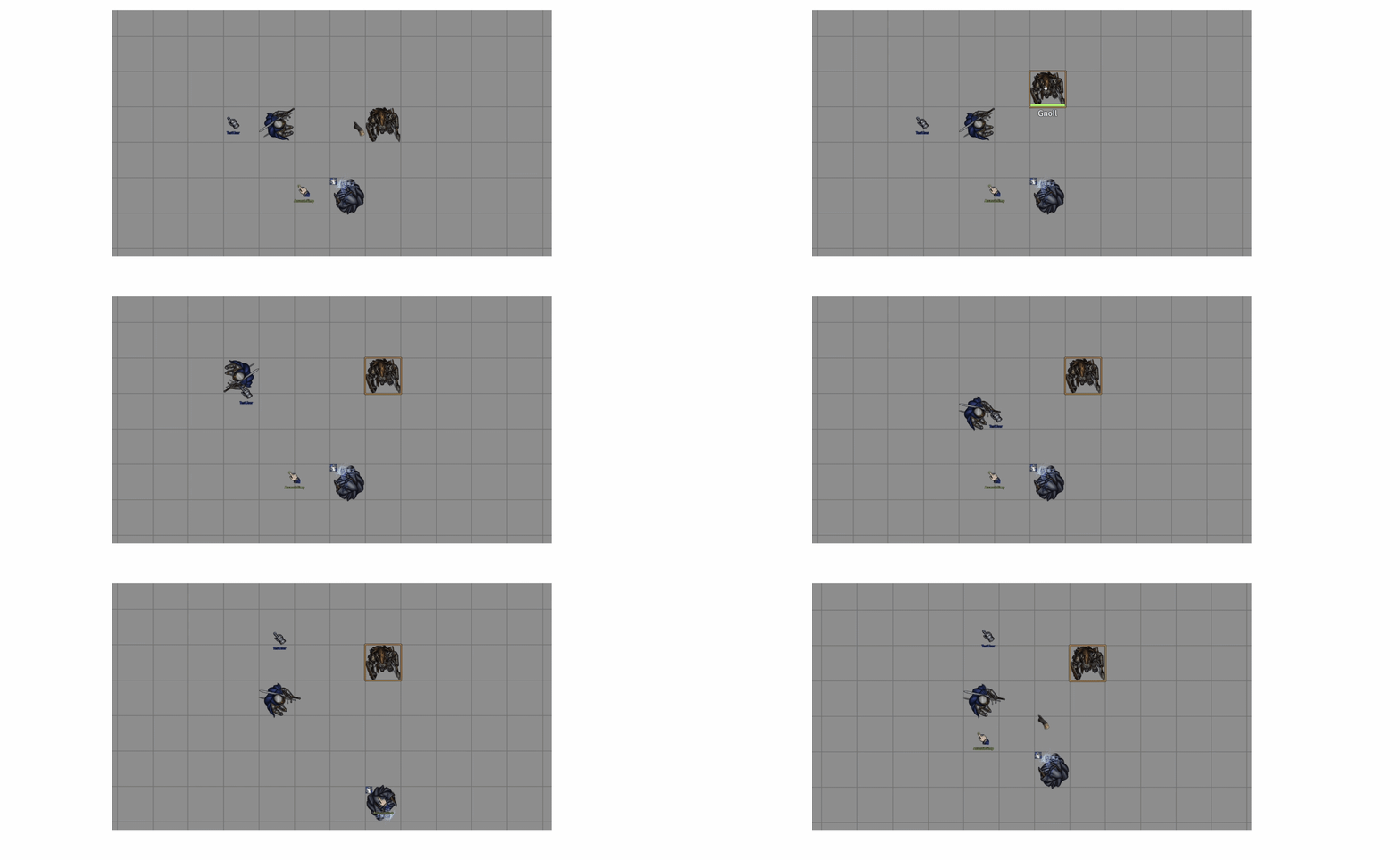
Quick Start
- Install and enable Show of Hands in your world.
- Open Configure Settings > Module Settings > Show of Hands.
- Set Middle-Mouse Actions to Click + Drag for both single-token targeting and marquee selection.
- Open Cursor Settings to choose cursor images, hotspots, cursor sizes, and shared overlay name placement.
- Set Cursor Sharing Mode to decide whether you share your cursor, receive only, or stay private.
Features
Middle-Mouse Targeting
Target tokens with the mousewheel button instead of swapping to the targeting tool.
- Middle-click a token to target it.
- Shift + Middle-click a token to add it to your existing targets.
- Middle-click empty canvas to clear your current targets when that setting is enabled.
- Shift + Middle-click empty canvas keeps existing targets.
- Works like pressing
T, but without interrupting your active tool.
Marquee Box Select
Hold the middle mouse button and drag to target several tokens at once.
- Middle-click + drag draws a selection rectangle on the canvas.
- Shift + drag adds selected tokens to your current targets.
- Dragging over empty space without Shift clears targets.
- Optional token filters can limit marquee selection to hostile, neutral, friendly, or non-friendly tokens.
- Optional level filtering can limit marquee targeting to the currently viewed Scene Level when Foundry exposes one.
- GMs and co-GMs can target all tokens, including hidden ones.
- Players can only target tokens visible to them.
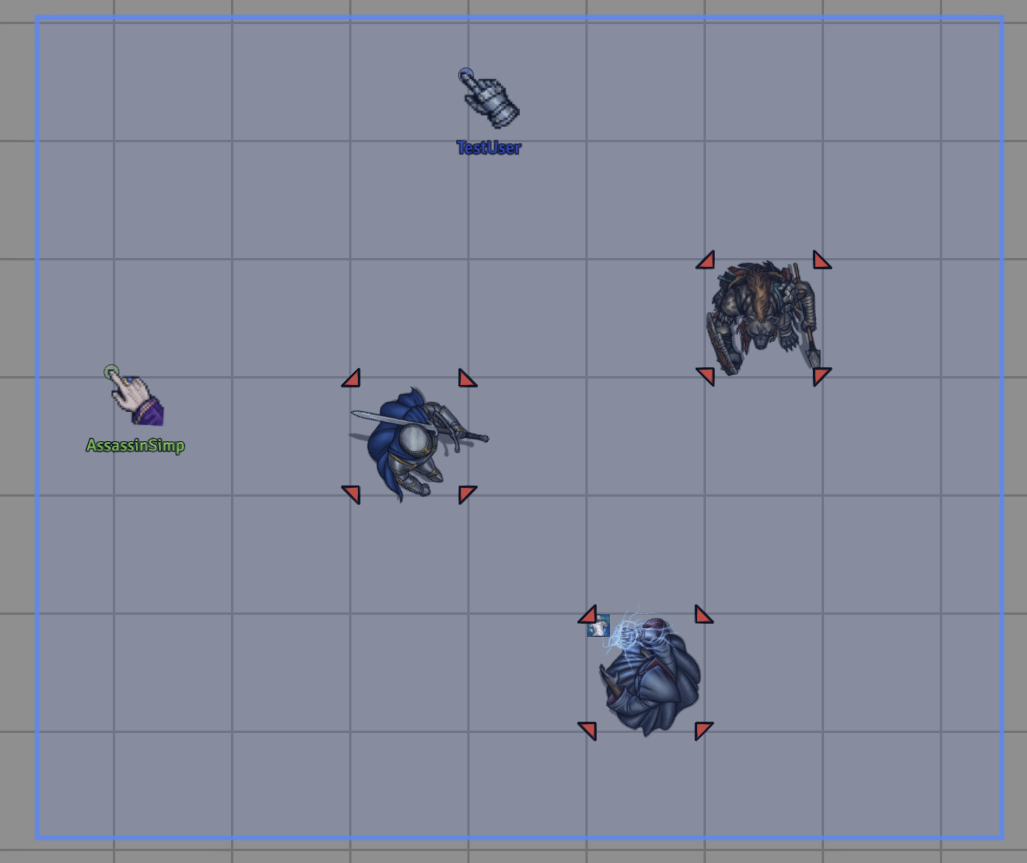
Marquee targeting details
- Drag threshold is
10pixels before the gesture becomes a marquee selection. - Single-click targeting and drag marquee targeting are controlled together by Middle-Mouse Actions: Off, Click to Target, Drag Marquee, or Click + Drag.
- Marquee filters live in Advanced Settings to keep the normal settings list compact.
- Scene Level filtering is only used when the runtime exposes level context and Advanced Settings > Marquee Targeting > Level Filter is set to Viewed Level Only.
Custom Cursors
Replace Foundry's default browser cursor with your own image for each cursor state.
| State | When Active |
|---|---|
| Default | Normal cursor on the canvas and UI. |
| Hover | Mouse is over a token or clickable Foundry UI control. |
| Pressed / Held | Primary mouse button is down during a default or clickable interaction, after press and before release/cancellation. Dragging keeps its separate cursor. |
| Hover To Drag | Mouse is over draggable headers, rows, or drag sources. |
| Dragging | A draggable UI element is actively being dragged. |
| Resize | Mouse is over a window resize handle. |
| Text Editing | Mouse is over a text field or editor. |
| Targeting | Targeting tool is active. |
| Panning | Right-click dragging to pan. |
Per-state customization includes FilePicker-backed image paths, click hotspot position, rotation from 0-359 degrees, width and height controls, aspect-ratio locking, state enablement, live preview, native fallback previews, and profile copy/reset controls. Hotspot sliders use the loaded source image's pixel dimensions, then scale that point with the image into the browser's 128px cursor limit. Show of Hands ships without cursor artwork; leave an image path empty to use Foundry's native cursor for that state.
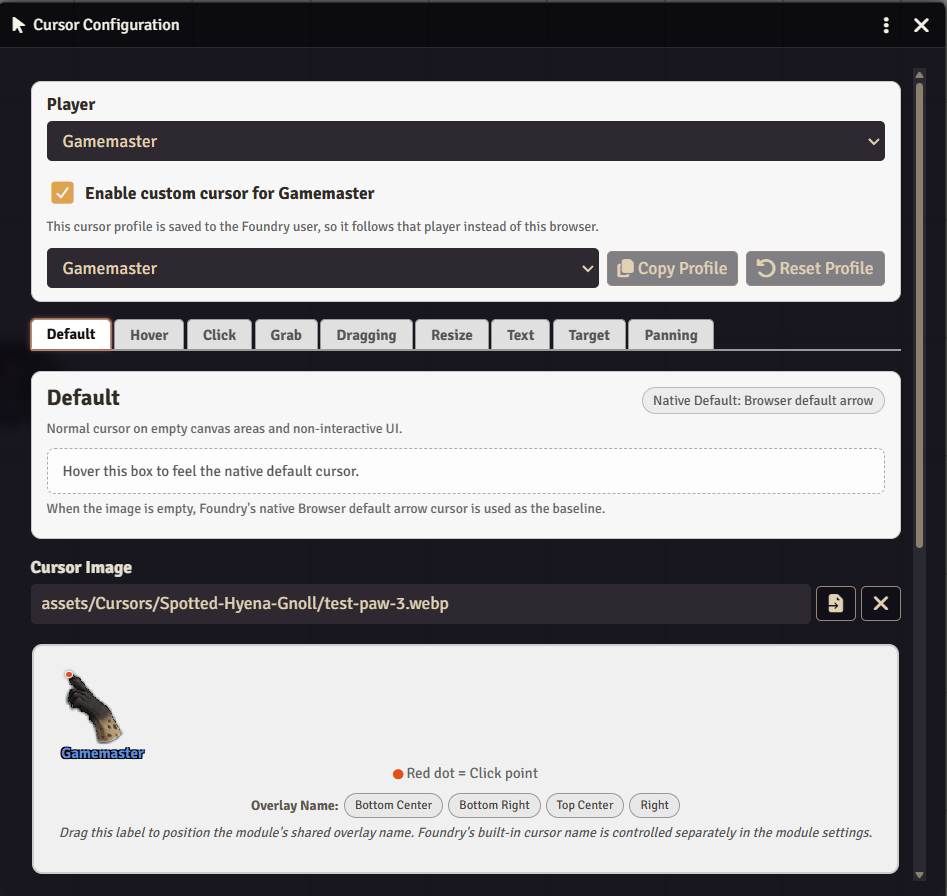
Cursor configuration details
Click Cursor Settings in module settings to open the configuration UI. GMs can choose a player at the top of the window before saving; connected players automatically apply GM changes to their own cursor profile.
For each cursor state you can:
- Set an image by typing a path or using the Browse button to choose a file available to Foundry.
- Clear the image path to use Foundry's native cursor for that state.
- Adjust the hotspot with X and Y sliders.
- Rotate the cursor from
0-359degrees. - Resize it with width and height controls.
- Enable or disable non-default states.
- Preview each state's native fallback cursor directly in the config UI.
- In the Default tab, drag the preview label or use preset buttons to position the module's shared overlay name.
- Reset a profile to defaults or copy a profile from another player.
The live preview shows the cursor image with a red dot marking the hotspot. The draggable name label controls only the module's shared overlay name; Foundry's built-in cursor name is configured separately through Built-In Foundry Cursor Elements. Players can use their own cursor image files anywhere Foundry's FilePicker can read them.
Multiplayer Cursor Sharing
See other players' cursors on the canvas in real time. Each shared cursor appears as either the player's synced custom cursor image or a colored arrow fallback using that player's Foundry color.
- Cursor positions update about 30 times a second, with smoothing so remote motion stays readable.
- Custom cursor images are shared between players.
- Cursor size stays the same at any canvas zoom.
- Shared Cursor Size controls the final on-screen size for remote cursors.
- Only cursors from players on the same scene are shown.
- Cursor images refresh when sharing is turned on after other players have already connected.
- Cursor Sharing Mode can share your cursor, receive only, or fully hide your cursor from others.
- Sharing respects Foundry's core Display Mouse Cursor permission.
- Per-player visibility controls can hide specific shared cursors locally.
- Shared cursors auto-fade after
5seconds of inactivity unless fade is disabled in advanced settings.
Privacy and visibility details
Cursor Sharing Mode has three options:
| Mode | Behavior |
|---|---|
| Share My Cursor | Send your module cursor and receive others. |
| Receive Only | Hide your cursor from others while still seeing shared cursors locally. |
| Private | Hide your cursor from others, including Foundry's built-in cursor dot and name. |
Private mode also wraps native cursor activity so canvas pings do not reveal your cursor through Foundry's built-in cursor display.
Shared Cursor Name Labels
Place a player name label next to each shared cursor. The module overlay label is separate from Foundry's built-in cursor name. You can use preset positions or drag the label into a custom position in the Default tab of the Cursor Settings preview. Per-user positioning is synced to other clients.
When Show Shared Cursor Names (Overlay) is enabled, the module hides Foundry's default white cursor name only for peers who have an active Show of Hands overlay, while preserving the native color dot when applicable. Native-only and Receive Only peers keep their Foundry name, so nobody shows up with two labels or an anonymous dot.
Built-In Foundry Cursor Elements
Control Foundry's native cursor dot and name independently from the module overlay.
| Option | What's Shown |
|---|---|
| Show Player Names & Color Dots | Both Foundry default elements visible. |
| Show Only Player Names | Foundry name label visible, color dot hidden. |
| Show Only Color Dots | Color dot visible, Foundry name label hidden. |
| Hide Both | All Foundry default cursor elements hidden. |
More Details
Idle identity fade-in
When the hidden advanced Show Identity on Idle setting is enabled and some Foundry elements are hidden, those hidden elements fade in as a player's cursor fades out after going idle.
| Foundry Elements Setting | What Fades In on Idle |
|---|---|
| Hide Both | Both name and color dot. |
| Show Only Player Names | Color dot. |
| Show Only Color Dots | Player name. |
| Show Player Names & Color Dots | Nothing. |
Advanced settings
Open Advanced Settings from module settings to tune less-common behavior without crowding the main Foundry settings list.
- Adjust shared cursor opacity and fade behavior.
- Filter marquee targeting by token disposition.
- Filter marquee targeting to the current viewed Scene Level when scene level context is available.
- Hide specific players' shared cursors on your own client.
- View and copy diagnostics for troubleshooting.
Troubleshooting
Cursors not appearing for other players:
- Make sure the player whose cursor is missing has Cursor Sharing Mode set to Share My Cursor.
- Make sure Foundry's Display Mouse Cursor permission is enabled for that player role.
- Make sure that player is not using Private mode.
- Verify both players are on the same scene.
- Switch Cursor Sharing Mode back to Share My Cursor to rebroadcast that player's cursor image.
- Check the browser console (
F12) for errors. - Set Debug Mode to Cursor Sharing to see socket messages.
Custom cursor not displaying:
- Ensure the image path is valid and the file exists.
- Keep cursor images at
128x128or smaller for best browser compatibility. - Clear the image path to confirm the native cursor fallback, then choose a known-good image file through Browse.
- Set Debug Mode to Cursor CSS & Settings for detailed logging.
Shared cursor name placement not behaving as expected:
- Enable Show Shared Cursor Names (Overlay) to see the module's movable label.
- Foundry's default white cursor name is hidden only when that peer has an active module overlay; native-only peers keep their Foundry label.
- Use the Default tab in Cursor Settings to drag the overlay name label or choose a preset position.
- Name placement uses the same fixed screen-space offsets in the preview and live overlay; changing a viewer's Shared Cursor Size scales the art without multiplying the saved label offset.
Middle-mouse targeting not working:
- Verify Middle-Mouse Actions is set to Click to Target or Click + Drag.
- Make sure you're clicking directly on a token.
- If you moved the mouse more than the marquee threshold before release, the click is treated as a drag gesture instead of a single-target click.
- Some mice and trackpads may not have a middle button.
Marquee box select not working:
- Verify Middle-Mouse Actions is set to Drag Marquee or Click + Drag.
- Make sure you drag at least
10pixels to trigger the selection rectangle. - Marquee selection can remain enabled even when middle-click targeting is disabled.
- Check Advanced Settings > Marquee Targeting if a token disposition or level filter is active.
- Players can only target tokens visible to them.
- Set Debug Mode to Marquee Box Select to see selection details.
Set Debug Mode in module settings to focus console output:
| Mode | Use For |
|---|---|
| Cursor CSS & Settings | Cursor settings migration, image load checks, generated cursor CSS. |
| State Detection | Token hover, active targeting tool, and panning cursor classes. |
| Cursor Sharing | Socket messages, cursor image broadcasts, cursor image requests. |
| Marquee Box Select | Middle-click targeting, drag threshold, selected token counts. |
Useful browser console checks:
game.settings.get("show-of-hands", "settings-version")
game.settings.get("show-of-hands", "middle-mouse-actions")
game.settings.get("show-of-hands", "cursor-sharing-mode")
game.user.getFlag("show-of-hands", "cursorConfig")
game.activeTool
document.getElementById("board")?.classList.toString()
The module also exposes a compact support snapshot in the console:
game.modules.get("show-of-hands").api.getDebugState()
ShowOfHands.getDebugState()
Diagnostics (MCP Bridge)
For MCP Diagnostics through Foundry MCP Bridge, enable Debug Mode as a GM and turn on Enable MCP Diagnostics. These controls are advanced GM-only troubleshooting tools and can stay disabled during normal play. The available actions are listed under Developer API.
The normal hard refresh path from MCP is the bridge-level reload-foundry-client tool. The module-level refreshClient({ delayMs }) action is also available so this module's own diagnostics gate can be tested.
validateV14Runtime() is read-only and checks the V14 ApplicationV2, DialogV2, cursor, FilePicker, FormDataExtended, and canvas cursor contracts used by the module. It also reports Scene Levels observations when Foundry exposes them.
A diagnostic warning that legacy cursor-states differs from flags.show-of-hands.cursorConfig is expected after per-user profiles exist. The user flag profile is canonical.
Mutating fixture checks are paired with Enable MCP Diagnostics and still require an explicit confirmMutation: true argument. Automation creates temporary active-scene token fixtures named with the SOH-MCP-FIXTURE prefix and flagged with flags.show-of-hands.mcpAutomationFixture. Cleanup recognizes old TTB-MCP-FIXTURE fixtures for compatibility, but new automation uses the Show of Hands prefix. Keep MCP diagnostics disabled during normal play and use automation only in dedicated test worlds.
Use It For
| Use case | What it looks like |
|---|---|
| Fast combat targeting | Middle-click enemies without changing canvas tools. |
| Area targeting | Drag a marquee over a cluster of visible tokens and target the whole group at once. |
| Table presence | Show player cursors with readable, movable name labels. |
| Cursor theming | Give the whole Foundry UI custom cursor art for hover, drag, targeting, panning, and text states. |
| Privacy | Receive other cursors while hiding your own, or go fully private when needed. |
Recipe: quick group target
- Set Middle-Mouse Actions to Click + Drag.
- Hold the middle mouse button on the canvas.
- Drag across the tokens you want to target.
- Release to replace your current targets, or hold Shift while dragging to add to them.
Recipe: shared cursor labels
- Enable Show Shared Cursor Names (Overlay).
- Open Cursor Settings.
- Use the Default tab preview to drag the overlay label or choose a preset.
- Set Built-In Foundry Cursor Elements to show only the native color dot, or hide both native elements.
Installation
- Foundry -> Add-on Modules -> Install Module.
- Search for "Show of Hands", or paste this manifest URL:
https://github.com/GnollStack/Show-Of-Hands/releases/latest/download/module.json
Important:
show-of-handsand the legacytarget-the-beastieare distinct Foundry packages. Install Show of Hands, disable the legacy module, and never enable both together. On first load, Show of Hands imports compatible legacy settings and the local user's cursor profile. Verify the migrated profile before uninstalling the legacy package.
- Enable the module in your world.
- Configure it under Module Settings > Show of Hands.
| Requirement | Version |
|---|---|
| Foundry VTT | v14 required; verified on 14.367 |
Compatibility
Module version: 14.2.2
Foundry VTT: v14 required; verified on 14.367.
Game systems: works in any system; tested in dnd5e 5.3.3. Targeting, cursor styling, and cursor sharing work at the canvas and UI level and don't use dnd5e data.
Browsers: cursor customization relies on browser cursor image support. Keep cursor images at 128x128 or smaller for best compatibility.
Scene Levels notes
The optional viewed-level marquee filter only activates when Foundry exposes scene level observations. If no level context is available, marquee targeting continues to operate on visible tokens normally.
Foundry cursor permission notes
Cursor sharing respects Foundry's core Display Mouse Cursor permission. If that permission blocks a player role, the module will not force that player's cursor to appear through the normal sharing path.
Developer API
Access:
const api = game.modules.get("show-of-hands").api;
Show of Hands' public API is small and support-oriented.
Support state and cursor utilities
api.getDebugState()
api.refreshSharedCursorImage()
api.syncHiddenRemoteCursors()
getDebugState() also exists on the global helper:
ShowOfHands.getDebugState()
Diagnostics actions
api.diagnostics.actions.getStatus()
api.diagnostics.actions.validateSettings()
api.diagnostics.actions.validateAssets()
api.diagnostics.actions.validateV14Runtime()
api.diagnostics.actions.collectClientDiagnostics()
api.diagnostics.actions.runSmokeTests()
api.diagnostics.actions.validateCursorConfig()
api.diagnostics.actions.validateCursorAssets()
api.diagnostics.actions.openWindow({ window: "cursor" })
api.diagnostics.actions.refreshClient({ delayMs: 250 })
Read-only diagnostics are gated behind GM-only debug settings. Mutating fixture automation additionally requires confirmMutation: true:
api.diagnostics.actions.runAutomation({ confirmMutation: true })
api.diagnostics.actions.cleanupFixtures({ confirmMutation: true })
Notes for other module authors
- Foundry stores
--cursor-*values inline on the root element; overriding them only in a stylesheet can leave the native cursor active. - Hover states use CSS selectors and Foundry's native cursor families rather than document-wide JavaScript hover listeners.
Example macros
Copy a compact debug snapshot to the console.
console.log(game.modules.get("show-of-hands").api.getDebugState());
Refresh the shared cursor image after changing a cursor asset.
game.modules.get("show-of-hands").api.refreshSharedCursorImage();
Open the cursor configuration window through diagnostics. Requires the diagnostics gates to be enabled.
game.modules.get("show-of-hands").api.diagnostics.actions.openWindow({ window: "cursor" });
Bakshi's Bazaar
Show of Hands is free. My premium modules are released as Bakshi's Bazaar for Bazaar Patrons and install through Foundry's Premium Content.
| Module | What it adds |
|---|---|
| 5e Activity Importer | Adds activities and Active Effects to dnd5e Items from YAML, or imports complete Items together with 5e Item Importer. |
| Custom Currency 5e | Custom coins, exchange rates, regional markets, and physical coin items on native dnd5e sheets. |
| FileSmith | Folder colors, multi-select, clipboard actions, and move undo for Foundry's sidebar. |
| Immersive Vision FX | Soft vision and light edges, creature vision profiles, cave light, and eyeshine. |
| Traffick | Party trading, merchant catalogs, perceived prices, and appraisal checks for dnd5e. |
A Bazaar Patron membership includes:
- Every Bakshi's Bazaar premium module while your membership is active, including ongoing updates and new modules as they're added.
- Patron-only channels in the Bakshi's Bazaar Discord.
- Priority module support.
- A direct place to share feedback and feature suggestions. Suggestions are welcome and taken seriously, but development priorities remain at my discretion.
Everyone is welcome in the Bakshi's Bazaar Discord: the public channels cover release announcements, questions, and feature ideas, and patrons also get the patron-only channels and priority support. Bug reports for Show of Hands still go to GitHub issues, as described under Community.
Community
- Report bugs - open an issue with your Foundry version, module version, steps to reproduce, console logs, and screenshots or short clips when useful.
- Ask on Discord - anyone can ask questions in the public channels of the Bakshi's Bazaar Discord. Bazaar Patrons get priority support in the patron-only channels.
- Request features - tell me what happened at your table and what you wish the module could do.
- Star the repo - if the module is useful at your table, a star helps other GMs find it.
- Watch releases - follow the repo for updates, compatibility notes, and new feature releases.
Contributing
Bug reports, feature ideas, reproduction notes, documentation fixes, and localization ideas are welcome.
I am not generally accepting unsolicited code PRs for features, refactors, architecture, or behavior changes. This is still my module and my codebase; I will decide how features are designed and implemented unless I explicitly say otherwise.
- Bug reports - include Foundry version, module version, a console log, and the steps to reproduce. Screenshots or short clips help a lot.
- Feature requests - tell me what happened at your table and what you wish the module could do.
- Pull requests - please do not open code PRs unless I ask for one. Open an issue with the idea instead.
- Code ownership - core implementation, architecture, and release decisions remain with me unless stated otherwise.
- Translations and docs - typo fixes, wording suggestions, and localization ideas are welcome by issue first. I do not have a public translation setup yet, so I will fold useful wording in myself.
I may adapt, decline, or implement submitted ideas. Any accepted contribution or submitted project material may be released under the same EULA as the rest of the module.
AI-Assisted Development
This module is developed and maintained with the help of AI-assisted tools for coding, debugging, and testing.
I care about the quality, behavior, performance, security, and long-term maintainability of this module, and I take full responsibility for what ships. AI assistance does not replace review, testing, debugging, or security and design judgment.
AI is used here as a tool under my direction to make Foundry better and allow for long term mod support while still having a life outside of building and maintaining my free and premium modules.
If you are uncomfortable using software developed with AI-assisted tools, this module is not for you.
Support Development
This module represents many hours of development.
If this module made your table smoother, clearer, or just a little more stylish, consider supporting development:
"Thanks for the support! It helps me maintain support for the module and puts a nice steak on the table."
License & Permissions
Proprietary EULA
This module is licensed under the GnollStack Proprietary EULA. It is Free for Personal Use, meaning you can use it in your home games, stream it, or modify it for your own table without restriction.
However, Commercial Redistribution is Strictly Prohibited. You may NOT sell this module, bundle it within paid content such as Patreon maps or adventures, or host it as a commercial service without prior written consent.
Commercial Licensing
I am open to partnerships. If you are a map maker, adventure writer, or developer who wishes to use this module commercially, please contact me. Commercial licenses are available for:
- Bundling this module with paid VTT content.
- Official integration into commercial systems.
- Custom feature development for your specific product.
Contact
For licensing inquiries or permission slips:
- Discord:
GnollStack(Preferred) - Email:
Somedudeed@gmail.com - Please do not open GitHub Issues for commercial licensing discussions. But feel free to contact me via Discord or Email.
Author: GnollStack - Compatibility: Foundry VTT v14 - Version: 14.2.2