5e Activity Importer
A premium Bakshi’s Bazaar module for Foundry VTT.





Add D&D 5e activities and Active Effects to existing Items from structured YAML, with previews and checks before importing.
Preview · Quick Start · Features · Installation · Changelog · Compatibility · API · Free Modules · Roadmap · Community · AI Use · License
Feature Index
| Feature | What it does |
|---|---|
| Activity & Effect Authoring | Add attacks, saves, spells, effects, and other supported mechanics to Items you already have. |
| Preview & Validation | Review parsed data, check references, and compare the imported result. |
| Linked Activity Batches | Import activities with their Forward targets resolved in dependency order. |
| Import Tools | Reuse presets, find linked documents, and undo imports from the current session. |
| Item Importer Integration | Create Items with activities and effects when the free companion is enabled. |
Use quick-start templates, write YAML yourself, or supply the bundled references to an LLM for help preparing it. Review generated mechanics before importing and test their behavior at your table. The module imports the YAML you supply; it does not generate content through an AI service.
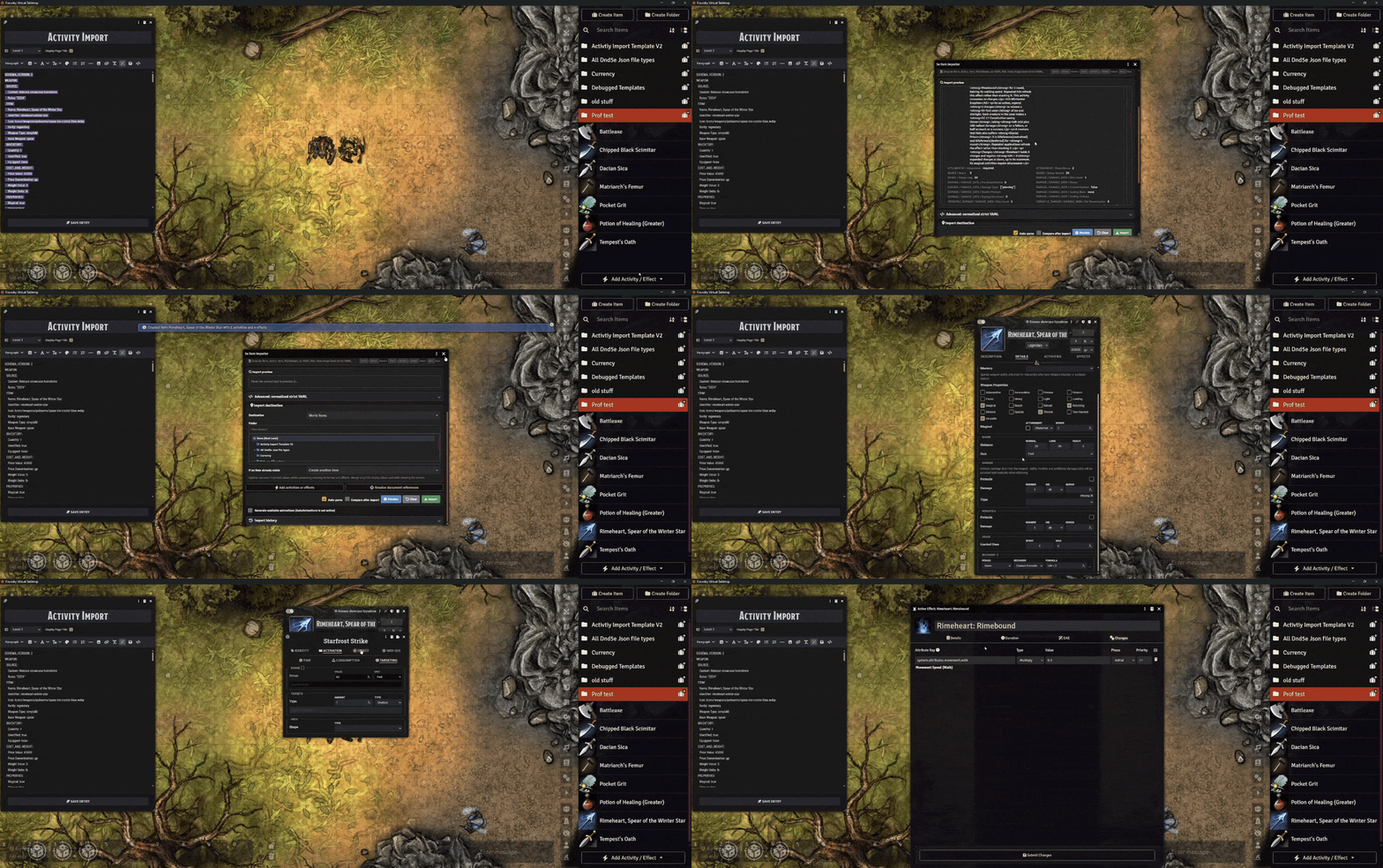
Preview
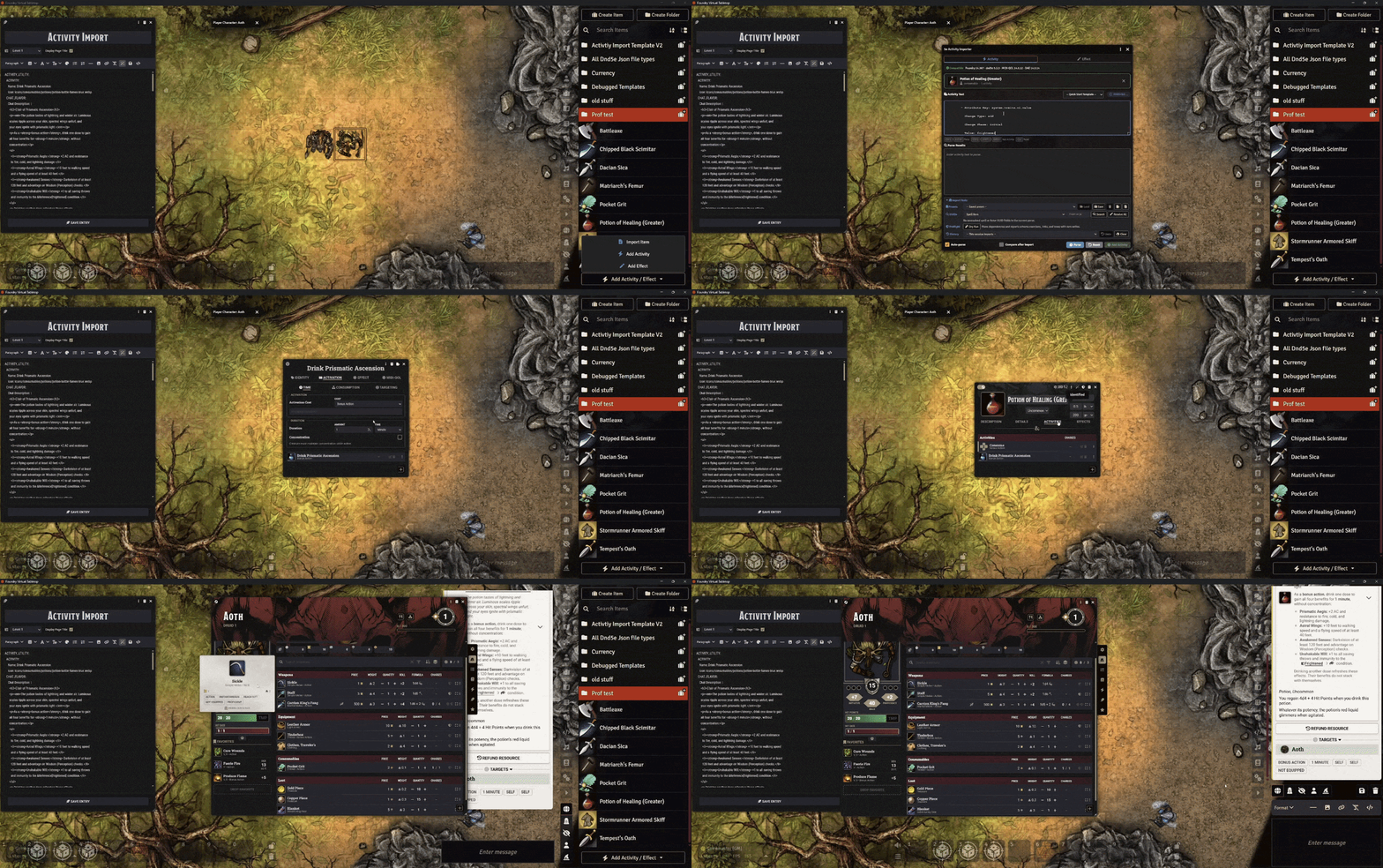
Quick Start
- Open the Items Directory dropdown and choose Add Activity or Add Effect.
- Drop the target Item into the window.
- Paste YAML or insert a quick-start template.
- Click Preview and review the preview cards. Resolve required document links.
- Use Check import to check the import without changing the Item, then add the parsed activities or effects.
Auto-parse is enabled by default. Ctrl+Enter previews; Ctrl+Shift+Enter adds the current results. See the import-window guide (docs/import-window.md in the installed module) for presets, view options and reset controls.
Features
Activity & Effect Authoring
Choose Add Activity or Add Effect from the Items Directory dropdown, drop an Item into the window, and paste your YAML. Start with a quick-start template or an editable recipe (templates/README.md#schema-4-automation-and-recipes in the installed module), or use the full references for field options and examples. The Activity and Effect tabs keep separate drafts.
The importer supports Attack, Save, Damage, Heal, Utility, Check, Cast, Enchant, Summon, Transform, and Forward activities, plus standalone Active Effects. MIDI-QOL variants are available for workflows that use that module.
YAML can preserve activity descriptions, dice modifiers, Check/Save roll bonuses and visibility, effect expiry, and native effect conditions and rules. Transform supports effect-based forms. Applied effects can link to standalone ActiveEffects by UUID, and APPLIED_BEHAVIORS supports the native Apply Active Effect and Difficult Terrain behaviors.
Recipes cover these mechanics plus filtered roll bonuses, AC calculations, minimum proficiency, and shared effects. Compatible MIDI-QOL/DAE installations add automation recipes. See Automation storage in schema 4 (docs/automation-schema-4.md in the installed module) for the settings preserved during import and export.
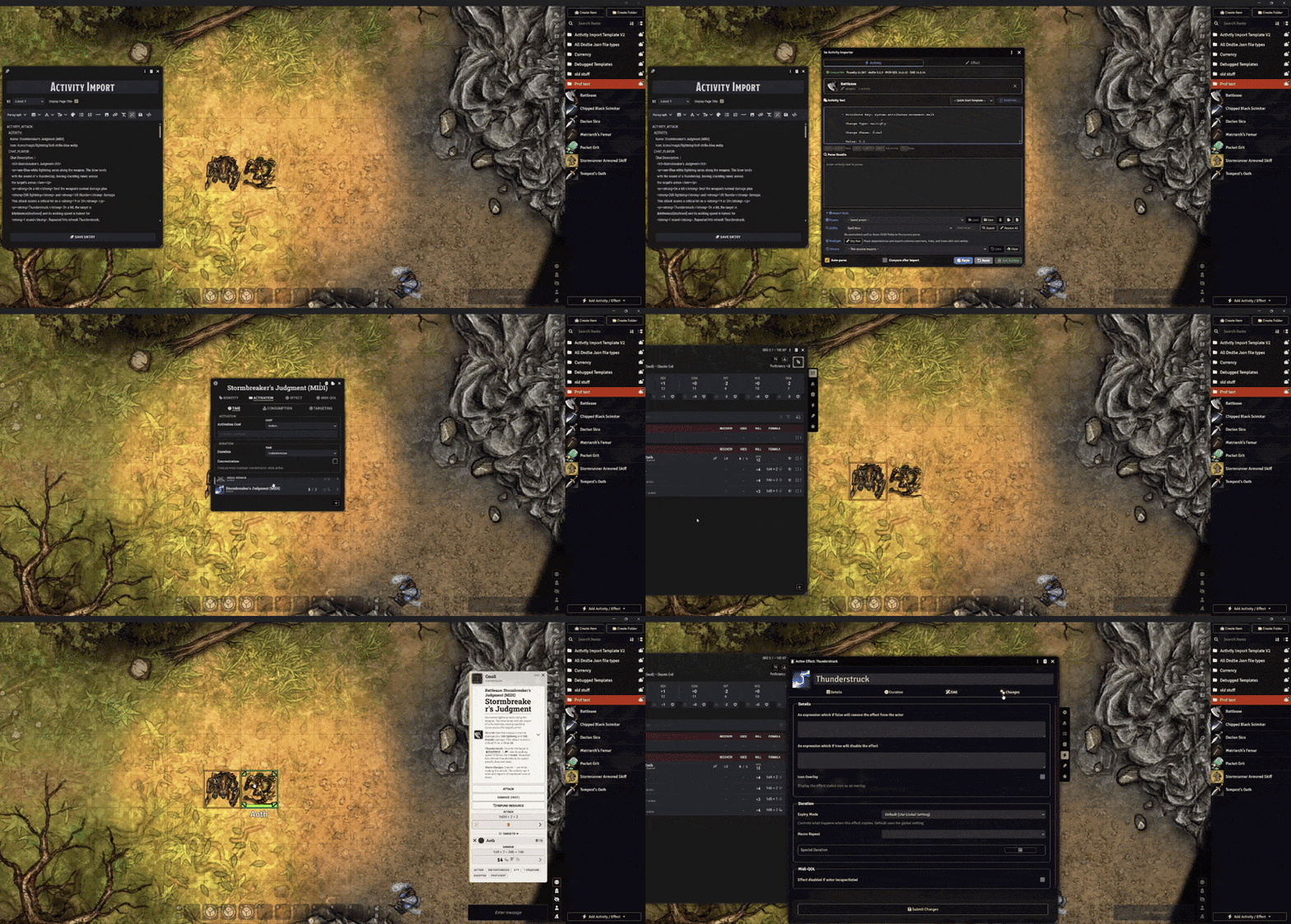
Preview & Validation
Parse the input to review preview cards, then use Check import to inspect the planned import without changing the Item. It reports schema changes, unresolved references, dependency problems, and icon checks. Expand Version status to see the active Foundry, dnd5e, MIDI-QOL, and DAE versions.
Full mechanical previews are the default; View options also offers Compact previews. Previews do not run commands or evaluate conditions. Enable the comparison option when importing to see expected values beside the saved result. Validation only checks the data, so test automation in your world as well.
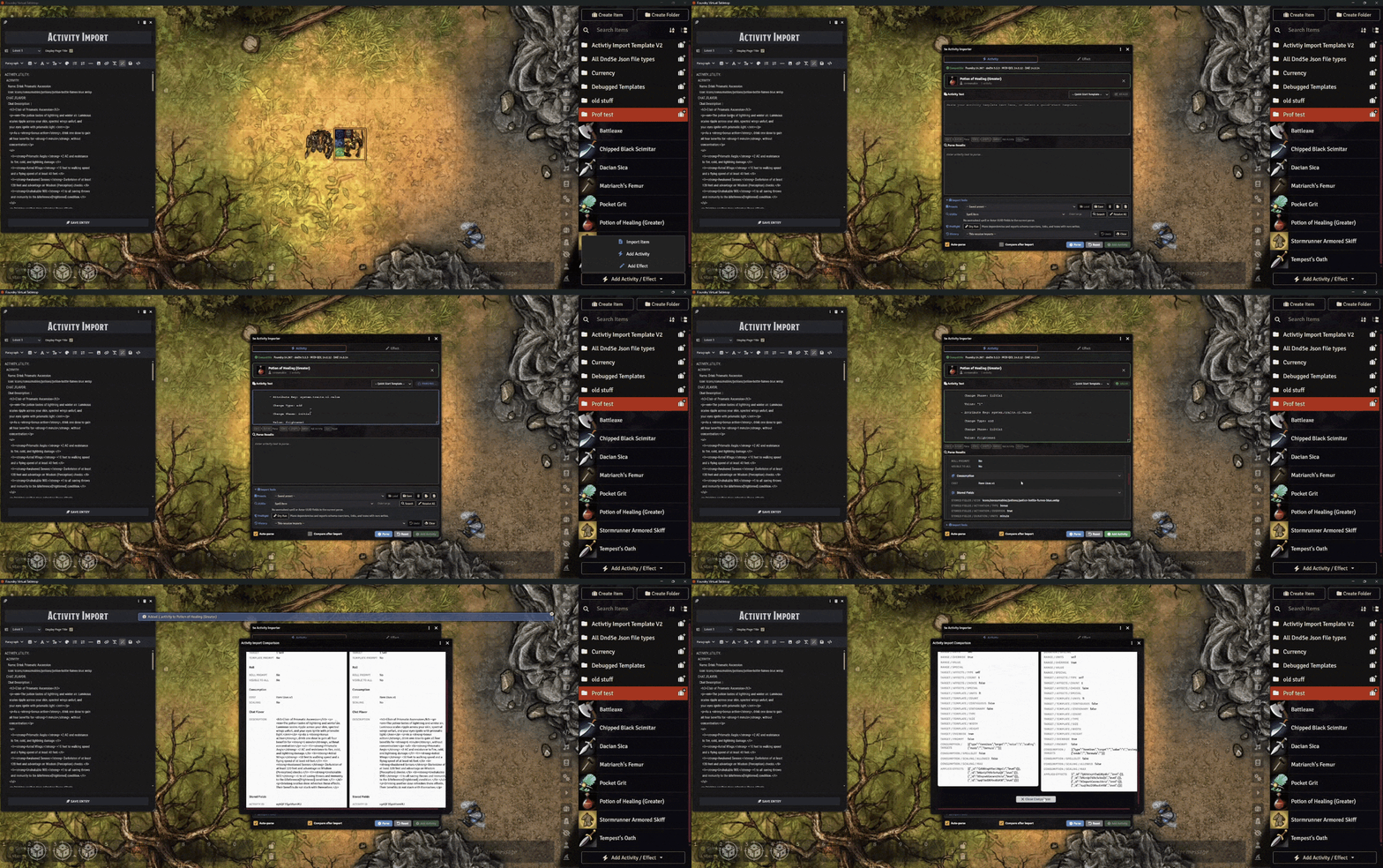
Linked Activity Batches
Forward activities can refer to an existing or same-batch non-Forward activity by exact ID, identifier, or unique exact name. The importer assigns IDs and imports dependencies before the Forward activities that use them. Missing, ambiguous, Forward-to-Forward, and cyclic references block the plan.
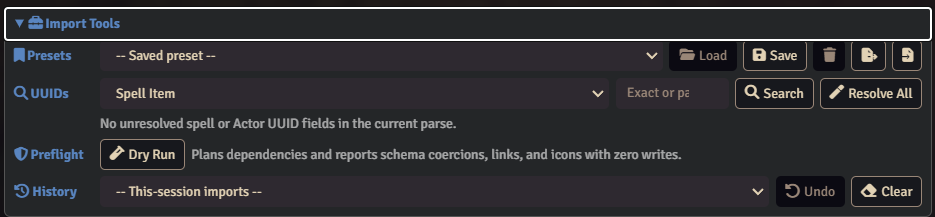
Import Tools
Templates and saved presets share one picker. Manage opens controls to save, update or delete presets in the current browser, and exchange them through JSON export or JSON/YAML import. Search accessible world and compendium spells or Actors for Cast, Summon, and Transform links. Resolve All fills a UUID only when there is one unique exact-name match.
Enable View options > Show Import History to display recent imports and Undo; it is hidden by default. Undo asks for confirmation. It checks access and import markers before removing documents created by that import. Reloading the client clears history.
Use View options > Reset layout for display preferences or Import options > Restore defaults for all window options; both preserve your work. The import-window guide (docs/import-window.md in the installed module) covers the controls in detail.
This capture shows the earlier layout; see the current window controls (docs/import-window.md in the installed module) for the consolidated picker and optional panels.
Item Importer Integration
The free 5e Item Importer can create Items on its own; install it from Foundry's Add-on Modules browser. With both modules enabled, you can include activities and effects when creating an Item, or export them with the Item as YAML.
Activity Importer also works directly on existing Items without the companion. Strict export rejects saved fields and third-party data it cannot preserve.
More Details
YAML input
Each activity starts with a top-level key such as ACTIVITY_ATTACK:; a standalone effect starts with EFFECT:. Raw YAML and one enclosing YAML code fence are accepted. Separate repeated top-level types with --- inside the fence; duplicate keys in one YAML mapping are invalid. Different types can share a document. Legacy ===ACTIVITY_*=== markers are not supported.
Start with the generation guide (templates/README.md in the installed module), authoring guide (docs/template-authoring.md in the installed module), and concrete examples (docs/examples/README.md in the installed module). Full references are in Base Activity Templates (templates/Base Activity Templates/ in the installed module) and Midi QOL Activity Templates (templates/Midi QOL Activity Templates/ in the installed module). Replace bracket placeholders before importing. Supply the actual reference files to an LLM; a link alone does not provide their contents.
Supported types, fields & limits
| Type | YAML root |
|---|---|
| Attack | ACTIVITY_ATTACK: |
| Save | ACTIVITY_SAVE: |
| Damage | ACTIVITY_DAMAGE: |
| Heal | ACTIVITY_HEAL: |
| Utility | ACTIVITY_UTILITY: |
| Check | ACTIVITY_CHECK: |
| Cast | ACTIVITY_CAST: |
| Enchant | ACTIVITY_ENCHANT: |
| Summon | ACTIVITY_SUMMON: |
| Transform | ACTIVITY_TRANSFORM: |
| Forward | ACTIVITY_FORWARD: |
| Active Effect | EFFECT: |
The native dnd5e Order and Teleport activities are not supported for import. Condition effects remain catalog-only; authored effects use base or enchantment types. Loot and Container Items can receive passive effects but cannot host activities.
Full templates document shared activation, duration, consumption, scaling, uses, recovery, range, targeting, and visibility fields, plus the fields specific to each type. The field coverage reference (docs/explicit-yaml-v2.md in the installed module) explains supported mappings and compatibility aliases. Use Active Effect Keys V2.txt (templates/Active Effect Keys V2.txt in the installed module) as an effect-key reference; a key’s behavior still depends on the system or integration that handles it.
Authored activation and duration use their own timing by default. Set the corresponding override to false when inheriting from the parent Item. The YAML controls are Override Activation, Override Duration, Override Range, and Override Target. Supported inactive values remain stored where documented.
Check skill/tool choices share one ability override and DC; use separate activities for different overrides or DCs. Foundry 14 Active Effects use one duration unit at a time. Cast needs a spell Item UUID; direct-link Summon and Transform need Actor UUIDs. A name used for lookup is not itself a resolved document link.
Check import, comparison & recovery
Check import validates the planned data without writing documents. Review any fields that were removed or converted, inaccessible links, and icon warnings before importing. A dry run doesn't execute activities, macros, resource consumption, MIDI workflows, or effect application.
Comparison displays the values the module knows how to extract. Some MIDI fields are missing from previews and comparisons; check those fields on the imported activity or effect sheet.
If an import fails partway through creation, the module attempts to remove the documents it created and reports recovery failures. A comparison or callback failure after a successful import does not roll that import back.
History retains up to 25 imports in the current client session. Undo removes the activities/effects created by that import; it doesn't snapshot the whole Item. It checks the target Item, permissions, compendium lock, import fingerprints, and deletion results. Keep world backups for anything else.
Settings & local storage
Open Configure Settings → 5e Activity Importer.
| Setting | Scope | Default / purpose |
|---|---|---|
| Debug Logging (Advanced) | Client | Off; detailed troubleshooting logs |
| Show Parse Results | Client | Off; log parsed activity/effect data |
| Show YAML Normalization Warnings | Client | Off; report input normalization |
| Auto-Parse on Input | Client | On; parse while typing |
| Auto-Parse Delay (ms) | Client | 1000; adjustable from 250 to 3000 |
Presets use a hidden client setting and stay with the current browser profile. Export them before moving to another browser. Import history is memory-only and clears on reload.
Troubleshooting
Confirm the world uses a supported dnd5e version and that Activity Importer is enabled, then reload. The Items Directory controls require Create Items permission; the target Item must also be editable. Locked compendia cannot be updated.
If parsing fails, check YAML indentation, replace reference placeholders, and separate repeated roots with ---. Review each error before importing. For unresolved Cast, Summon, or Transform links, search for or drag the actual document; Resolve All leaves a name unresolved if more than one document matches.
For more detail, enable Debug Logging (Advanced) and inspect the browser console. Test suspected integration conflicts in a separate test world with only the modules needed for the workflow.
The native catalog guide (docs/native-field-catalog.md in the installed module) and MIDI catalog guide (docs/midi-field-catalog.md in the installed module) describe field discovery and coverage. Discovery does not add import or export support.
Installation
- Join Bazaar Patron.
- Link your Patreon account to your Foundry VTT account.
- Install 5e Activity Importer through Foundry Premium Content.
- Open your dnd5e world, enable 5e Activity Importer in Manage Modules, and reload connected clients.
Your Bazaar Patron membership includes:
- Every Bakshi’s Bazaar premium module while your membership is active, including ongoing updates and new modules as they're added.
- Patron-only channels in the Bakshi’s Bazaar Discord.
- Priority module support.
- A direct place to share feedback and feature suggestions. Suggestions are welcome and taken seriously, but development priorities remain at my discretion.
Updates install from Foundry's Add-on Modules screen like any other module. Release notes are in the changelog. Updates are also announced in the Bakshi’s Bazaar Discord.
Enable the free 5e Item Importer as well to create Items with activities and effects. MIDI-QOL and DAE are optional integrations for the templates and fields that use them.
| Requirement | Version |
|---|---|
| Foundry VTT | v14 only, build 14.367 or later; verified on 14.369 |
| dnd5e | 6.0.6 minimum; verified on 6.0.6 |
| Additional modules | None required for base activity/effect import |
| 5e Item Importer | Optional; 14.2.0 minimum |
Compatibility
Foundry VTT: v14 only, build 14.367 or later; verified on 14.369. Foundry 13 is not supported by this release line.
Game system: dnd5e 6.0.6 minimum; tested on 6.0.6.
Optional modules: 5e Item Importer for creating complete Items. MIDI-QOL and DAE for the templates that use them. D&D5e 6 requires their compatible 14.6 release lines; reviewed storage support targets MIDI-QOL and DAE 14.6.0.
Integration limits
Validation checks the imported data. Test MIDI-QOL and DAE automation in your own world before relying on it at the table.
Schema 4 preserves reviewed native and MIDI-QOL/DAE authored settings through import, export, preview and comparison, including inactive values and named macros. Unknown extension fields fail with a clear error. See the automation reference (docs/automation-schema-4.md in the installed module).
The two importers can run at different versions as long as both have the features the import or export needs. Other sheet replacements and module combinations haven't all been tested.
Developer API
The optional free 5e Item Importer is the supported companion for creating complete Items with activities and effects. The internal interfaces used by that integration are not offered as a supported public API for third-party modules or macros.
For other integration requests, describe the workflow you want to support on the Bakshi’s Bazaar Discord.
Free Modules
I also make free modules. Install them from Foundry's Add-on Modules browser.
| Module | What it adds |
|---|---|
| 5e Item Importer | Turns D&D 5e stat blocks or YAML into Items. See Item Importer Integration. |
| Show of Hands | Middle-mouse targeting, marquee selection, and custom shared cursors. |
| Squad Combat Initiative | Runs big dnd5e fights as squads with group initiative, captains, and morale. |
| The Sound of Silence | Internal loops, crossfades, silence gaps, and soundscapes for Foundry playlists. |
Roadmap
I plan updates around campaign needs, reported issues, and ideas I want to build. Share a feature request on Discord with an example of what you are importing and what you would like to do.
Suggestions are not promises or commissions.
Community
Support is handled through the Bakshi’s Bazaar Discord. Patrons receive priority support, without guaranteed response or resolution times.
- Report bugs — Report on Discord. Include your Foundry version, 5e Activity Importer version, game system and version, steps to reproduce, console logs, and screenshots or short clips when useful.
- Request features — tell me what you were trying to import and what you wish the module could do.
- Follow updates — check the Bakshi’s Bazaar Discord for changes and compatibility notes.
AI-Assisted Development
This module is developed and maintained with the help of AI-assisted tools for coding, debugging, and testing.
I care about the quality, behavior, performance, security, and long-term maintainability of this module, and I take full responsibility for what ships. AI assistance does not replace review, testing, debugging, or security and design judgment.
AI is used here as a tool under my direction to make Foundry better and allow for long term mod support while still having a life outside of building and maintaining my free and premium modules.
If you are uncomfortable using software developed with AI-assisted tools, this module is not for you.
⚖️ License & Permissions
Premium License
5e Activity Importer is a paid, premium module from Bakshi’s Bazaar. Refer to the shipped LICENSE.txt (LICENSE.txt in the installed module) for usage and redistribution permissions. Bundled js-yaml retains its MIT license in THIRD_PARTY_NOTICES.txt (THIRD_PARTY_NOTICES.txt in the installed module).
Commercial Licensing
For bundling, commercial integrations, or custom feature development, contact me to discuss licensing and permission.
Contact
For licensing inquiries or permission slips:
- Discord:
GnollStack(Preferred) - Email:
Somedudeed@gmail.com
Author: GnollStack · Compatibility: Foundry VTT v14 / dnd5e 6.0.6 verified