Custom Currency 5e
A premium Bakshi’s Bazaar module for Foundry VTT.





Create custom currencies, set exchange rates, and use them on native dnd5e sheets.
Preview · Quick Start · Features · Installation · Changelog · Compatibility · API · Free Modules · Roadmap · Community · AI Use · License
Feature Index
| Feature | What it does |
|---|---|
| Custom Currencies & Groups | Create your own coins, rename familiar ones, and keep each region's money organized. |
| Actor Sheets & Prices | Track custom money beside standard coins and price items, NPC services, and vehicles in your own denominations. |
| Exchange Rates & Converter | Set what each coin is worth and exchange an actor's money between denominations. |
| Regional Markets | Give regions and factions different exchange values, including a moneychanger's cut. |
| Physical Currency | Turn coins into inventory stacks that stay in sync with currency amounts. |
| Import & Export | Reuse custom currencies, groups, and markets across worlds with portable JSON. |
| Audit & Repair | Find stale links, missing denominations, and mismatched coin stacks in one place. |
Custom Currency 5e brings your campaign's money into the native D&D 5e sheets. GMs define the currencies and exchange rates; players manage money on actors they can edit. Physical coin items and regional markets are optional.
Preview
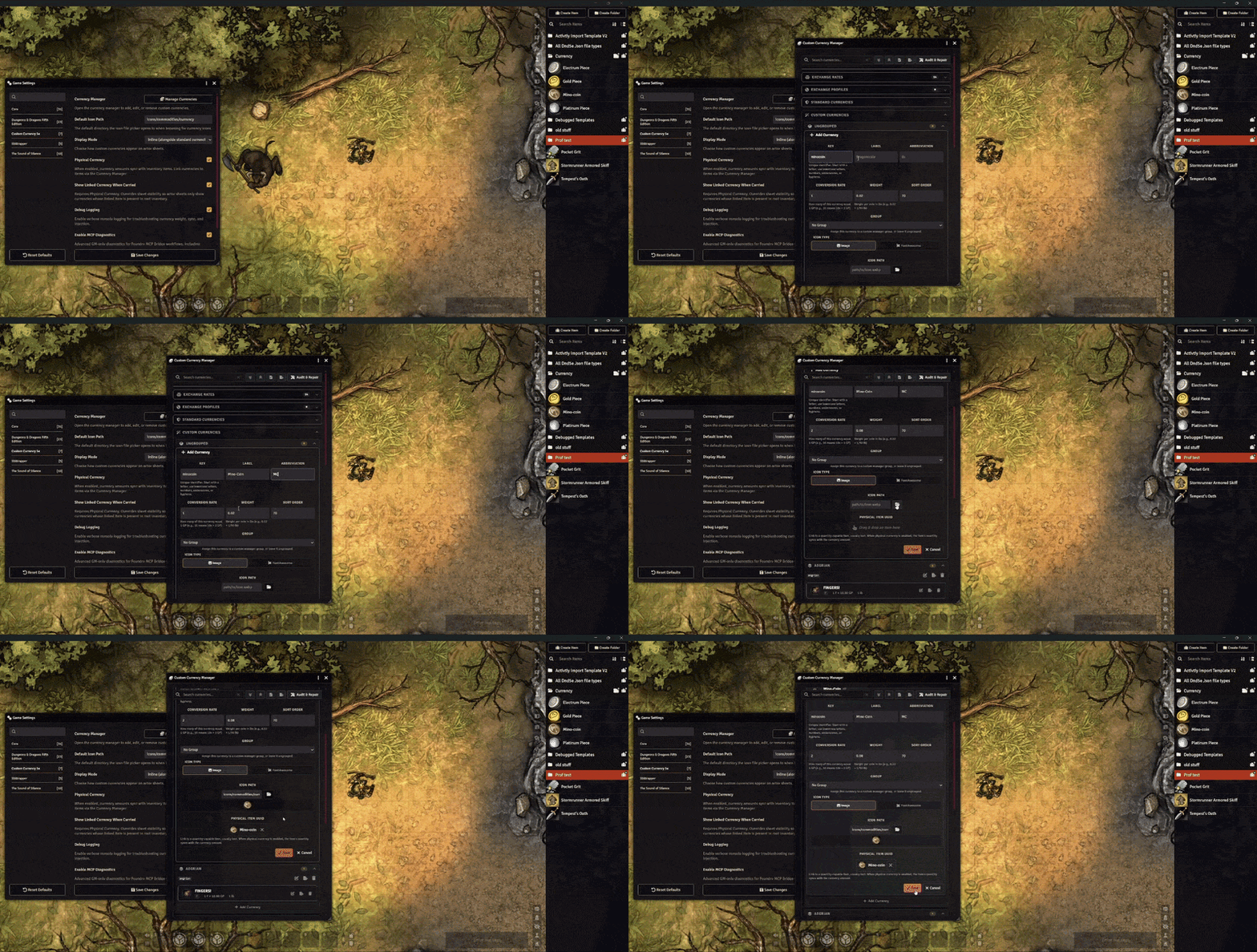
Quick Start
- Open Configure Settings → Custom Currency 5e → Manage Currencies as a GM.
- Optionally choose Add Group for a region, faction, or kind of money.
- Choose Add Currency in that group or in Ungrouped, fill in its definition, and save.
- Open an editable actor sheet and enter an amount in the new currency field.
Features
Custom Currencies & Groups
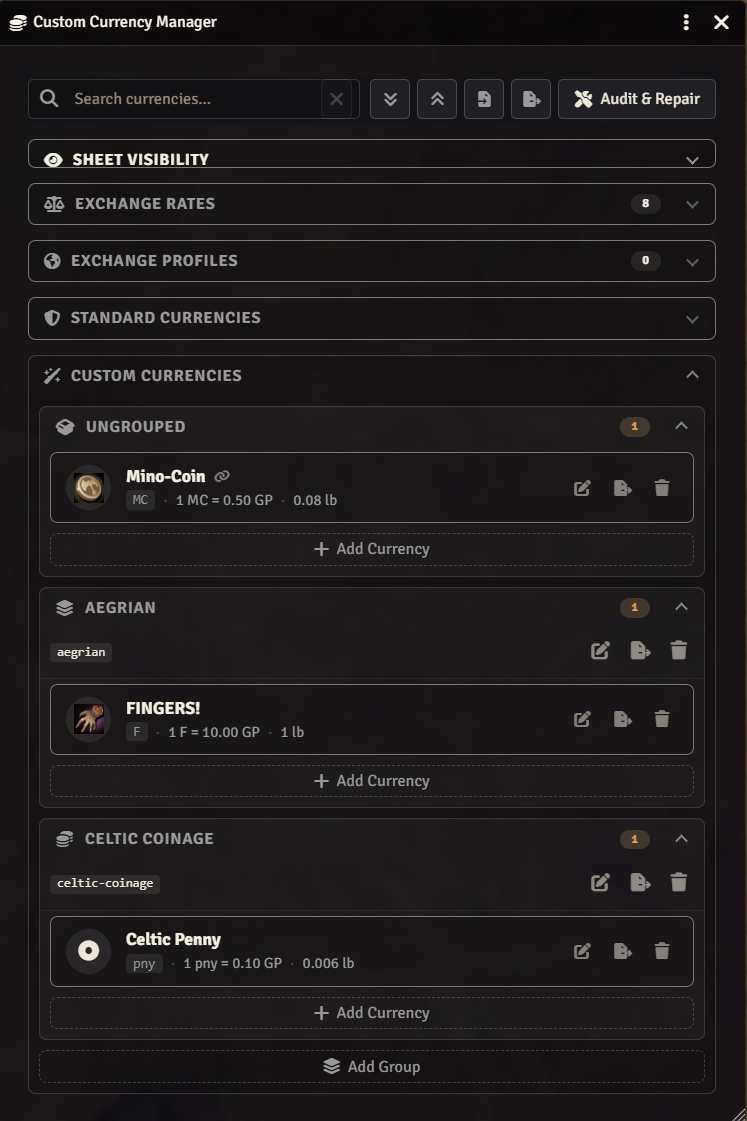
Create currencies with their own names, abbreviations, conversion rates, weights, and image or FontAwesome icons. You can also rename and customize the five standard D&D currencies, then revert them to their original defaults whenever needed.
Organize custom currencies into collapsible groups with their own icons and sort order. Search, expand, and collapse the Currency Manager as your economy grows. Groups organize the manager and Exchange Rates panel; they do not create extra actor-sheet sections.
Actor Sheets & Prices
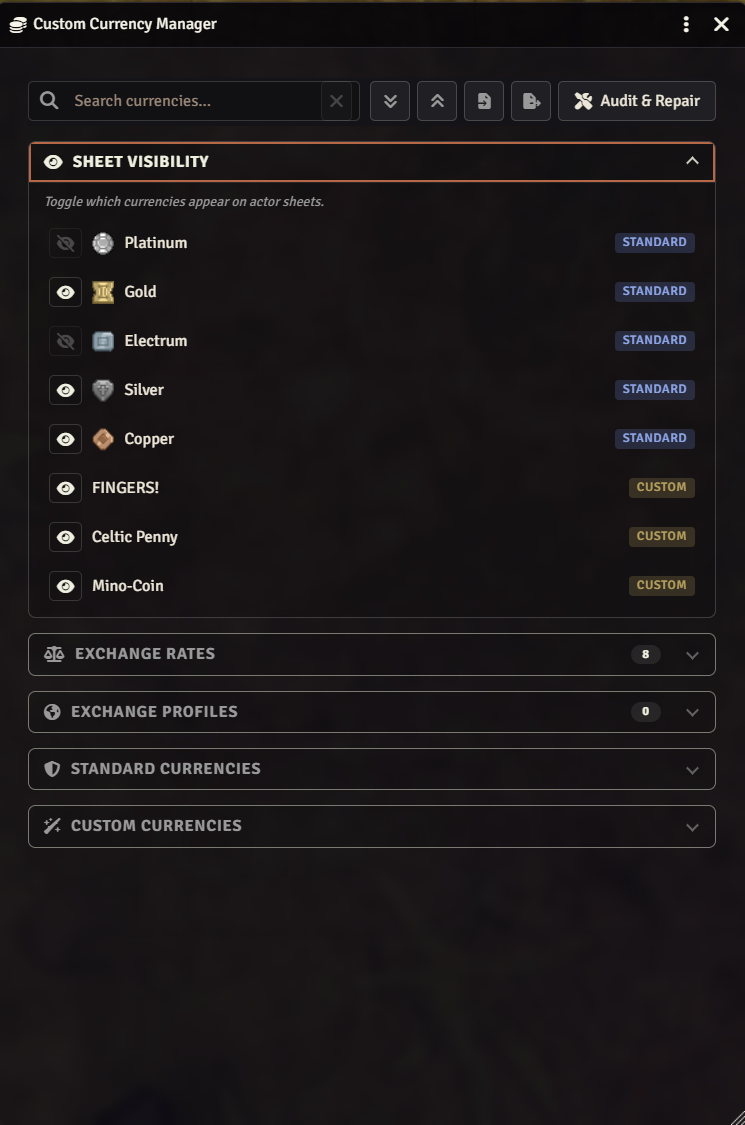
Custom currencies appear on native Character, NPC, Vehicle, and Group actor sheets. Choose Inline to place them alongside standard coins or Separate Section to put them below. Hide individual standard or custom currencies through Sheet Visibility, including Electrum if your world does not use it.
Physical item prices, NPC cost/perceived-value fields, and vehicle costs can use your custom denominations, labels, and icons. Custom coin weight contributes to encumbrance when dnd5e's currency-weight setting is enabled; linked physical items handle their own weight without counting the same coins twice.
Exchange Rates & Converter
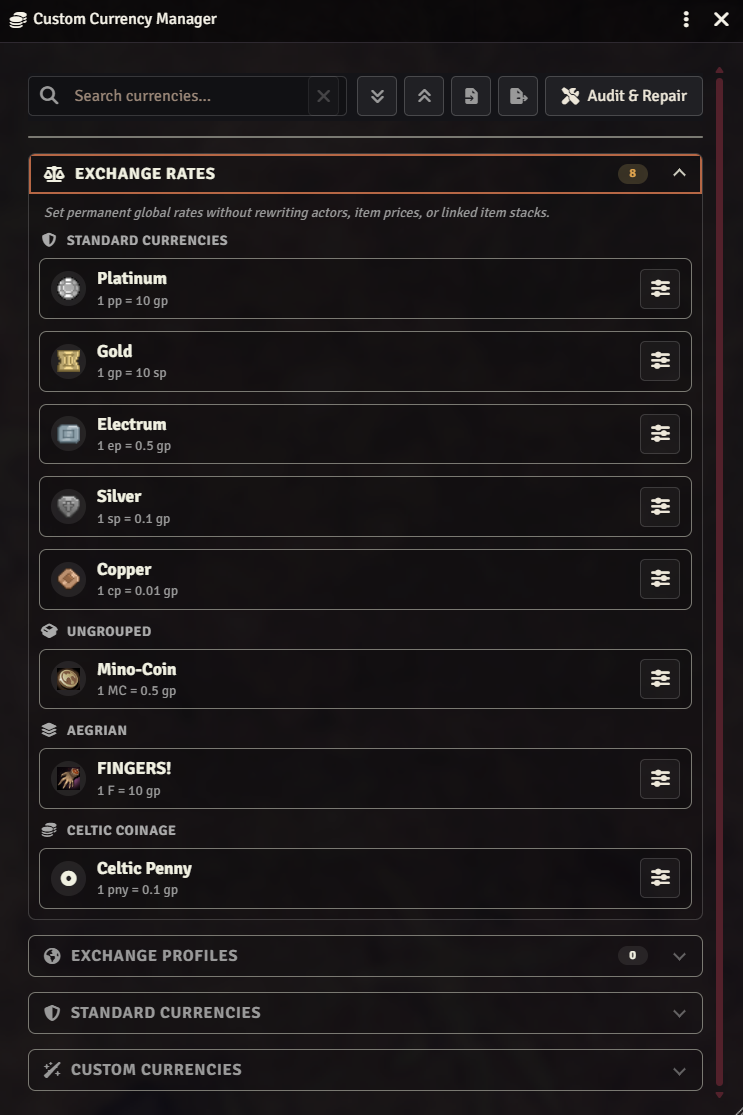
Open Exchange Rates in the Currency Manager and choose Set Rates on a currency. Enter a relationship such as 1 Dragonscale = 3 Trade Bars; the module updates that source currency's global value and calculates its other exchange rates from there.
On an editable actor sheet with a visible custom currency, click the rotate-arrows button to open the Converter. Choose an amount, source, and target, preview the exchange, then apply it to the actor's balances. The Converter is available in both display modes.
Changing a global rate updates what the currencies are worth without changing anyone's coin quantities. Applying a conversion subtracts the chosen source amount and rounds the received amount down to whole coins.
Regional Markets
Let a coin buy more in one city and less in the next.
Create Exchange Profiles for regions, factions, or individual moneychangers. Give each currency a local value multiplier and add a buy/sell spread. Set the current market as the default, then choose that market or Base rates (no market) in the Converter.
Choose a market in the Converter to see its exchange rate and fee before you apply the exchange.
Physical Currency
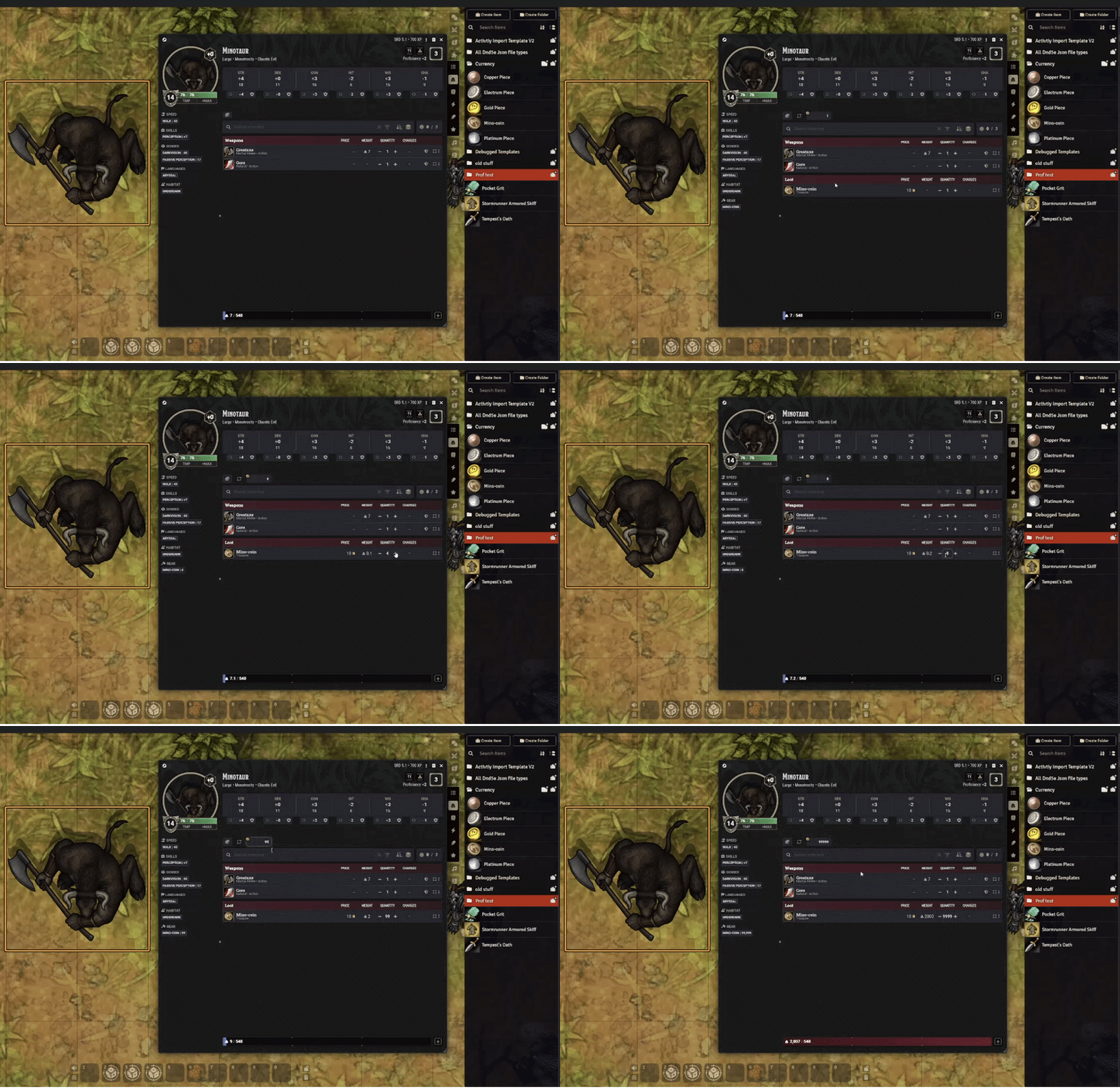
Enable Physical Currency, then link a standard or custom currency to an inventory item with a quantity field. Editing the actor's currency creates, updates, or removes the linked stack; editing the stack quantity updates the currency amount.
Optionally enable Show Linked Currency When Carried so sheets display only denominations with a linked item in the relevant inventory.
Import & Export
Build an economy once and bring it to another world.
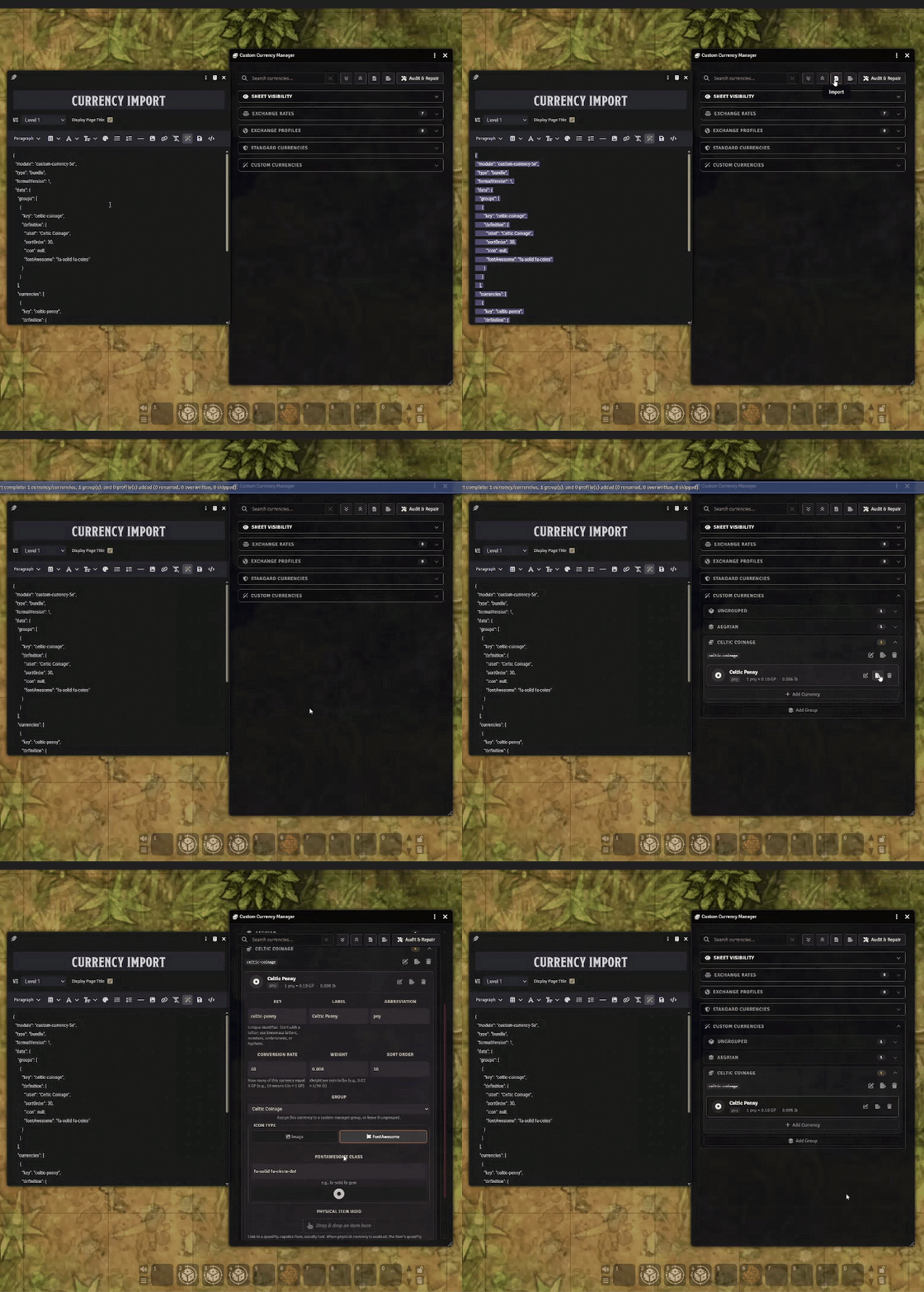
Export individual currencies, groups, or exchange profiles, or export them all together. Download a JSON file or copy the data to your clipboard, then use Import in the destination world's Currency Manager.
When a key already exists, choose Rename, Overwrite, or Skip, with an option to apply the choice to remaining conflicts. Physical item links are specific to each world and must be set again after import.
To create several currencies at once, use the ready-to-paste LLM prompt and schema (docs/llm-currency-group-template.md in the installed module). The importer accepts the resulting JSON with or without its surrounding code fence.
Audit & Repair
Click Audit & Repair in the Currency Manager to check for stale settings, missing physical item links, orphaned currency data, invalid price denominations, and linked stack quantities that no longer match their currency amounts.
Review the findings and repair issues the module can safely fix. Uncertain item matches and incompatible item types need manual review.
More Details
Currency definitions
| Field | What to enter |
|---|---|
| Key | A unique identifier of 2–40 characters, starting with a lowercase letter, using lowercase letters, numbers, underscores, or hyphens; for example, dragonscale. |
| Label / Abbreviation | The displayed name and short code; for example, Dragonscale and ds. |
| Conversion Rate | How many of this currency equal 1 GP. 2 means half a GP per coin; 0.5 means two GP per coin, with GP at its default rate. |
| Sort Order / Group | Where the currency appears and which manager group contains it. |
| Weight | Pounds per custom coin; default 0.02. Use 0 for weightless currencies. Metric worlds convert this weight automatically. |
| Icon | A Foundry image path or a FontAwesome class. Default Icon Path sets where the image picker opens. |
| Physical Item | A world or compendium Item with quantity support, dragged into the drop zone. Requires Physical Currency for sync. |
The standard keys pp, gp, ep, sp, and cp are reserved. Edit their existing entries to change their labels, abbreviations, rates, icons, or physical links. Standard denominations can be reverted or hidden, but cannot be deleted. Their coin weight follows dnd5e's settings.
Deleting a group offers a choice: cancel, remove just the group and move its currencies to Ungrouped, or remove the group and all assigned currencies.
Sheet visibility & physical inventory
Sheet Visibility hides selected denominations, including standard currency pills on Group sheets, without deleting balances. Show Linked Currency When Carried requires Physical Currency and overrides those choices. Actor sheets check items carried directly by the actor, outside bags or containers. Container sheets check their own contents and support standard denominations only.
Physical links accept non-container Items with stack quantity support. Containers, spells, Actors, and Journal Entries cannot be linked as coin stacks.
Duplicate matching stacks can be consolidated during sync to keep the quantity exact.
Standard denominations also sync with container currency fields when linked coins move into or out of a container. Custom coins can be stored in containers, but their currency fields appear only on actor sheets. The actor's synced balance counts coins carried outside bags or containers.
Changing a physical source refreshes existing linked stacks while preserving quantities and container locations. Same-type refreshes update the name, image, and system data. If the item type differs, only safe visual/source metadata is refreshed and Audit & Repair reports the mismatch.
Clearing a physical link preserves inventory items and removes their sync metadata. Disabling Physical Currency offers a choice to keep linked items or remove them from actors. Actor sync counts coin stacks outside bags or containers. Container sync supports standard denominations only.
Global rates, markets & conversion rounding
Each currency has one stored global conversion value. Saving 1 source = X target changes only the source's value, which also changes its relationships with other currencies. It does not rewrite actor balances, item quantities, or price denomination keys.
Exchange Profiles apply only to exchanges in this module's Converter. Global rates, listed item prices, and how sheets calculate currency values stay the same. Applying an exchange updates the actor's balances.
To create a market, expand Exchange Profiles → Add Profile:
- Value ×:
1is normal,0.8values the currency at 80% of its usual value, and1.2values it at 120%. - Spread: splits the moneychanger's margin around each currency's local value. You sell below that value and buy above it; per-currency overrides are available.
- Set as current market: makes this profile the Converter's default. Users can choose another profile or base rates for an exchange.
The gp anchor carries no spread by default, unless explicitly assigned its own override. Profiles do not automatically apply to merchant modules or listed prices.
The Converter accepts positive whole-number source amounts and rejects same-denomination exchanges, insufficient funds, and results smaller than one target coin. Apply deducts the full source amount and credits the rounded-down target amount; fractional change is not returned. For example, a result of 3.75 credits 3 coins.
Import & export scope and conflicts
Use a currency or profile card's export button for one definition, a group's toolbar for Group Only or Group + Currencies, or Export All for all custom groups, currencies, and profiles. Each export offers Download .json and Copy to clipboard. Import accepts a file or pasted JSON.
Imports merge into the current setup. Overwrite replaces the conflicting definition; Rename keeps both under distinct keys; Skip leaves the existing definition alone. Reserved standard keys can only be renamed or skipped. References within the import follow renamed currencies and groups.
Export All is an economy-definition export, not a world backup. It excludes standard currency overrides, actor balances, sheet visibility and other module preferences, the current-market selection, and physical item links. Image paths are included, but image files are not bundled; make those assets available in the destination world.
Physical links are unset on import, including when overwriting an existing custom currency. Relink those definitions in the destination manager afterward.
Renaming, deletion & repair
Renaming a custom currency migrates actor balances, linked item flags, visibility entries, item price and NPC/vehicle cost denominations, and exchange-profile references to the new key.
Deleting a custom currency removes its actor balances and clears linked-item metadata while keeping physical inventory items as ordinary items. Prices using a deleted or missing denomination fall back to gp; their numeric price values are not converted.
Audit & Repair checks invalid physical links, stale visibility/group references, orphaned actor flags and item metadata, invalid price denominations, and mismatched physical stacks. Stack repairs use the current actor or supported container currency amount as the quantity to match. Source-link and item-type mismatches are also checked; ambiguous matches and unsafe type changes need manual review.
Settings
Open Configure Settings → Custom Currency 5e. World settings apply to the world; Debug Logging is saved for the current client.
| Setting | Scope | Default / purpose |
|---|---|---|
| Display Mode | World | Inline; choose Separate Section to show custom coins below standard ones. |
| Default Icon Path | World | icons/commodities/currency |
| Physical Currency | World | Off; enables currency/item quantity sync. |
| Show Linked Currency When Carried | World | Off; requires Physical Currency and makes visibility follow linked inventory items. |
| Debug Logging | Client | Off; enables detailed console messages. |
| Enable MCP Diagnostics | World | Off; advanced GM troubleshooting that also requires Debug Logging. Leave disabled unless requested for support. |
| Manage Currencies | GM menu | Opens the manager for definitions, groups, visibility, rates, profiles, import/export, and audit. |
Troubleshooting
Confirm that the world uses a supported dnd5e version and that Custom Currency 5e is enabled, then reload the client. If a denomination is missing, check Sheet Visibility and the linked-inventory override. The Converter button requires an editable actor sheet with a visible custom currency.
For sync problems, confirm that Physical Currency is enabled and the linked item still exists and has a quantity field. Use Audit & Repair to inspect missing or outdated item links and mismatched coin quantities. For weight problems, also check dnd5e's currency-weight setting.
Enable Debug Logging and inspect the browser console for messages prefixed with custom-currency-5e |. If another module changes sheets, price fields, or currency behavior, reproduce the issue in a test world with only Custom Currency 5e enabled.
Installation
- Join Bazaar Patron.
- Link your Patreon account to your Foundry VTT account.
- Install Custom Currency 5e through Foundry Premium Content.
- Open your dnd5e world, enable Custom Currency 5e in Manage Modules, and reload connected clients.
- As a GM, open Configure Settings → Custom Currency 5e → Manage Currencies to add your first currency.
Your Bazaar Patron membership includes:
- Every Bakshi’s Bazaar premium module while your membership is active, including ongoing updates and new modules as they're added.
- Patron-only channels in the Bakshi’s Bazaar Discord.
- Priority module support.
- A direct place to share feedback and feature suggestions. Suggestions are welcome and taken seriously, but development priorities remain at my discretion.
Updates install from Foundry's Add-on Modules screen like any other module. Release notes are in the changelog. Updates are also announced in the Bakshi’s Bazaar Discord.
| Requirement | Version |
|---|---|
| Foundry VTT | v14 only; verified on 14.369 |
| dnd5e | 5.3.3 minimum; verified on 6.0.6 |
| Additional modules | None required |
Compatibility
Foundry VTT: v14 only; verified on 14.369.
Game system: dnd5e, minimum 5.3.3, verified on 6.0.6. The module is built around dnd5e's currency data and native sheets.
Sheets: native Character, NPC, Vehicle, Group, and Encounter actor sheets; physical item price fields; NPC cost/perceived-value and vehicle cost fields. Container presentation and currency-field sync support standard denominations only.
Permissions: currency management and world configuration are GM tasks. Actor-sheet currency editing follows the sheet's edit permissions.
Native currency tools & other modules
- Native dnd5e tools: the system's currency manager, awards, transfers, and conversion workflows remain oriented around standard denominations. Use this module's Converter for custom exchanges.
- Containers: custom coin items can be carried inside containers, but there are no custom container currency fields. Actor balances and carried-item visibility count items carried directly by the actor, outside bags or containers.
- Markets: exchange profiles apply in this module's Converter; automatic merchant integration and transaction logs are not implemented.
- Other sheets and modules: replacements for native sheet markup, price fields, currency calculations, or inventory behavior may need separate integration.
Developer API
Custom Currency 5e works through the Currency Manager and dnd5e's own sheets. Its api object serves my own integrations, such as Traffick reading your currency definitions, and diagnostics; it isn't offered as a supported public API for third-party modules or macros.
For integration requests, describe the workflow you want to support on the Bakshi’s Bazaar Discord.
Free Modules
I also make free modules. Install them from Foundry's Add-on Modules browser.
| Module | What it adds |
|---|---|
| 5e Item Importer | Turns D&D 5e stat blocks or YAML into Items. |
| Show of Hands | Middle-mouse targeting, marquee selection, and custom shared cursors. |
| Squad Combat Initiative | Runs big dnd5e fights as squads with group initiative, captains, and morale. |
| The Sound of Silence | Internal loops, crossfades, silence gaps, and soundscapes for Foundry playlists. |
Roadmap
Future priorities will be shaped by real campaign workflows and reported issues along with any that I feel would be appropriate but Share a feature request on the Discord! with an example of what you are organizing and where the current tools get in your way.
Suggestions are not promises or commissions. I decide development priorities and which features to build.
Community
Support is handled through the Bakshi’s Bazaar Discord. Patrons receive priority support. There is no SLA or guaranteed response or resolution time.
- Report bugs — Report on Discord. Include your Foundry version, Custom Currency 5e version, game system and version, steps to reproduce, console logs, and screenshots or short clips when useful.
- Request features — tell me what you were trying to organize and what you wish the module could do.
- Follow updates — check the changelog (
CHANGELOG.mdin the installed module) for releases and compatibility notes.
AI-Assisted Development
This module is developed and maintained with the help of AI-assisted tools for coding, debugging, and testing.
I care about the quality, behavior, performance, security, and long-term maintainability of this module, and I take full responsibility for what ships. AI assistance does not replace review, testing, debugging, or security and design judgment.
AI is used here as a tool under my direction to make Foundry better and allow for long term mod support while still having a life outside of building and maintaining my free and premium modules.
If you are uncomfortable using software developed with AI-assisted tools, this module is not for you.
⚖️ License & Permissions
Premium License
Custom Currency 5e is a paid, premium module from Bakshi’s Bazaar. Refer to the shipped LICENSE.txt (LICENSE.txt in the installed module) for usage and redistribution permissions.
Commercial Licensing
For bundling, commercial integrations, or custom feature development, contact me to discuss licensing and permission.
Contact
For licensing inquiries or permission slips:
- Discord:
GnollStack(Preferred) - Email:
Somedudeed@gmail.com
Author: GnollStack / Bakshi’s Bazaar · Compatibility: Foundry VTT v14 / dnd5e 5.3.3