Traffick: Trade & Barter Overhaul
A premium Bakshi’s Bazaar module for Foundry VTT.





Trade items with the party, publish merchant stock, and configure appraisal and identification checks.
Preview · Quick Start · Features · Installation · Changelog · Compatibility · API · Free Modules · Roadmap · Community · AI Use · License
Feature Index
| Feature | What it does |
|---|---|
| Trade with the Party | Invite several characters to one merchant session and review their offers together. |
| Merchant Catalog | Choose which wares players can browse and give them optional public names and images. |
| Quantities & Containers | Trade part of a stack or a loaded container while keeping the remaining items with their owner. |
| Agreed Prices & Payments | Barter freely or agree quotes, payments, and change. |
| Receipts & Recovery | Review completed trades and recover interrupted sessions. |
| Real & Perceived Prices | Choose whether players see an item's real price or a perceived value set by the GM. |
| Appraisal & Identification | Let characters judge value or identify an item through GM-configured checks. |
| Inventory Drag Tools | Optionally use quantity prompts and move behavior outside the trade panel. |
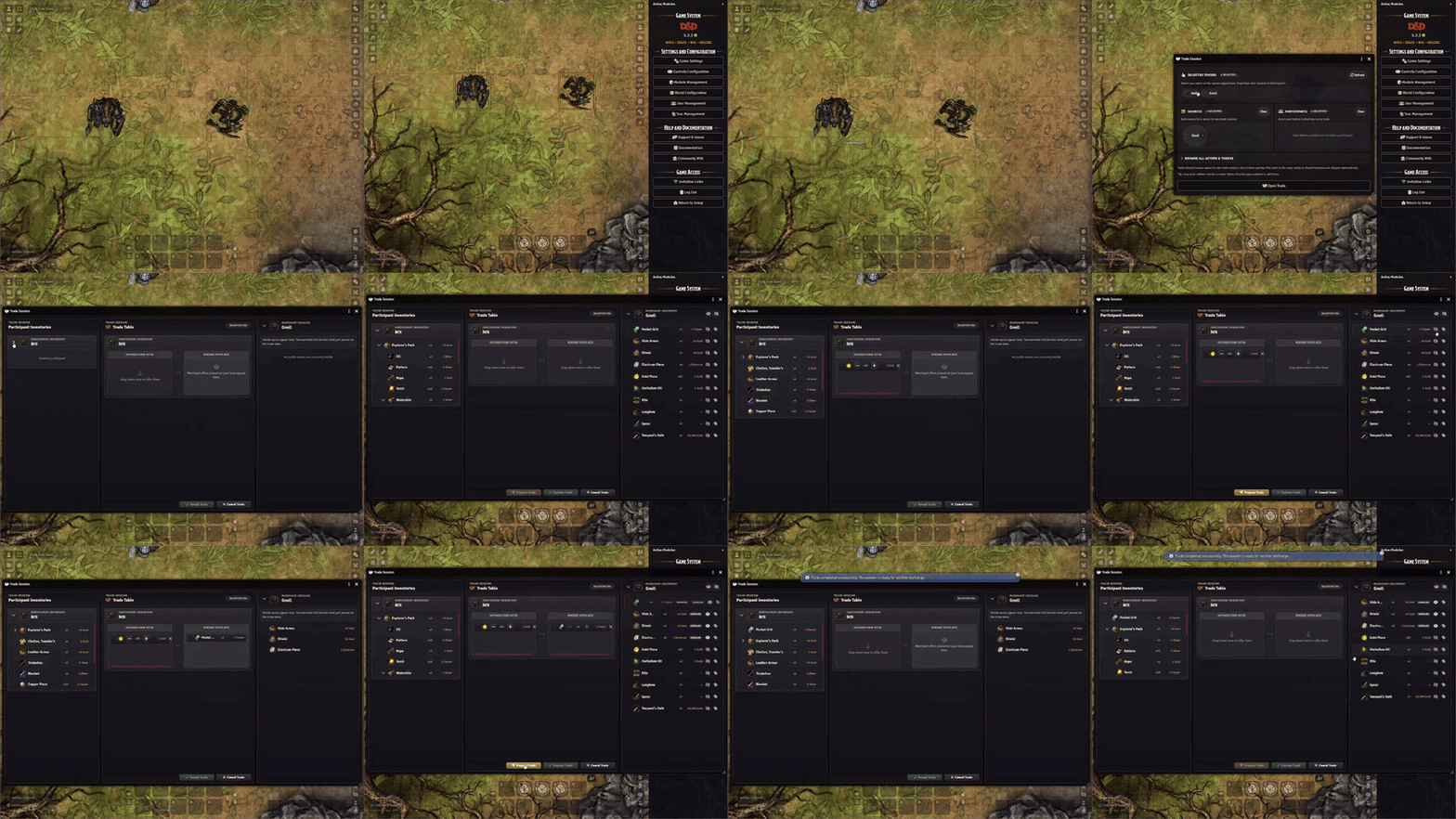
Players offer items and coins, approve the deal, and let the GM complete each exchange.
Preview
Quick Start
- As a GM, choose Open Trade from an actor's right-click menu, use its sheet's handshake control, or press Shift+T.
- Add the merchant to Merchants and the trading characters to Customers, then choose Open Trade.
- Online player owners accept their invitations; customers with no online player owners join immediately under GM control.
- Drag items into the offer columns, then choose Propose Trade.
- Once every player has approved, the GM chooses Execute Trade.
Features
Trade with the Party
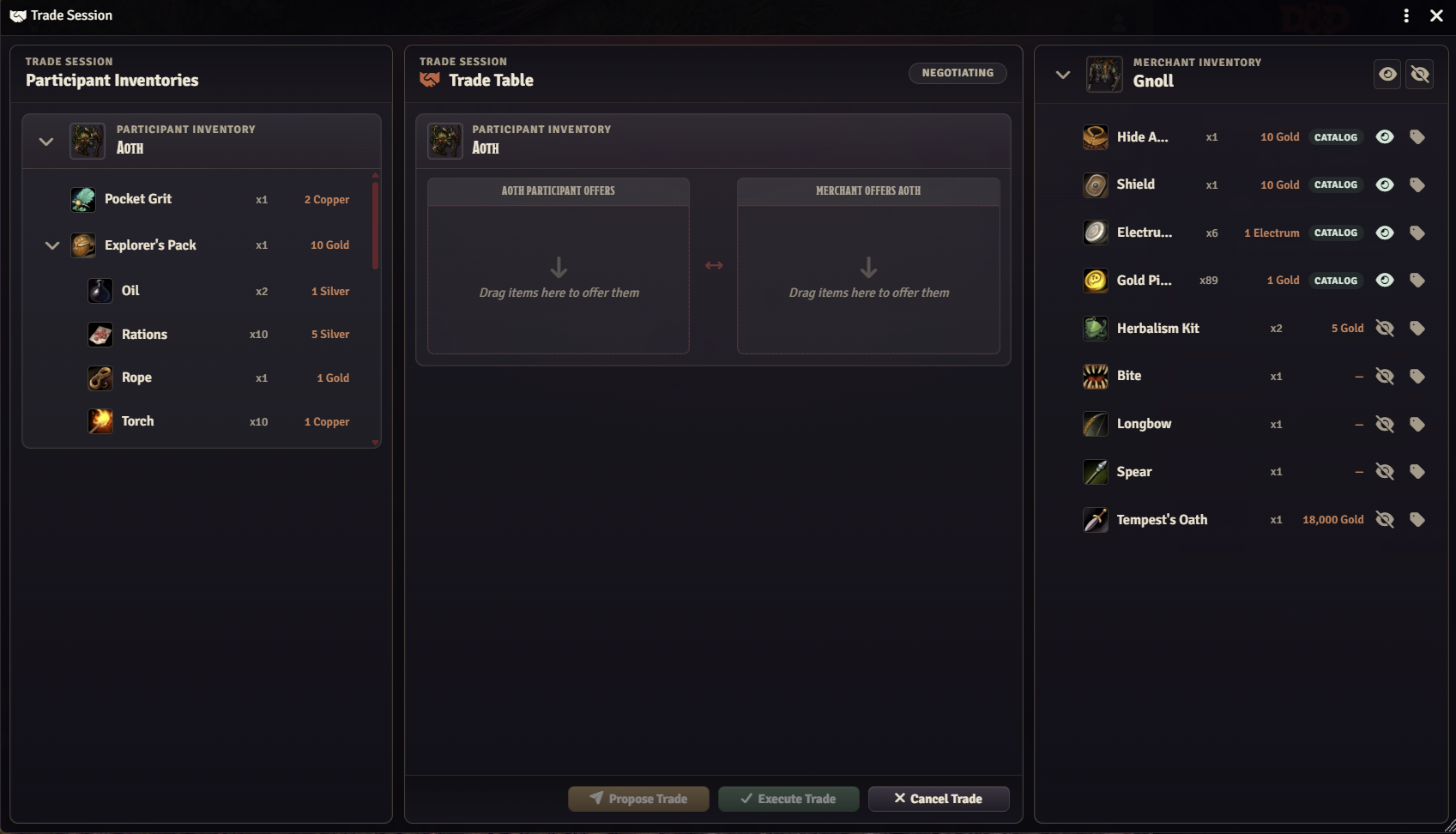
Trade with several characters in one shared session. Players manage their own offers and approve the deal; the GM controls the merchant and completes the exchange. Characters whose players are offline can trade under GM control. Choose three panes, tabs, or stacked cards to suit your table.
Merchant Catalog
Publish the wares customers can browse, keep other stock private, and add a shopkeeper greeting. Set up shop gathers the initial choices in one place; Shop window previews the customer's view. Optional catalog aliases give wares public names and images while preserving the original items.
Quantities & Containers
Drag items onto the table or use Offer selected. Trade part of a stack, send a loaded container, or adjust its contents before proposing. Matching loot and consumables can stack automatically. Unidentified containers with concealed contents travel as sealed bundles, keeping their contents hidden from players.
Agreed Prices & Payments
Barter with items and coins by default. Optional Pricing tools add agreed quotes, haggling, payment, and change. Coins come from each character's existing purse, and quoted trades require exact payment. Fractional payments are optional; existing fractional balances are always preserved.
Receipts & Recovery
Completed trades leave receipts that survive reloads. Open Session → Trade receipts & recovery to review them or inspect an interrupted exchange. Draft offers can return after a reload in the same browser tab, with fresh approvals required.
Real & Perceived Prices
Keep the true value visible to the GM while showing players a manual price or their character's appraisal. Configure these options in the item sheet's collapsible Pricing & appraisal section. Optional Custom Currency 5e integration supplies custom denominations and conversion rates.
Appraisal & Identification
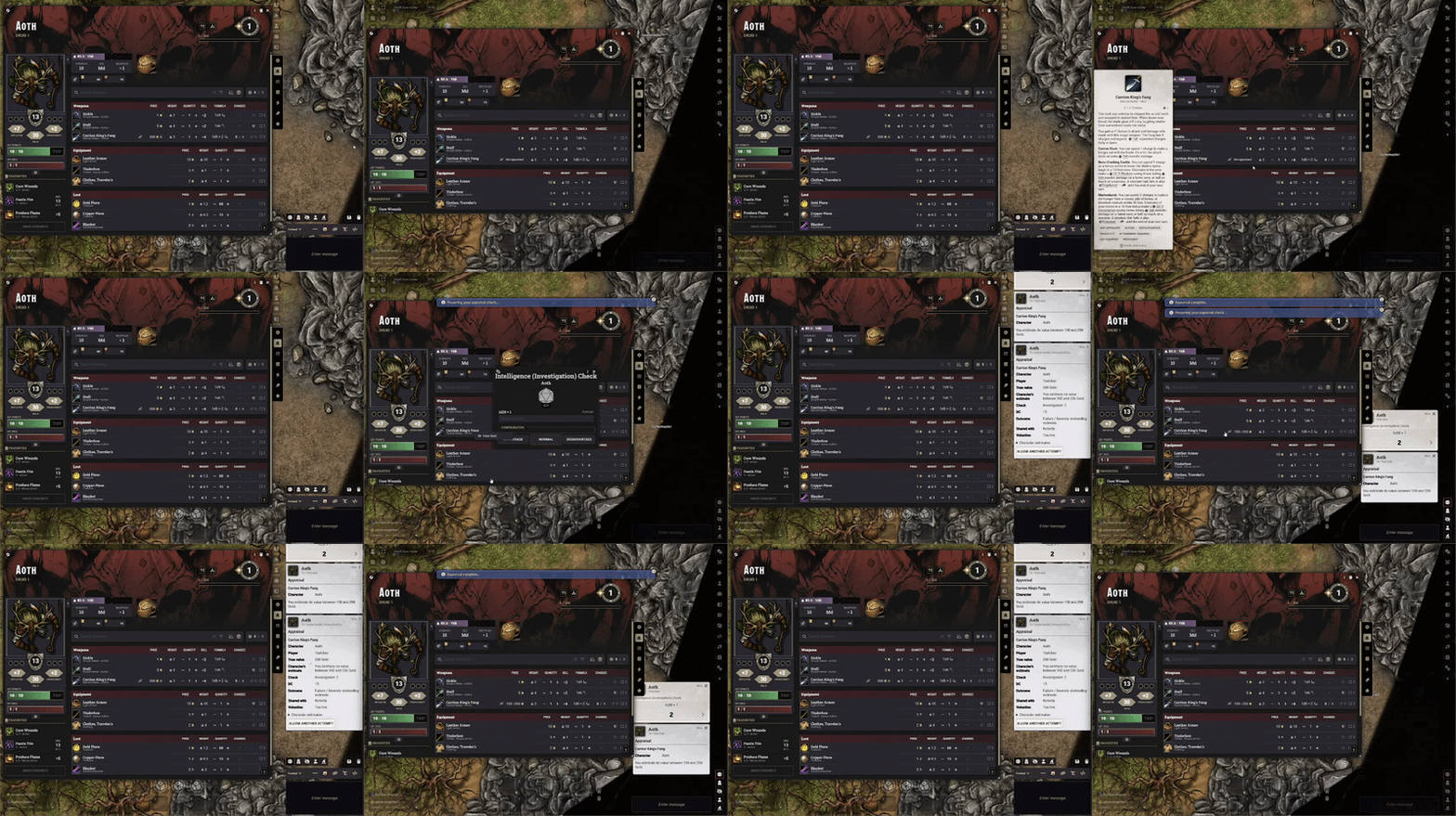
Let characters appraise or identify items with skill, ability, or tool checks. Appraisals give personal estimates that players can share; successful identification reveals the shared item for everyone. Both features are off by default and have separate rules in Configure Traffick.
Inventory Drag Tools
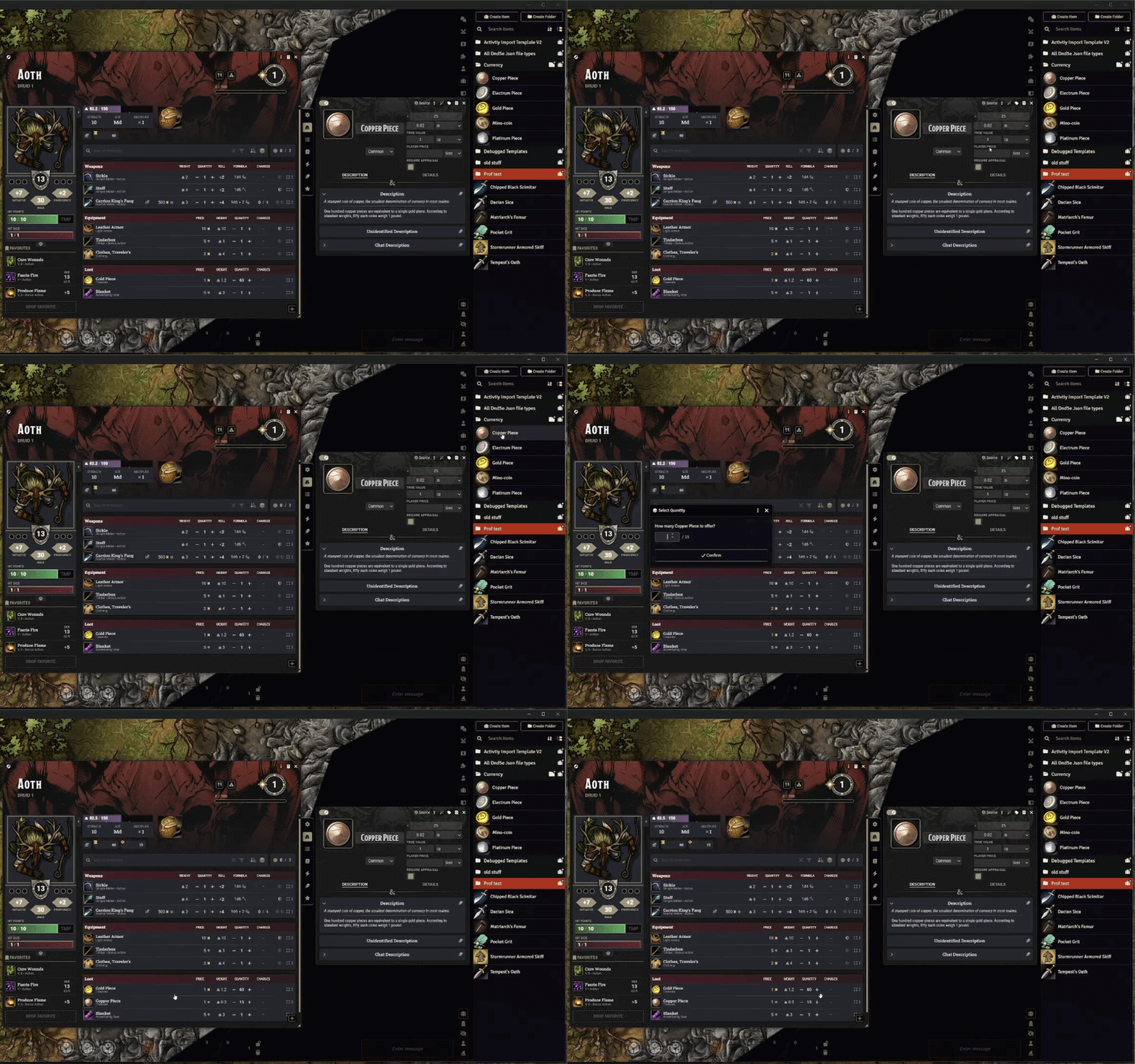
Choose quantity prompts for Trades only (the default), All drags, or Off. Optionally move items during supported inventory drops and merge matching loot or consumables. Drags from an open container sheet still copy by default; use the system's move modifier to move them.
More Details
Expand a topic for its controls, settings, and trade rules.
Starting a session and managing customers
- Open a trade: use an actor's right-click menu, the sheet's handshake control, or Shift+T. Add actors or current-scene tokens to Merchants and Customers. Each merchant opens a separate session.
- Choose tokens: drag them in or use the searchable browser. Tokens in Selected Tokens need to be assigned a role. Linked tokens share their actor's inventory; unlinked tokens have independent inventories. Traffick skips self-trades and pairings that share one inventory.
- Invite customers: online owners accept or decline. Characters without an online player owner join under GM control, including player-owned characters.
- Manage control: customer status shows invitations, connections, and GM control. Use More actions to resend, remove, take control, or invite an online owner to take over. Reconnecting does not automatically hand control back. Handoffs preserve offers, clear approvals, and leave character ownership and receipt access unchanged.
- Add or replace: drop an actor or current-scene token onto the customer pane to add them. Replace the merchant by dropping onto its pane while the offer table is empty.
The GM can manage several sessions. Offers update across connected clients, and a completed exchange leaves the session open for another round.
Publishing stock and taking customer requests
Merchant stock starts private. Players browse published wares with stock remaining in the session.
| Control | Use it to |
|---|---|
| Item eye / selected-row eyes | Publish or hide one item or a selection. |
| Merchant More actions | Publish or hide all stock matching the current search and filters. |
| Set up shop | Set a greeting, publish all stock, and optionally enable automatic quotes when Pricing tools are on. |
| Speech-bubble button | Write the greeting shown above the catalog. |
| Shop window | Preview customer names and prices, with a count of hidden stock. Offering, dragging, and visibility controls remain available. |
| Item More actions | Edit a displayed price or catalog alias when those features are enabled. |
Enable Merchant Catalog Aliases allows a public name and image. It preserves the original name, native unidentified name, stack matching, and transferred data.
Players can Request wares and withdraw requests. Requests reserve no stock and do not change approved offers. The GM's request inbox collects them, with a toolbar count. Adjust, decline, or add a request to the offer; requested containers exclude contents unless the GM includes them.
Layouts, inventory search, and display controls
Choose Customer layout in Configure Traffick. Your layout preference is saved for your browser or app.
| Layout | Arrangement |
|---|---|
| Three panes (default) | Customer inventories on the left, offers in the middle, merchant on the right. |
| Tabs | One customer at a time, plus an All customers overview. |
| Stacked cards | All authorized customers together; expand each card's Inventory when needed. |
- Find items: search visible names; expand Filters for type, remaining stock, and sorting. GMs can also filter published/private stock. The filter count shows active secondary filters.
- Keep your place: searches, filters, selection, scroll, and collapsed rows survive trade updates. Searches reveal matching container contents while preserving the saved collapse state. Clear filters keeps sorting and offers.
- Choose a customer: tabs direct merchant offers to the open tab; other layouts use Offer to beside merchant search. The separate Customer filter only changes which customers are visible.
- Resize: drag pane dividers to save widths per user. Narrow windows stack the panes. Toolbar views focus on All panes, Customer trades, Merchant, or Customer inventories in three-pane mode.
- Reset: Session → Reset layout restores automatic sizing and All panes, keeping customer selection, filters, offers, and expanded sections.
- Read the table: columns name the characters; your own reads You give. Counts show remaining stock, with offered/total quantities on hover. Portraits, purses, and actor/token badges identify participants and inventory types.
- Track stock: Highlight stock on the table tints offered merchant stock amber and customer stock blue. Hover shows the holding customer; Offer indicates its recipient when several customers are present.
- Inspect items: owned or controlled items show native item cards. Identified names use rarity colours; multiple rarities show Rarity varies with a hover list and neutral styling. Unidentified items hide rarity.
Offers, approvals, and completing an exchange
- Drag items into an offer or use Offer / Offer selected. A drop into a customer's Merchant gives area targets that customer directly. Players edit their own side; the GM can adjust either side.
- Use + / −, type a quantity, or choose More actions → All available. X removes an offer. Catalog items remain browsing stock until offered.
- Choose Propose Trade. Every player-controlled customer exchanging goods or coins must approve; browsing customers do not block the trade. GM-controlled customers are ready immediately.
- The GM chooses Execute Trade. Traffick checks current actors, items, quantities, and wallets before transferring them.
Edits to offers, quotes, coins, wallet balances, or relevant item/presentation data clear approvals and reopen negotiation. Item-value totals are informational; agreed quotes and offered coins are shown separately.
After completion, offers clear and the session returns to negotiation. Chat receipts are on by default; each client can enable a coin sound. Players can leave individually or with all their controlled customers, releasing their offers. The GM can end the session before execution begins.
For failed or interrupted exchanges, see Receipts, draft recovery, and retained locks below before rebuilding an offer.
Containers, sealed contents, and stack transfers
- Supported goods: weapons, equipment, consumables, tools, loot, and containers.
- Partial stacks: only the agreed quantity moves. Loot and consumables merge only when their item properties match; a shared name is insufficient.
- Loaded containers: nested contents are included. Expand the offer to remove or reduce contents before proposing. Excluded items stay with the source actor and detach from the departing container.
- Preserved item data: transfers retain rarity sets, uses, activities, and conditional effects. References between goods transferred together follow them into the new inventory.
An unidentified container with Unidentified Contents enabled is a sealed bundle:
- Players see Contents concealed. All nested contents stay out of player catalogs, searches, individual offers, proposal comparisons, and receipts; the GM can inspect them.
- Contents cannot be divided, removed, or quoted separately. Use an explicit GM bundle quote or barter.
- Changes require a fresh proposal. Resolve empty stacks inside the container before offering it.
Quotes, haggling, coins, and fractional payments
Enable Configure Traffick → Prices & payments → Pricing tools to create agreed quotes. Without quotes, items and coins can be bartered or gifted freely.
| Control | What it does |
|---|---|
| Offered item More actions → Quote | Sets an agreed unit price. |
| Quote at list price | Quotes all offered items in a customer lane from list prices. |
| Haggle | Applies buy/sell percentages of list price; can quote new merchant offers automatically. |
| Due / Paid / Outstanding | Shows the GM each lane's payment balance. |
| Add coins / Edit coins | Offers coins beneath either editable side; players edit their own side only. |
| Ask for payment | Fills the customer's offered coins from their purse to cover the amount due. |
| Give change | Fills change from the merchant's purse after overpayment. |
Quote rules: a container quote covers its offered contents; clear separate contents quotes first. Blank quotes allow barter or gifts. Disabling Pricing tools keeps existing quotes binding and editable; clear them with Edit quote to return to barter. New quotes require Pricing tools. Quotes leave appraisals and hidden values unchanged.
Payment rules: quoted trades require exact net payment and player approval. Both sides use coins already in their wallets; merchant funds are checked across all buyers. Change comes from the merchant's purse. Coin-only exchanges are supported.
Allow fractional payments, under Currency options, is off by default and works with or without Pricing tools:
- Off: payment and change use whole coins, preserving fractional remainders.
- On: coin entry, payment, and change can use decimal amounts. Unsafe stored balances are rejected; wallets are never rounded or automatically converted.
- Traffick uses stored balances even if a native sheet displays rounded amounts. Changing this setting clears approvals. Item quantities remain whole numbers.
- With Custom Currency 5e, denominations synchronized to physical coin items must be traded as those items. Other standard/custom wallet denominations support exact settlement.
Player prices and GM previews
Enable Prices & payments → Enable alternate player prices. The native dnd5e price remains the item's true value.
- In the item sheet's Pricing & appraisal section, turn on Use player price and enter an amount/currency. Blank uses the native price; zero means free. Turning it off keeps the saved override.
- Right-click a price cell in a supported actor/container inventory to toggle the override. Merchant item More actions can edit it during a trade.
- Player preview shows the effective value. Choose a character when appraisal applies. World appraisal requirements take precedence over manual player prices.
- Appraisal details contains check configuration and reset controls. Eligible players see appraisal/sharing actions without GM configuration fields.
- Edit mode exposes enabled features; read mode shows the section when an active rule matters. Its collapsed summary lists active rules, and its open state is remembered per browser, world, and user.
GM previews show the true value above the character's estimate. Choose Always visible or On hover in Prices & payments; Override on this device sets a personal preference.
| View | Character information shown to the GM |
|---|---|
| Character inventory | The owning character's estimate. |
| Merchant offer | That customer lane's estimate. |
| Merchant stock / standalone item | Known estimates in the tooltip. |
Hover identifies characters and sharing sources. Labels distinguish Player price, Appraised value, and Not appraised. Unidentified items keep prices hidden in supported player views. See Compatibility for the limits of interface privacy.
Appraisal and identification rules, including offline play
Open Configure Settings → Traffick → Configure Traffick. The Appraisal and Identification tabs have separate check and retry settings. Players use the native dnd5e roll dialog with advantage, disadvantage, and bonuses; their dialog omits the DC.
| Appraisal mode | Success | Failure |
|---|---|---|
| Exact or unknown | Full value. | No new estimate. |
| Exact or misleading (default) | Full value. | Misleading estimate. |
| Estimated value | A range; exceptional success reveals full value. | Misleading estimate. |
- Advanced appraisal sets range widths, exceptional success, and currency/ability overrides, with a repeatable 100 gp example.
- Estimated value defaults to exceptional success at DC + 10 and a maximum range width of 25%, including rounding: at most 125 gp wide for a 500 gp item.
- Range changes and switching between misleading-estimate modes affect future appraisals while preserving knowledge and attempt limits. Switching to or from Exact or unknown requires fresh appraisals.
- Players receive their estimate; only GM cards show outcome labels and true-value comparisons. Appraisal leaves real and manual player prices unchanged.
Appraisal when no GM is connected offers three policies:
| Policy | Behavior |
|---|---|
| Require connected GM (default) | Wait for a GM before rolling. |
| Roll now, resolve later | Save the roll for a GM to resolve on return. |
| Allow offline appraisal | Show the estimate immediately and sync knowledge when a GM connects. |
Offline policies still require a connection to the Foundry server and an item in a character the player owns. Saved rolls survive reloads and are visible to co-owners. Existing visibility/retry rules apply; limited-retry characters need an initial history sync with a GM. Party sharing happens on GM resolution.
Changed items, ownership, or rules can invalidate saved rolls. Immediate offline estimates trust the player's client; the GM recalculates from the saved native roll on return.
Identification always needs a connected GM. Success identifies the shared item for everyone; failure leaves it unidentified. Cancelling without a roll consumes no attempt. Dialogs expire after five minutes, but saved offline rolls remain queued. After a GM disconnects during an online check, start a fresh request under the selected policy.
Character knowledge, sharing, and retry controls
- Character knowledge: each character keeps separate estimates and attempts. Linked tokens share actor knowledge; unlinked tokens keep their own. A numeric result replaces an earlier estimate, even if less accurate; a nonnumeric result preserves it.
- Choose the appraiser: use Appraise as in the catalog when controlling several customers. Merchant offers use their customer lane.
- Share Appraisal with Party: shares with accepted trade customers, or players' assigned characters outside a trade, including offline recipients. Personal estimates take priority. Sharing records the appraiser and consumes no recipient attempt; all character owners see the same knowledge.
- GM cards: show true value, estimate, roll, DC, accuracy, character/player, sharing recipients, and known estimates.
- Allow another attempt: clears that character's attempt limit for the relevant check while preserving their estimate. Reset Appraisals clears item knowledge.
Settings and defaults
Open Configure Settings → Traffick → Configure Traffick. GMs get Trading, Prices & payments, Appraisal, and Identification; players get Preferences for their own device.
| Setting | Default for new/reset configurations |
|---|---|
| Quantity prompt | Trades only |
| Always move items on drag | Off |
| Customer layout | Three panes; each client can choose tabs or cards |
| Post trade receipts to chat | On |
| Coin sound | Off; per client |
| Pricing tools / fractional payments | Both off |
| Highlight stock on the table | On; per client |
| Alternate player prices / catalog aliases | Both off |
| GM price preview | Always visible; clients follow the world preference |
| Appraisal / identification | Both off |
| Appraisal check | Intelligence (Investigation), DC 15 |
| Identification check | Intelligence (Arcana), DC 15 |
| Appraisal result | Exact or misleading |
| Roll visibility / retries | Player and GM / Unlimited, for both checks |
| Automatic appraisal sharing | This character |
| Debug logging / developer diagnostics | Both off |
Saved preferences may differ. Switching tabs, collapsing advanced options, or disabling a feature preserves its configured values.
Save applies the draft; Cancel discards it. Reset affects the draft until saved, and each changed field has its own reset icon. Personal options say This device only. Settings marked Reload required produce one combined reload prompt.
Receipts, draft recovery, and retained locks
Open Trade receipts & recovery from the Session menu or an actor sheet's header. Receipts survive reloads and preserve each buyer's visible terms; GMs can inspect private transaction details and locks.
Drafts after a reload
- Sessions run on the initiating GM's client. Draft merchants, customers, items, quotes, and coins can restore in the same browser tab, scoped to that GM and world.
- Restoration checks current ownership and stock, reducing/removing unavailable items. Fresh proposals and approvals are required. Wallet shortages and unbalanced quotes must be corrected first.
- Interrupted execution restores an empty offer table for review. Drafts use browser session storage: ending a session removes its draft, and closing the tab is not durable storage.
Interrupted transfers and locks
- A disabled Traffick trade in progress effect prevents overlapping trades on each inventory, including across GMs. It changes no statistics and is removed after confirmed completion or rollback.
- Failed exchanges clear offers and restore earlier changes when write outcomes are known. Uncertain outcomes retain locks for review; locks do not expire automatically.
- Stop every client that owned the original execution and review receipts, inventories, quantities, and wallets before releasing a lock. If requests may still be pending, close the originating clients and restart the world before reviewing.
- Confirm those checks in the GM recovery screen. Releasing a lock neither undoes nor repeats a transfer. Never remove one while another client may still be writing.
Upgrading from earlier versions
- Existing exceptional-only exact-reveal settings are preserved. Configurations that gave ranges on every success adopt On any success; the former no-exact option is no longer supported. Applicable range and failure tuning is retained.
- Old account-based appraisal records are archived once in the GM-owned appraisal journal. Character knowledge starts empty and old browser caches are discarded; the archive stays available without assigning old estimates to guessed characters.
- Reload all clients after updating so invitations and proposals use the same protocol.
Troubleshooting
| Problem | Check |
|---|---|
| Can't start or complete a trade | Enable Traffick in a supported dnd5e world, connect a GM, and reload clients. |
| Empty player catalog | The customer accepted the invitation, wares are published, and stock remains. |
| Hidden price | Identification, alternate-price, and appraisal rules. |
| Missing quantity prompt | Its scope in settings; reload after changing it. |
| Interrupted trade or retained lock | Follow Receipts, draft recovery, and retained locks above. |
| Sheet, inventory, or price conflict | Reproduce in a test world with Traffick alone, then add Custom Currency 5e if custom denominations are involved. |
If needed, enable Debug Logging and look for traffick | in the browser console. Send the information listed under Community to the Bakshi’s Bazaar Discord.
Installation
- Join Bazaar Patron.
- Link your Patreon account to your Foundry VTT account from your Foundry profile.
- In Foundry's Setup screen, open Add-on Modules → Install Module, filter by Premium Content, and install Traffick: Trade & Barter Overhaul.
- Open your dnd5e world, enable Traffick in Manage Modules, and reload connected clients.
Your Bazaar Patron membership includes:
- Every Bakshi’s Bazaar premium module while your membership is active, including ongoing updates and new modules as they're added.
- Patron-only channels in the Bakshi’s Bazaar Discord.
- Priority module support.
- A direct place to share feedback and feature suggestions. Suggestions are welcome and taken seriously, but development priorities remain at my discretion.
Updates install from Foundry's Add-on Modules screen like any other module. Release notes are in the changelog. Updates are also announced in the Bakshi’s Bazaar Discord.
If access is missing, refresh the Patreon link and check your Foundry account's subscribed content. See Foundry's premium activation and installation guide.
| Requirement | Version |
|---|---|
| Foundry VTT | v14 only, build 14.367 or later; verified on 14.369 |
| dnd5e | 6.0.6 minimum; verified on 6.0.6 |
| Additional modules | None required |
| Custom Currency 5e | Optional; 14.1.3 minimum |
Compatibility
Foundry VTT: v14 only, build 14.367 or later; verified on 14.369.
Game system: dnd5e 6.0.6 minimum; verified on 6.0.6.
Optional modules: Custom Currency 5e for custom denominations. Without it, Traffick uses native dnd5e denominations.
Permissions: GMs start sessions, configure merchant stock and prices, and execute trades. Players manage and approve offers for customers they control.
Sheets, privacy, and compatibility limits
- Native sheets: the integrations use dnd5e actor and container sheets, physical item price fields, inventory rows, and item tooltips. Replacement sheets and modules that change the same methods or markup may need separate integration.
- Privacy: hidden prices, catalog filters, and private appraisal cards control what the interface shows. Foundry can still send underlying item data and world settings, including checks and DCs, to players' clients. Treat concealed information as a table convention; it is not encrypted.
- Unidentified items: Traffick uses dnd5e's unidentified names and images in its views. Make sure imported items have an unidentified name set in dnd5e. Other sheets still use the system's naming rules.
- Sessions and stock: offers reserve quantities within a session. Separate sessions don't share stock reservations; execution checks current quantities. GM reloads restore drafts in the same browser tab with fresh approvals; interrupted executions restore with empty offers for review.
- Checks and identification: identification always requires a connected GM and reveals the shared item for everyone on success. Appraisal requires a GM by default; optional offline policies can save rolls for later or show estimates immediately. Coordinate appraisal and identification when several GMs are active.
Developer API
Traffick works through its trade window, item sheets, and Configure Traffick. Its api object serves its own interface and diagnostics; it isn't offered as a supported public API for third-party modules or macros.
For integration requests, describe the workflow you want to support on the Bakshi’s Bazaar Discord.
Free Modules
I also make free modules. Install them from Foundry's Add-on Modules browser.
| Module | What it adds |
|---|---|
| 5e Item Importer | Turns D&D 5e stat blocks or YAML into Items. |
| Show of Hands | Middle-mouse targeting, marquee selection, and custom shared cursors. |
| Squad Combat Initiative | Runs big dnd5e fights as squads with group initiative, captains, and morale. |
| The Sound of Silence | Internal loops, crossfades, silence gaps, and soundscapes for Foundry playlists. |
Roadmap
Future priorities will be shaped by real campaign workflows and reported issues along with any that I feel would be appropriate but Share a feature request on the Discord! with an example of what you are trading and where the current tools get in your way.
Suggestions are welcome, but they are not commitments or commissions. Development priorities remain mine.
Community
Support is handled through the Bakshi’s Bazaar Discord. Patrons receive priority support, without guaranteed response or resolution times.
- Report bugs — Report on Discord. Include your Foundry version, Traffick version, game system and version, steps to reproduce, console logs, and screenshots or short clips when useful.
- Request features — tell me what you were trying to trade and what you wish the module could do.
- Follow updates — check the Bakshi’s Bazaar Discord for changes and compatibility notes.
AI-Assisted Development
This module is developed and maintained with the help of AI-assisted tools for coding, debugging, and testing.
I care about the quality, behavior, performance, security, and long-term maintainability of this module, and I take full responsibility for what ships. AI assistance does not replace review, testing, debugging, or security and design judgment.
AI is used here as a tool under my direction to make Foundry better and allow for long term mod support while still having a life outside of building and maintaining my free and premium modules.
If you are uncomfortable using software developed with AI-assisted tools, this module is not for you.
⚖️ License & Permissions
Premium License
Traffick is a paid, premium module. Refer to the shipped LICENSE.txt (LICENSE.txt in the installed module) for usage and redistribution permissions.
Commercial Licensing
For bundling, commercial integrations, or custom feature development, contact me to discuss licensing and permission.
Contact
For licensing inquiries or permission slips:
- Discord:
GnollStack(Preferred) - Email:
Somedudeed@gmail.com
Author: GnollStack · Compatibility: Foundry VTT 14.369 / dnd5e 6.0.6