An unofficial system for playing Stonetop, the pastoral fantasy Powered by the Apocalypse game by Jeremy Strandberg.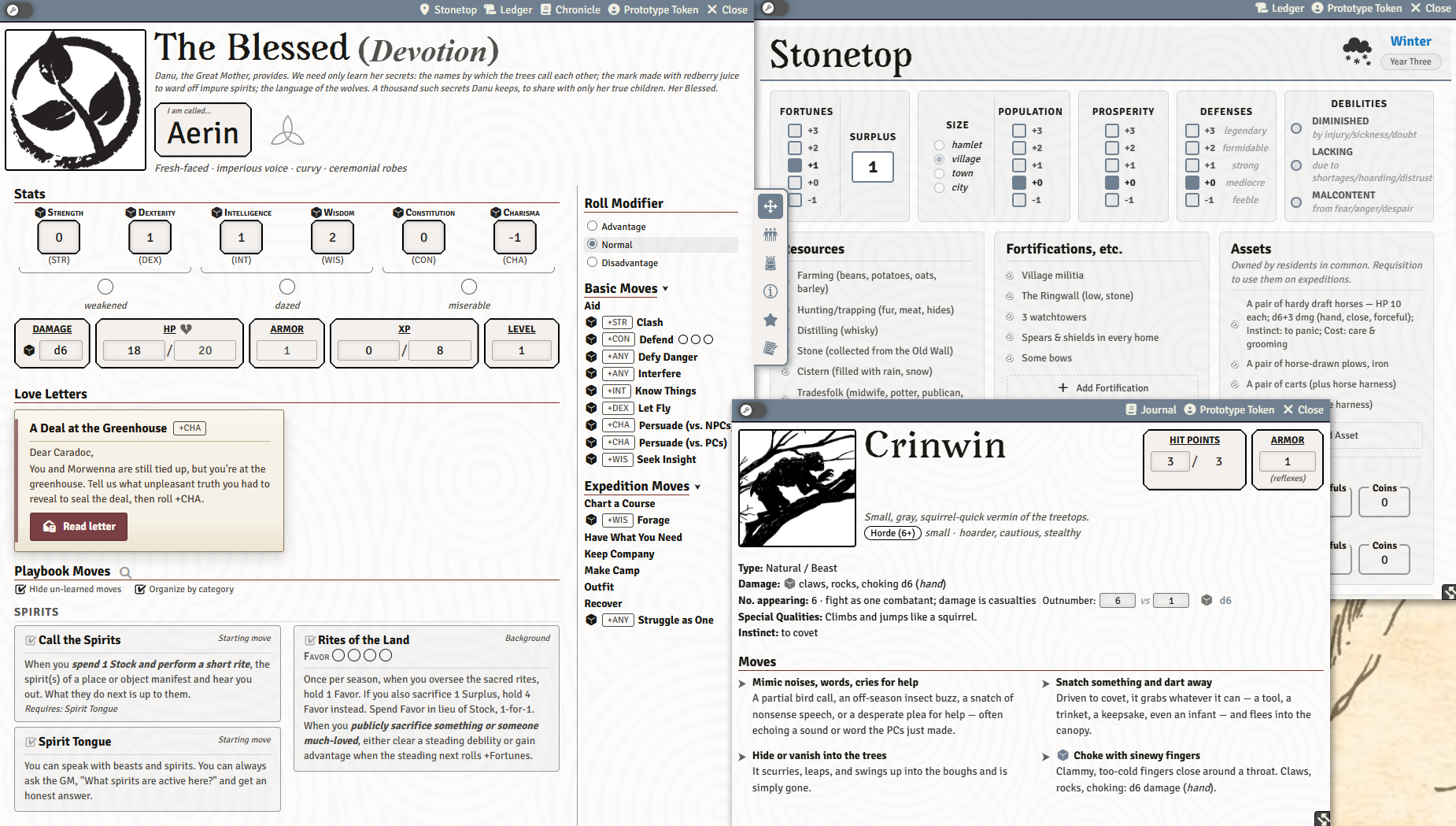
Features
Your books, open inside Foundry. Point the system at your own PDFs of Books I and II and it reads them in a window beside the sheets, with bookmarks and a resume-where-you-left-off tab. Page citations throughout the system are clickable and jump the reader straight to that page, and the GM can push a page to the whole table. An Import Book Art macro pulls the illustrations out of your copy and hangs them on the matching creatures, locations, and townsfolk. No copyrighted pixels ship with the system; the art comes from the PDF you already own.
A GM Toolkit sheet. The GM gets a sheet of their own: every GM move and both core loop flowcharts as at-a-glance reference, plus the tabs where prep actually lives. Threats and dangers, sites, and the world's relationship maps.
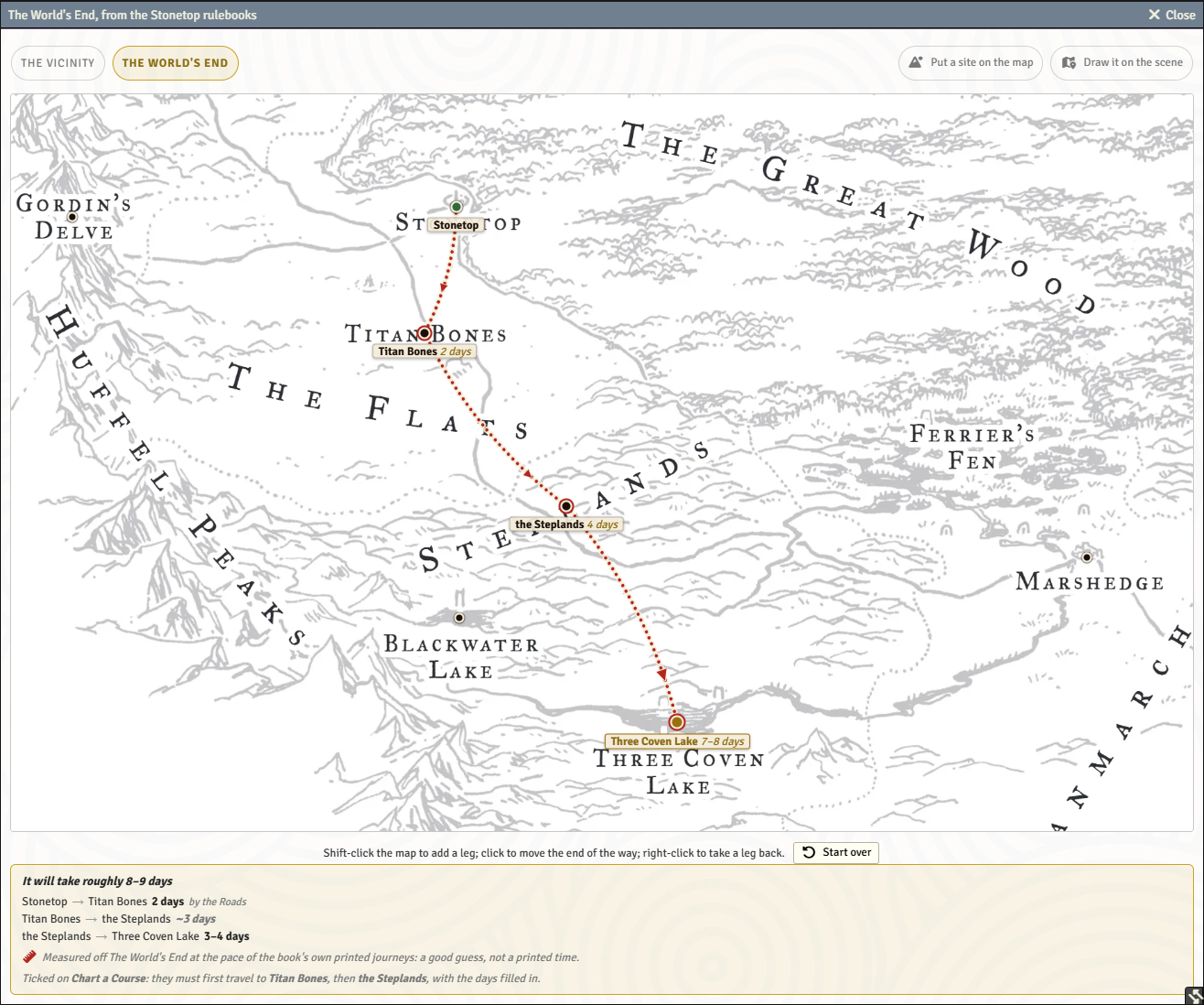
Expeditions you can draw. Trace the party's route across the travel maps by hand, stop by stop, and the system prices it against the book's own travel table and tells you how long the trip will take, leg by leg. The walkthrough that follows shows what everyone is carrying, whose load has switched off which move, and who is fit to travel at all.
Guided character creation and leveling. A multi-step wizard covers every playbook's setup, from stat allocation to lore questions to Seeker arcana, and saves as it goes so a player can stop and come back. Level Up works the same way: it shows what you can afford, locks moves whose prerequisites aren't met, opens the right chooser when a move grants a choice, and applies the lot in one click.
Moves that roll themselves. Every move goes through a pre-roll dialog that accounts for forward, ongoing, debilities, advantage, and alternate stats, then posts a card naming the tier and spelling out what happens at it. A miss awards XP on the spot. The GM can nudge any result up or down a tier from the card without rerolling.
The homefront. The steading sheet tracks Fortunes, Prosperity, Population, and Defense, and wires up the steading moves. Seasons Change walks the full seasonal checklist and nudges each player for their upkeep, Meet with Disaster applies its own penalty and picks a consequence, and a completed improvement applies its effect (and can be undone).
Books I and II, bundled. Around 180 creatures with illustrated codex entries and drop-ready stat blocks, all 30 Book II locations, and the setting's gods and factions, cross-linked so a click carries you from a region to what haunts it. All of it stays hidden from players until you reveal it.
Also in the box: followers, Seeker arcana, love letters, Death's Door, guided introductions and the Chronicle, an end-of-session XP macro and homebrew content creation.
Prerequisites
- Foundry VTT v13 or v14
Installation
In Foundry VTT, go to Game Systems -> Install System and paste this manifest URL:
https://github.com/PrinceWitherdick/stonetop-pwd/releases/latest/download/system.json
That is all you need. Install it and start a world.
Bug Reports? Feature Requests?
I'm always open to feature requests and bug reports, please reach out on my discord server created for this Stonetop system.
Recommended Modules
Dice So Nice! renders 3D dice rolls on the tabletop. Every move, damage, and steading roll in this system uses Foundry's dice, so Dice So Nice adds a tactile sense of immersion to the table without any extra setup.
Credits & Attribution
Stonetop is the work of many hands. Per the credits page in the rulebooks, this system builds on:
- Written by Jeremy Strandberg
- Illustrated by Lucie Arnoux
- Arranged (design & layout) by Jason Lutes
- Proofread by Angel Green, Rob Rendell, Matt Wetherbee, John Pham, Steven Quillen, and Dennis Taylor
- and a legion of volunteers from the Stonetop community
- Published by Lampblack & Brimstone
Some concepts and procedures are derived from Dungeon World by Sage LaTorra & Adam Koebel, used under a Creative Commons Attribution (CC BY) license.
All of the game's artwork is © Lucie Arnoux. That artwork is not open-licensed and is not redistributed by this system: the illustrations from Stonetop's books do not ship here. Any art bundled with this system is either our own work or separately licensed.
License
This system reuses the CC BY-SA 4.0 text and evokes the visual presentation (trade dress) of Stonetop. In keeping with the ShareAlike terms, the game-content portions of this project are released under the same license, with attribution to the creators above.
- Code (JavaScript, templates, styles, build tooling) is licensed under the MIT License.
- Game content derived from Stonetop by Jeremy Strandberg, together with any part of this system that reproduces the game's text or evokes its trade dress, is licensed under CC BY-SA 4.0.
- Icon assets sourced from game-icons.net are used under CC BY 3.0, with per-icon artist credits in the attribution files bundled with the system.
This is an unofficial, fan-made system, not affiliated with or endorsed by Jeremy Strandberg or Lampblack & Brimstone. Stonetop, its artwork, and its trade dress remain the property of their respective owners.
AI Training and Data Mining
Rights are reserved for text and data mining, machine learning, and AI training. This project and its release artifacts may not be used to train, fine-tune, or evaluate AI models, or be included in datasets built for those purposes. See the AI Training and Data-Mining Notice, with machine-readable signals in ai.txt, .well-known/tdmrep.json, and robots.txt.