The code was written with the assistance of artificial intelligence for the written portions, while following a step-by-step programming process and testing everything locally.
Minion! (D&D 5e)
Minions should die like minions. One hit drops them, a big swing carries on through the crowd, and thirty goblins take a handful of turns instead of thirty.
Minion! brings the minion rules of MCDM's Flee, Mortals! to Foundry VTT, on top of Midi-QOL. Your players keep attacking the way they always do, and the module handles the rest.
Foundry 13 and 14
One release covers Foundry 13 and 14. It needs dnd5e 5.3.x, Midi-QOL (13.0.64 or later on Foundry 13, 14.0.11 or later on Foundry 14) and socketlib. The Flee, Mortals! module is optional: if it's installed, its minions work with no setup.
Features
The Minion trait
A hit drops a minion to 0 hit points, whatever the damage. So does a saving throw it fails. Anything else has to reach its hit point maximum, or it does nothing at all. Resistances and immunities count first, so an immune minion shrugs the hit off. The fallen get the Dead status and, in combat, the defeated mark.
Overkill
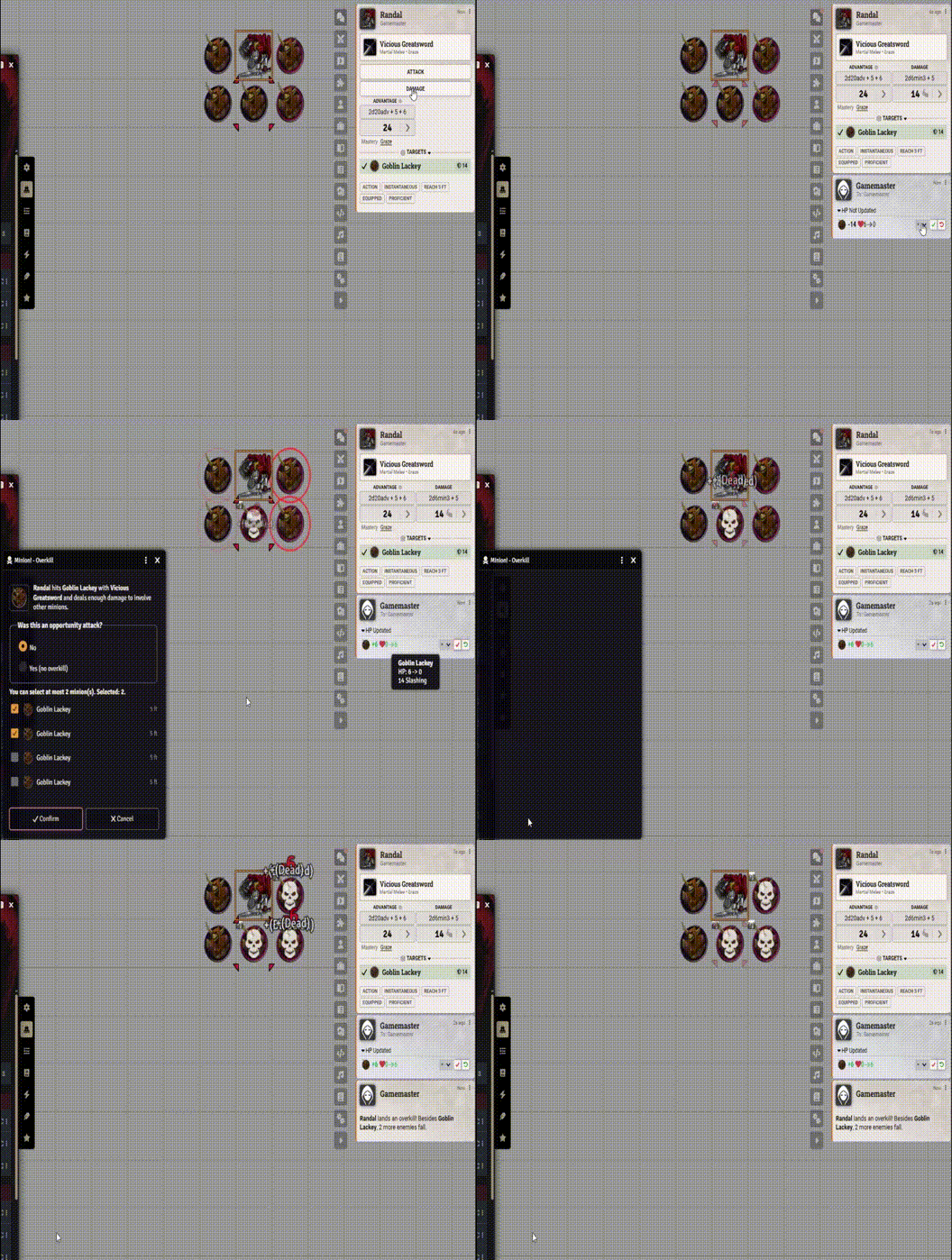
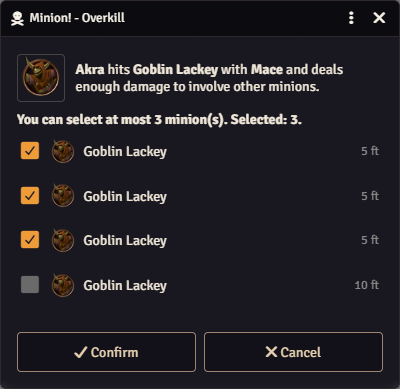
Akra swings her mace at a goblin with 6 hit points and rolls 20 damage. The goblin dies, and the 14 points left over take down three more within her reach.
- Her player picks which three, in a dialog that checks the nearest ones for her and rings them in red on the map.
- Melee attacks reach as far as the weapon does. Ranged attacks carry on along a line, up to the weapon's short range.
- No overkill on opportunity attacks. When an attack comes outside the attacker's turn, the dialog asks.
- While the player decides, the GM can wait, decide for them or cancel. Every overkill ends with a line in the chat.
Shared turns and bands (opt-in)
Thirty goblins, one tracker, a few clicks.
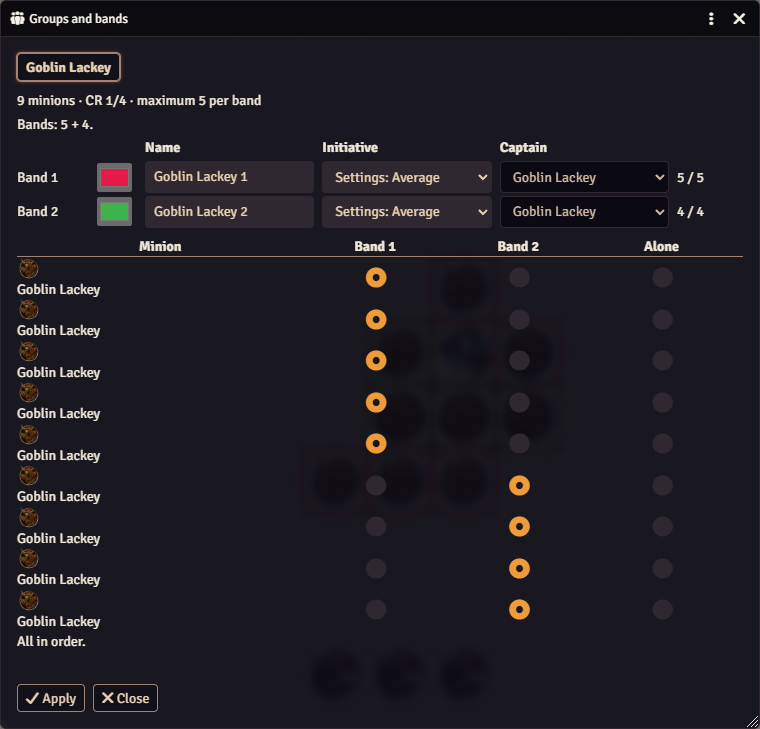
- Minions of the same kind share one initiative and one turn, split into bands of up to 5, 8 or 10 by challenge rating.
- Drop eleven goblins on the map and click Groups and bands: Minion! proposes two bands of five and one goblin on its own. Rename them, recolor them, pick a captain, and Apply adds them all to the combat.
- The captain rolls for the band, or use the average, highest, lowest or median of every member.
- Each band takes one place in the initiative order. Pass the turn, and it runs through every member before moving on.
- Every player sees each band's color on the map.
- No time to set up? Minions that join a combat before anyone rolls initiative are grouped on their own.
Combat Stats
With Combat Stats 4.4.0 or later, minion kills get their own tally: 2 (5) means two ordinary kills and five minions, overkill included. Older versions still get the overkill kills from Minion!, and nothing is counted twice.
For macro and module authors
Minion! calls minion-bang.minionKill once for every minion that dies, with the attacker, the challenge rating and the cause. api.isMinion(actor) tells minions apart from other creatures.
Getting started
- Mark your minions: check Minion in the actor sheet's Special Traits, or use the skull in the Token HUD.
- Put a character and a few minions of the same kind in a combat, and start it.
- Hit a minion hard with a weapon attack.
- For bands, turn on Shared turns and bands in the module settings.
After every update, everyone at the table reloads with Ctrl+F5. If you use bands, turn off Squad Combat Initiative: it manages the same groups.
Guide and support
- Full guide: therealsega87.github.io/minion-bang
- Bugs and ideas: GitHub issues. Run Diagnostics in the module settings saves a report to attach.
- Discord: therealsega87
- Like it? Buy me a coffee on Ko-fi
Supported game systems
- D&D 5e, version 5.3.x
Flee, Mortals! is published by MCDM Productions. Minion! contains no content from the book.