Combat Stats (D&D 5e)
Your party deserves more than a forgotten roll. Combat Stats tracks every hit, heal, and kill, and makes sure no one forgets who carried the fight.
Combat Stats automatically records combat statistics for every player character — and optionally every enemy — fight by fight, across your entire campaign. When combat ends, a styled summary is posted to chat. A dedicated Charts window lets you browse totals, compare characters, dig into per-ability damage, and export everything to Excel.
No setup beyond choosing a tracker mode. No fuss.
Foundry v13 & v14
After last version (v 4.0.0) both versions of foundry VTT are supported on the same module!
Same module, same data format, and the two lines share the same core feature set.
Requires the socketlib module — without it, actions performed by players (rather than the GM) can't be relayed to the GM's client and won't be tracked.
Features
Automatic tracking
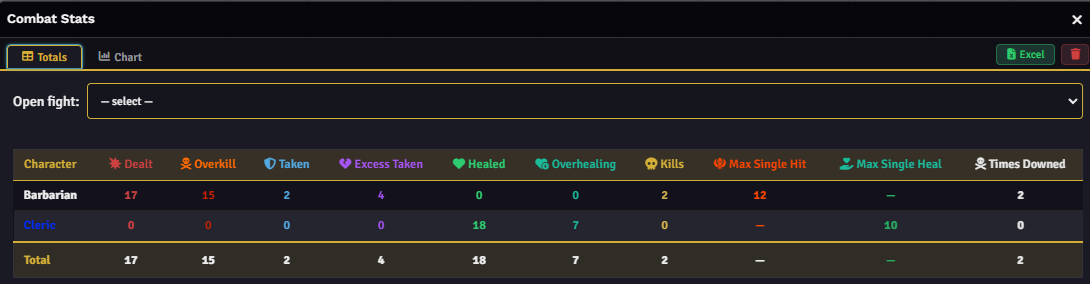
Combat Stats hooks into the D&D 5e damage and healing workflow and records every fight automatically. When the GM ends a combat, data is saved and a summary card is posted to chat.
Tracked stats per character:
- Damage dealt — with overkill sub-stat (MidiQOL only)
- Damage taken — with excess damage sub-stat (MidiQOL only)
- Healing done — with overhealing sub-stat (MidiQOL only); temporary HP counts as healing, never as overheal
- Kills
- Max single hit — biggest strike of the fight, with AoE toggle
- Max single heal — largest single heal, with AoE toggle
- Times downed — every time a character hits 0 HP
Every stat can be toggled on or off independently. Stats unavailable in the current tracker mode are marked automatically and hidden from all views.
Summons & Wild Shape
Damage, healing, and kills by summoned creatures are credited to their summoner: the druid's wolf bites, the druid's numbers go up. Works automatically with the dnd5e Summon activity, with an optional fallback for player-owned NPC tokens. Wild Shape and Polymorph are handled too — the transformed form's stats merge into the original character instead of appearing as a separate row.
Enemy tracking (opt-in)
Turn on Track enemy stats and the same breakdown is also recorded for NPCs, summed per monster name, in a dedicated "Enemies" section of the Charts window — never in the chat card, which stays focused on the party.
End-of-combat chat card
A styled summary is posted to chat at the end of every fight. Columns are configurable independently from tracking: you choose what appears in the card without affecting what gets recorded. The card can be sent by a custom Actor of your choice (name + portrait) instead of the default sender.
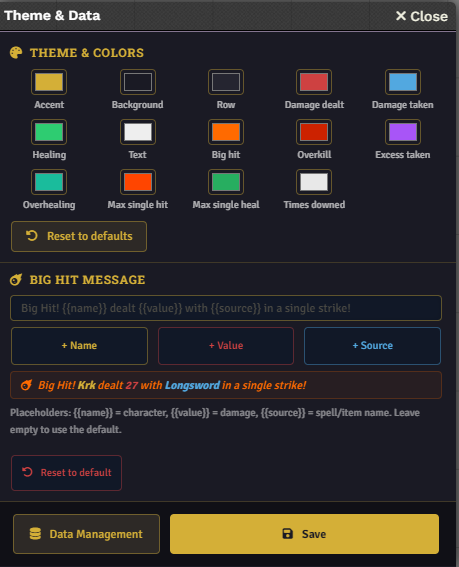
The card also includes a Big Hit achievement: a customizable callout that fires when a character lands a hit above a configurable threshold. The message supports {{name}}, {{value}}, {{source}}, {{round}} placeholders, with a live preview as you type.
The names in the preview are not random; they belong to my characters or they come from the very first campaign I have ever mastered.
Charts window
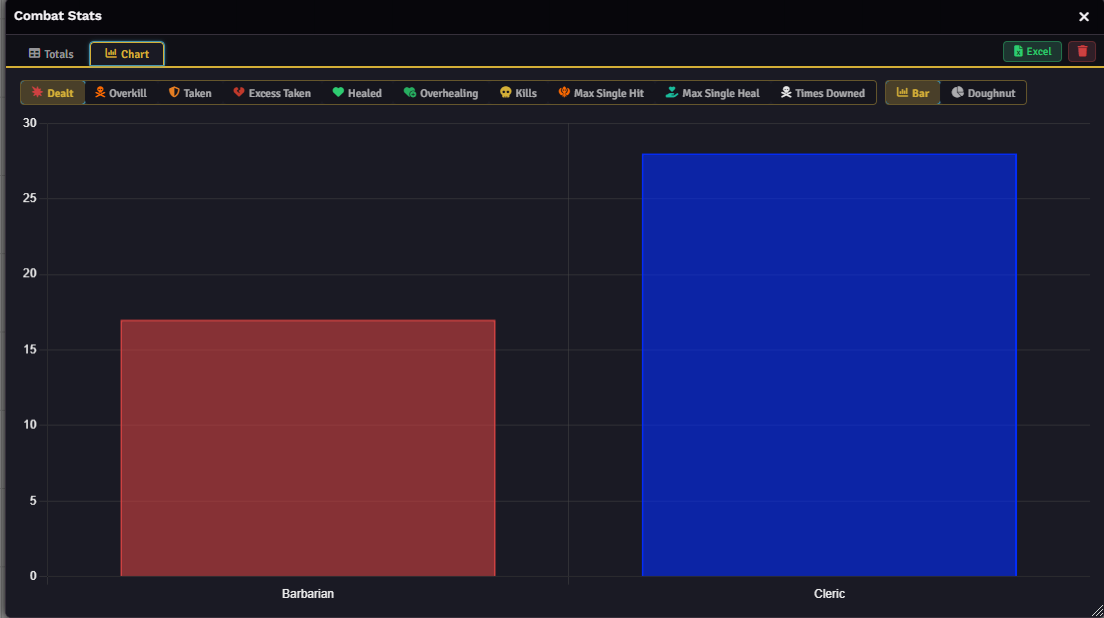
Accessible from the scene controls, the Charts window shows cumulative totals per character across all fights. Switch between any tracked metric with one click, choose between Bar, Doughnut, and Trend (fight-by-fight line chart) views, and export everything to Excel at any time. Colors follow each player's Foundry user color automatically.
Damage Meter
A per-ability damage ranking in the style of WoW raid logs: one bar per ability, sorted by total damage, with hits / average / max / share % at a glance — gold, silver, and bronze on the top three. Select any number of characters via chips and compare them side by side.
Full theme customization
14 individually customizable colors covering every stat category, backgrounds, and accents. Changes apply live as you drag the color picker. Reset to defaults at any time.
Export and import
- Export to Excel: full campaign history as a
.xlsxspreadsheet, localized (EN/IT) following Foundry's language - Export JSON: portable backup you can share or archive
- Import JSON: smart merge by UUID (no duplicates) or full replace
MidiQOL support
Combat Stats includes two dedicated MidiQOL tracker modes — Auto apply and Manual apply — matching MidiQOL's own "Auto apply damage to target" setting. Damage is registered only when actually applied, no double-counting. Sub-stats like overkill, excess damage taken, and overhealing are available exclusively in MidiQOL modes, where raw damage values are accessible before HP boundaries are applied.
Switch modes in Game Settings. A Foundry reload (F5) is required after changing — a dismissible reminder on startup tells the GM which mode is active.
Configuration
Tracked Statistics (Settings → Tracked Statistics) has two independent sections: which stats are computed and stored, and which appear in the chat card. You can track a stat for the Charts window without showing it in the recap.
Theme & Data (Settings → Theme & Data) covers color customization, the Big Hit message, and data management in a compact sub-menu.
Support
-
- Issues and feature requests: please signal me there → GitHub Issues
- Feel free to join the Discord