





Vagabond - Pulp Fantasy Roleplaying Game
This is an non-official adaptation for Foundry VTT of Indestructoboy's (Taron Pounds) RPG system, Vagabond.
Check the awesome books here: Vagabond - Land of the Blind.
You need the book (digital or paperback) to have access to the compendia containing the content.
Print Wave 3 (Alpha 3) — fully updated
All Print Wave 3 / Alpha 3 content is now in the system:
- All Classes and their features
- Ancestries, Perks and Spells
- Weapons, Armor, Alchemical gear, Starting Packs and Relics
- Bestiary and Humanlike NPCs
- Build Guides (Appendix C) as ready-to-play Level 1 characters
- Leveling, Statuses and core rules
- New Defense rules
Features
New features: Build Guides and Alchemy Lab YouTube video below
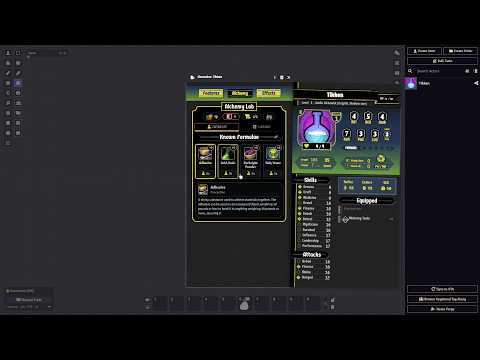
- Build Guides: in the Character Builder, right after Ancestry, choose Use a Build Guide or Build from Scratch. Pick from the book's 40 ready-made Level 1 builds, shown as flip cards (front: Stats, HP, gear, Spells, Perks; back: how the build grows to Level 10). Play it as it is or customize it in the Builder. GMs can hide guides from players.
- Alchemy Lab: Alchemists get an Alchemy tab on the sheet and an Alchemy panel on the HUD: Catalyze, Mix and the formula Library in one place, no popups. Pick new formulae in the Level Up menu and in the Character Builder.
New feature: New Downtime panel
- Shift tracker: one 4-Shift clock per Day. A downtime starts at 1 Shift; add more with + (a whole Day, or longer if the GM allows). Each activity spends a Shift, and the icons show what each Shift was used for.
- Activity mosaic: Craft, Study, Foraging, Hunting and Other Activities as picture tiles, plus Rest and Breather. Click a tile to open its options and the book's text; the yellow button does it.
- Book rules: Foraging and Hunting roll a Survival Check first (Crit = double / choose the Beast), Foraging adds the Rations or Materials to your inventory, Other Activities get +1 per 10g invested, Breather eats a Ration once per Shift, Rest pays for lodging.
- What you have, at a glance: Materials and Value per Shift for Craft, Survival Difficulty for Foraging and Hunting, your coins for Rest and Other Activities.
New features: Stores
Shops are now a real thing at the table. Create a Shop actor, stock it, drop its token on the map and let your players go shopping — prices, change, stock and receipts are all handled for you. Map: The City of Greybanner - 2 Minutes Tabletop
- Store window: a banner with the shop art and the merchant, a category sidebar (Armor, Weapons, Gear, Alchemical, Relics, with sub-categories), search, sort, and grid or list view. Every ware shows its price, Slots, stock left and key stats (weapon damage per grip, armor rating, alchemical damage).
- Carts: buy through a Personal cart (your character's purse) or a Party cart (the party treasury, items go to the party). Checkout is all-or-nothing, makes change automatically and warns you before you overflow your Slots.
- Selling: drop an item from your character or your party onto the sell zone. The merchant pays the ratio the GM set for that shop.
- Stocking in seconds (GM): drag an item, an item folder, a whole compendium or a compendium folder onto the shop. Duplicates are skipped, and each ware keeps its source folder as its category. Set per-item prices, sales, featured wares, limited or unlimited stock, hidden and no-buy flags.
- Pricing (GM): markup, sale discount, buy ratio, an optional Presence discount and a per-character attitude (Hostile to Allied) that moves prices. Hover any price to see the breakdown.
- Receipts: every purchase and sale posts a chat card (public, private or off, your choice in settings).
- Open and Close for business: Use the Open / Close Stores button on the scene controls (pick one shop or All), the toggle on the shop sheet, store banner or token HUD, or these GM Tools macros: Open All Stores and Close All Stores. The shop sheet can also create a hotbar macro that toggles that one shop, see below.
- Macro API:
game.vagabond.shop.openShop(shop),.closeShop(shop),.toggleOpen(shop),.setAllOpen(true|false),.open(shop)(view the store as GM),.buy(...),.sell(...).
New features: Workbench and Alchemists Lab
One Workbench for everything crafted at the table. Open it from the character sheet, the Character HUD menu or the Craft card in Downtime.
- Craft: a searchable catalog of everything craftable. Add items to your Projects, split a Shift across several of them by type how much effort (in currrency) you want to invest on it or use Auto-fill.
- Projects: unfinished work lives in your inventory as an item and becomes the finished item when done.
- Materials: tracked and spent for you as you work.
- Scrap: break items down into Materials.
- Alchemy: Alchemists learn formulas at level-up and craft them from a dedicated tab, including Prima Materia.
- Alchemist features: Eureka, Potency and thrown alchemicals are automated.
- Mix: combine two alchemicals into one temporary Mixture, with the merged damage, statuses and companion card handled for you.
- Relics: forge powers onto items and combine relics, for now through macros (
game.vagabond.craft). - GM control: a Crafting & Relics settings menu for every option, plus optional GM approval through a chat card.
New features: PW3 Alpha V2 Ruleset
- Flanking: automatic detection on the canvas. When two or more enemies are Close (grid-adjacent) to a foe no more than one size larger, the foe is marked Flanked — Vulnerable, taking +2 damage from attacks — and the attackers are marked Flanking. Multi-cell tokens count every occupied square, and the statuses update live as tokens move and on each attack.
- Weapon properties overhaul: properties reviewed and expanded, with many more of them now resolved automatically during attack and damage rolls instead of by hand.
- Defense property — block with a Shield: when an attack calls for a Save, the chat card now shows a button to defend with an equipped Shield instead of rolling the Save.
- Equip up to 3 Slots of weapons: you can keep up to three Slots' worth of weapons equipped at once, counted by weapon Slot size and tracked separately from the two-hand pool.
- Inventory fix: a stack of Slot 0 items (e.g. ×10) now counts as 1 Slot total instead of 0.
- Keep items fresh: a new GM macro, Sync Items From Compendium, re-pulls the current compendium version of items already on sheets and tokens after an update, so nobody is stuck with a stale copy. Per-instance state (quantity, equip, grid slot…) is kept.
IMPORTANT: Only the rules and calculations were updated. Classes, NPCs, Perks, Ancestries and even the Gear were not touched yet. We await until the book is released.
New feature: Combat Carousel & Enhanced Encounters YouTube video below
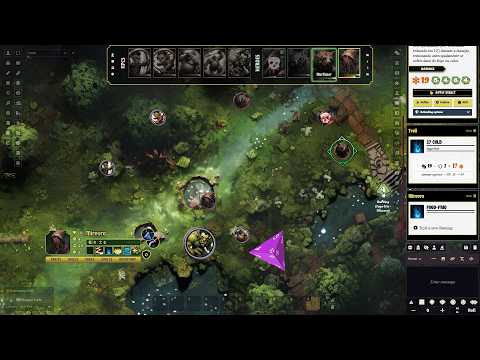
- Drag drop turn order: move factions and players around to set the turn order
- Combat carousel: easy to use overlay on canvas, flip cards to check info, players can reorder their group at will
Combat Carousel commands:
- [Left click]: select token or pan to token (depends on your setting)
- [Right click]: flip card, icons are buttons to change values
- [Double click]: activate card (if you dont want to start the encounter, using it just like a marker for the table)
- [Alt + Click]: target token
- [Drag group / cards within group]: change order (players are free to reorder themselves)
New feature: Glyph and Imbue Deliveries and new Light system YouTube video below
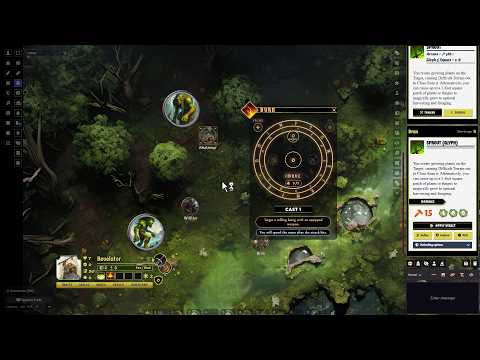
- Imbue: cast a spell onto a weapon, using the attack roll as the check.
- Glyph: place a glyph on the map that triggers whenever you want.
- Light Sources: torches, candles, lanterns and the like now apply real token light when used, with a burn-down timer: real time like Shadowdark, hourly (6 segments), or per Shift (4 segments) shown as a Progress Clock.
- Hand limits: equipped weapons now respect grip — a Two-Handed weapon, or a Versatile one used in 2H grip, fills both hands and prevents equipping anything else.
- Trinket gate: casting now requires an equipped trinket or a weapon, if you have the Gish Perk
New feature: Characters and NPCs HUD
You know what's even better than a small stylized character sheet? No sheet at all! Now the same info you have on the char sheet you have it available at a small HUD that you can place anywhere on the screen.
Using it:
- open the menu tabs in the bottom of the HUD, drag and drop gears and spells on the slots
- drag and drop weapons in the two circular weapon slots. Vesatile weapond will dispplay an icon indicating if they are being used as One or Two Hands, click the icon or the context menu to change (right click)
- Spells are mean to work with the new Spell HUD released earlier
Multiple ways to open:
Select your character token, that's it. You can turn this of in the Vagabond Tools, on the scene controls. But even with the automatic opening turned off you can still call it using the Open Selected Token HUD button in Token Controls (select your token first):
In the character sheet, in the header controls:
Right click on the portrait will give you more options:
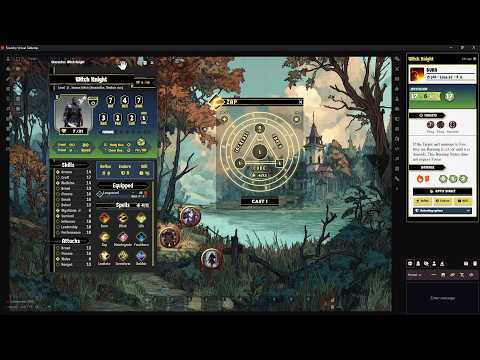
New feature: Casting HUD YouTube video below
New Casting dialog to help the player better understand how magic flows in game, mana consumption and all.
New feature: Automations (YouTube video below):
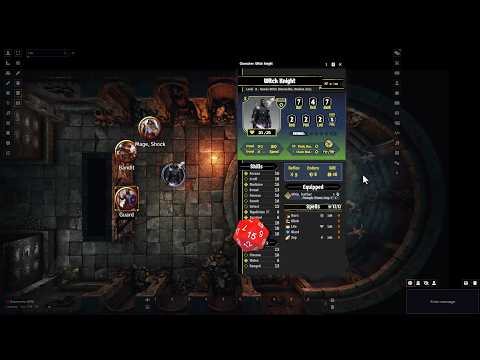
- Weapon properties automation: Vicious, Entangle and Cleave.
- On Hit Effects: items, spells and npcs actions can deal statuses and generate Cdx properly. And the Cdx dice will deal damage when rolled.
- Crit evaluation: If you Crit on combat, you can toggle: Receive the Luck point or deal more damage (default is Damage, click the Crit badge to toggle). Note: Crit on spells in general changes the die size of countdown effects, so you need to manually change those back for now.
- NPC Action Recharge: if the Action has a Recharge field (works for Cdx only) the action is marked as spent and an hourglass icon appear. Click the hourglass to roll. The recharges cards in chat are GM only, but you can make them public in Game Settings.
- Classes Features: Barbarian - Rage: Automated with active effects, but you need to set the exploding dice in the weapon manually.
- Classes Features: Fighter - Valor: Automated with active effects.
New feature: Item FX — Per-Item Animations:
Weapons, alchemicals, and relics can now have their own Sequencer animations configured directly on the item sheet. Set different files and sounds for hits and misses, choose between melee (impact at target) and ranged (beam to target) styles. For weapons the animation type is derived automatically from the weapon skill. Requires the Sequencer module.
New feature: Focused Spells:
Spellcasters now have a Focus track visible in the Spells panel. The Mana icon in Combat encounter also highlights if any spell is marked as Focused.
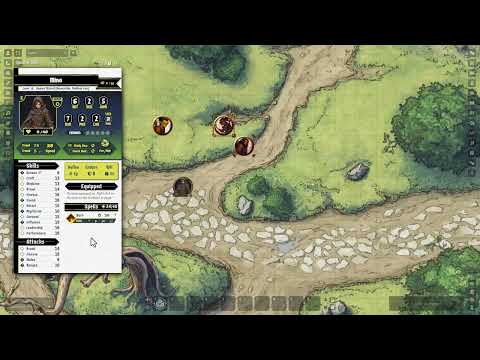
New feature: Sequencer Animations Panel (YouTube video below):
New feature: Full Homebrew:
Always wanted a system to call it yours? now you have it. With the new homebrew panel you have the freedom to edit almost everything in the system from names to formulas, dice rolls and limits. And after that export and import other homebrews to play in your tables.
Remember that when you change a key you effectively break the use of that particular element in the system, so if ypu want to change more than labels go for it, but go full: create new items, classes, perks, ancestries and so on, after you have set your system. Save it, name it, share it!
You can always reset to the default table, so mod to your heart content.
New feature: Party Sheet and Vehicles (YouTube video below):
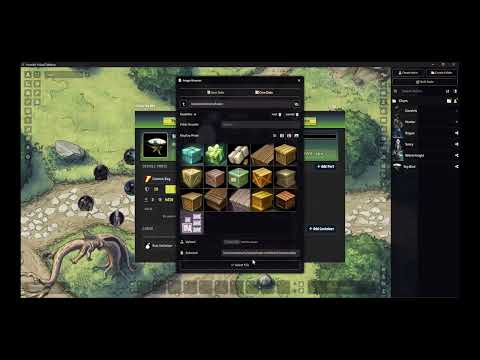
GMs can check main data of the party in a easy way, including a mini dashboard that you can position anywhere (compact mode). And beyond that this sheet can be used for a party vehicle!
From simple rides to complex airships, it allows the creation of multiple parts where you can place crew members and request rolls. Each part has its own individual HP, Armor, and Damage. All vehicles also have a Cargo section where you can place any number of Container items. With this, you can have huge transporters with high capacity and smaller stashes for your smugglers, all in the same vehicle. The parts system gives you freedom to choose the level of complexity you want at your table.
New feature: Level Up menu
Click on the XP label at the top right of the character sheet to open the level up menu
New Character Sheets Styles: Light and Dark Themes
Click on the right margin of the top sheet to open it!
To alternate between the styles toggle the Application style:
Game settings >> Core >> Configure interface >> Applications.
It does not affect Foundry appearance, only in game dialogs and theme.
Combat Encounters
Dedicated combat encounters with per factions separation: Heroes, NPCs, Neutrals and Secrets (set these in Token >> Appearance >> Token Disposition), with settings to add custom initiative for going in order or through "popcorn initiative" where the table decides the order at will.
Clocks, Trackers & Countdown Dice
Track tension and time directly on the canvas without needing external modules.
- Progress Clocks: Create clocks with 4, 6, 8, 10, or 12 segments. Position them anywhere to track long-term goals or impending doom.
- Trackers: Simple counters that can take positive or negative numbers. Use it to track resources, effects, time, anything you need.
- Countdown Dice: Create the countdice and never forget to roll when the time comes!
Downtime Manager
- Shift tracker: plan how many Shifts the downtime lasts; each activity spends one.
- Resting: pays lodging (Horrible to Opulent) and restores HP, Mana and the Luck Pool (or removes 1 Fatigue at full HP).
- Hunting & Foraging: Survival Check first, then the yield is rolled; Foraging adds Rations or Materials to your inventory.
- Crafting, Studying & Other Activities: open the Workbench, gain Studied dice, or roll a Skill Check boosted by the gold you invest.
Character Builder
Easy and fast to use character builder, with option to generate full random character with the press of a button or randomize only some steps:
Awesome Freeform Spellcasting
Magic in Vagabond is flexible and unique. The system includes a dynamic Mana Calculator:
- Fast and Magical: Adjust Damage Dice, Delivery methods (Cone, Line, Aura, etc.), and Range extensions on the fly.
- Auto-Calculation: The sheet automatically calculates the total Mana cost based on your modifications, ensuring you never miscalculate the price of power.
- Templates: target anything and click in the delivery range in the shat card to automatically draw a measure template in the canvas.
Got the book? You're in for a treat!
Inside the book you will find the one word password to unlock all content for your Foundry table. No need to purchase a premium module:
- 7 Ancestries and their Traits
- 18 Classes with all Features
- 100+ Perks
- 300+ NPCs
- 500+ Items!
Installation:
Go to Foundry >> Game Systems >> Install System and look for "vagabond" and click the Install button
- OR -
Paste the link below in the Manifest URL field located at the bottom of the same install window and click the Install button at the end.
https://github.com/mordachai/vagabond/releases/latest/download/system.json
Item Piles integration
If you want to use the module Item Piles to manage treasures and shop in your game install together the module below:
https://github.com/mordachai/item-piles-vagabond/releases/latest/download/module.json
Too Many Tokens Integration
Want some tokens and doesn't have a problem with Ai images? Install this module too:
https://github.com/mordachai/art-for-vagabond/releases/latest/download/module.json
You will need to also install the Too Many Tokens - DnD module that takes a bit of a space. in general you cant install this in services like Forge, but its a good alternative in a pinch. No, installing the online version will not work, at least not yet...
Acknowledgements
Huge thanks to KeyInk for the marvelous work designing the new chat cards and sheets. Check their other works here: https://bsky.app/profile/keylligraphyink.bsky.social
Relic Powers update: MadBlue - Discord: madblue2112 - https://bsky.app/profile/madblue2112.bsky.social
A big thank-you as well to everyone on Indestructoboy’s Discord server for the incredible support, playtests, and awesome tables. You all rock!
“Vagabond for Foundry is an independent product published under the Land of the Blind Third-Party License and is not affiliated with Land of the Blind, LLC. Vagabond // Pulp Fantasy RPG © 2025 Land of theBlind, LLC.”
Contributing / Development
See DEVELOPMENT.md for the full development setup guide, including SCSS compilation, compendium pack editing, and IDE configuration.