AI Usage Explanation
- Code: written with the help of an AI coding assistant (Claude); I direct, review and test all of it.
- Art in the module: none is AI-generated. The frames are rendered procedurally by my own generator from Poly Haven textures (CC0). The battle map in the preview is by 2-Minute Tabletop (CC BY-NC 4.0).
- Features: the module has no generative AI features and sends nothing to AI services.
The Best Token Generator
Make a complex token from an actor's portrait right in Foundry with ease. You only edit the portrait and highlight just the important parts. You'll be surprised how far this idea can take you.
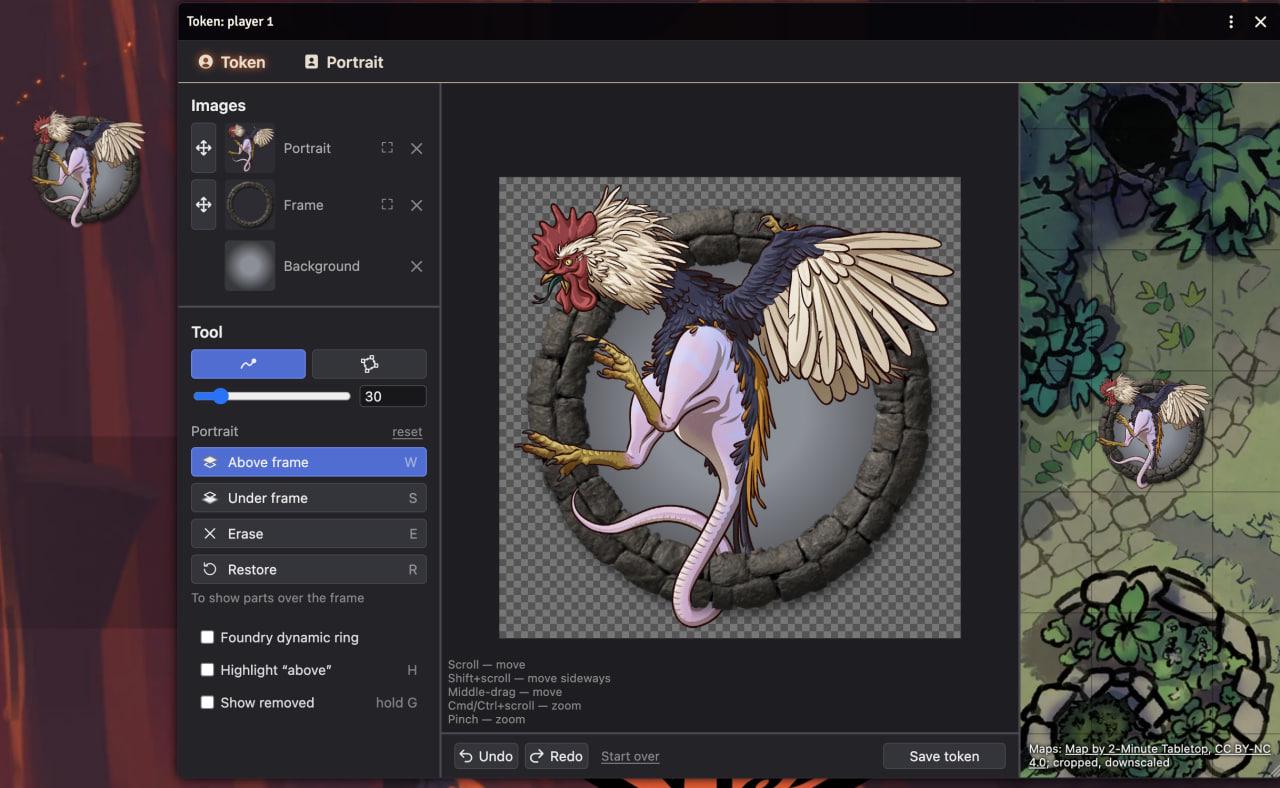
Cockatrice art: The Illustrated Bestiary by Gourdin Konbo Club, CC BY-SA 4.0; the screenshot is under the same license.
Features
- Portrait: simple yet powerful tools, with undo/redo
- Frames: pick from ready-made frames or upload your own + Dynamic Token Ring
- Backgrounds: a color, a darker edge or your own image
- Preview your token on different maps and at real size
- Swap frames and backgrounds, edit everything at any time
How to open
- Right-click an actor in the Actors sidebar → Token and Portrait.
- On the actor sheet: the ⋮ menu in the header (sheets like dnd5e) or the Token and Portrait button in the header (older sheets like pf2e).
- From a macro:
game.modules.get("best-token-generator").api.open(actor)
Feedback
Bugs and ideas: Discord.