This package contains art, text, or software code produced using generative AI.
Yes, partly for translations (documentation)
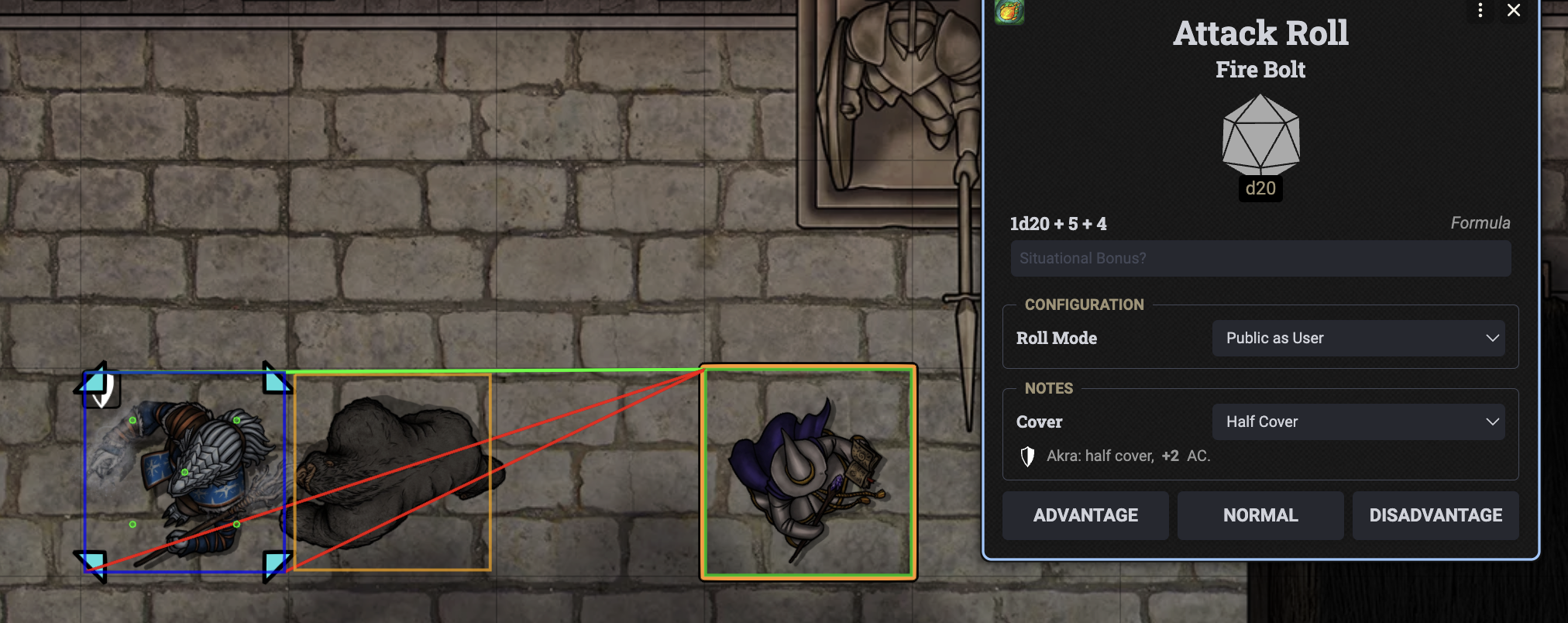
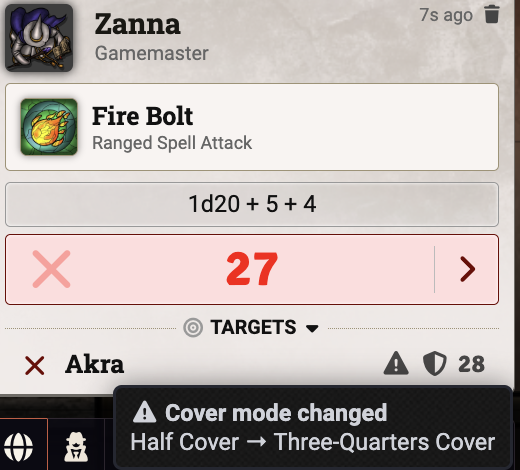
Simple Cover 5e automatically evaluates cover for the DnD5e system in Foundry VTT during attack rolls and saving throws (multi-target supported). It applies the correct mechanical bonuses (+2 / +5) to the roll, updates chat/card displays, and sets/clears target status effects. The module also adds a custom Ignore Cover item property that you can enable on specific items (e.g., Sacred Flame) to bypass cover for that roll.
How It Works
- Uses the DMG-style line-of-effect approach:
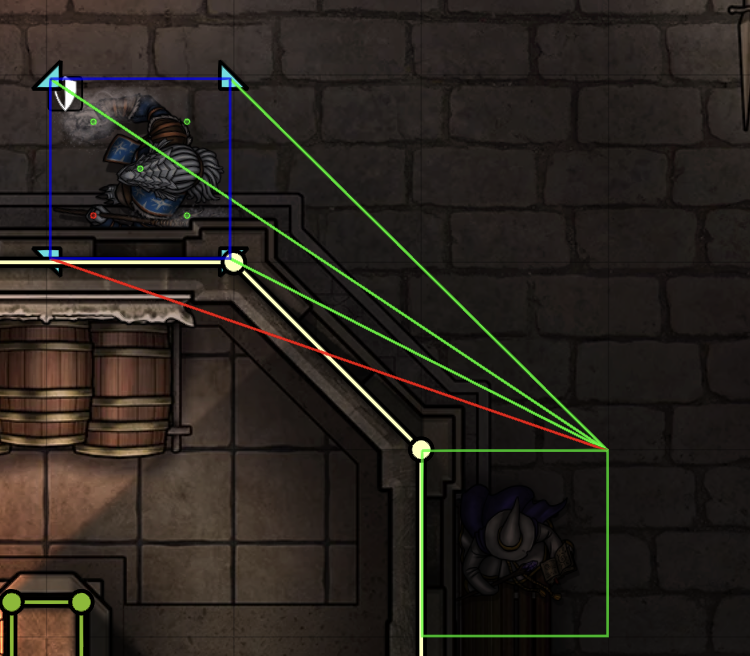
- Square grid: pick an optimal attacker corner and conceptually trace to the target’s four (inset) corners.
- Gridless (Square mode): tokens are treated as squares; we pick an optimal attacker corner and trace to the target’s four (inset) corners, similar to a normal square grid.
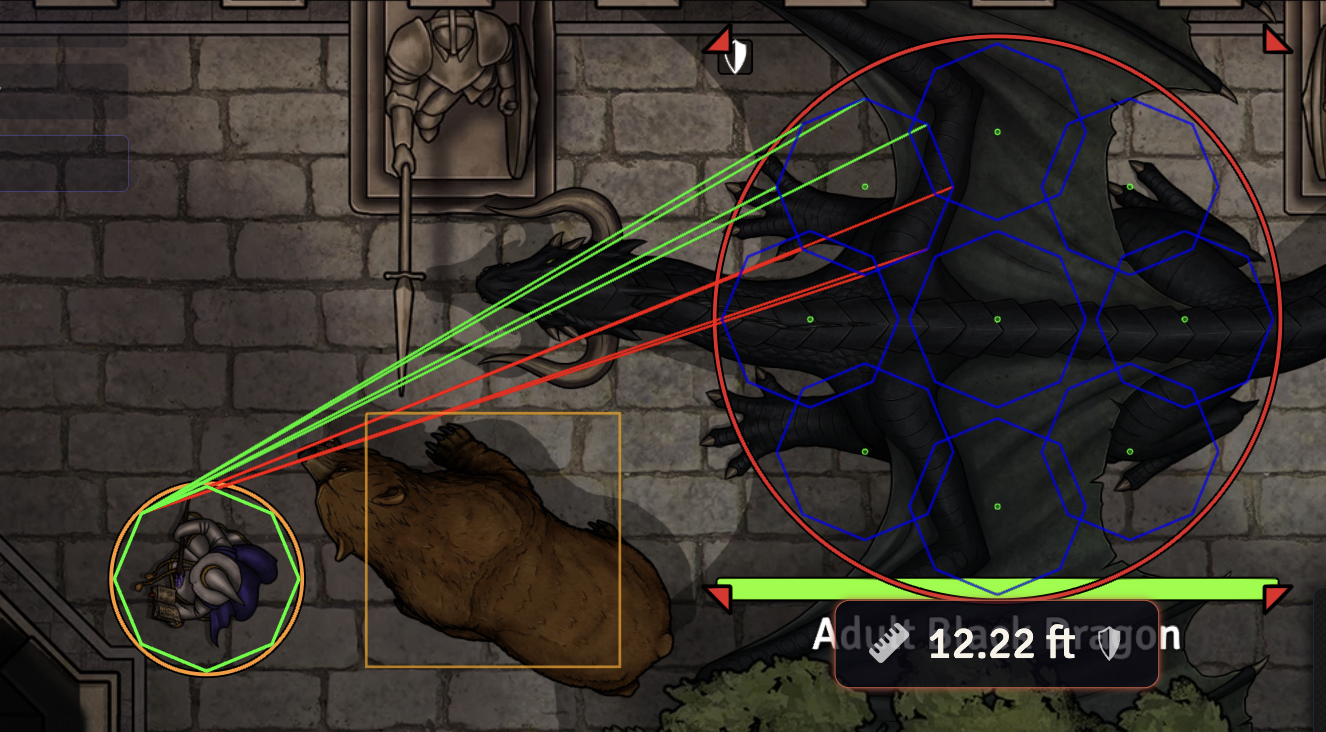
- Gridless (Circle mode): tokens are treated as circular footprints. Attacker and target use an octagon of sample points around the circle (8 inset points on the circumference). Larger creatures (Large and bigger) are approximated using multiple circles arranged inside the token footprint.
- Hex: pick an optimal attacker corner and trace to the six (inset) corners of the target hex.
- Cover thresholds:
- Square / Gridless (Square mode): if 1–2 lines are blocked, the target gains Half Cover; if 3–4 lines are blocked (and the effect still reaches), the target gains Three-Quarters Cover.
- Hex: if 1–3 lines are blocked, the target gains Half Cover; if 4–6 lines are blocked (and the effect still reaches), the target gains Three-Quarters Cover.
- Gridless (Circle mode): if 1–5 lines are blocked, the target gains Half Cover; if 6–8 lines are blocked (and the effect still reaches), the target gains Three-Quarters Cover.
- Blocking tokens are treated as 3D prisms with configurable heights by creature size. When the Wall Height module is active, creature heights are taken from that module instead of these defaults. Non-blocking creatures (hidden tokens, ethereal creatures, or creatures with 0 max HP / defeated) are ignored when evaluating cover.
- In gridless Circle mode, blocking creatures use slightly smaller internal squares as their blocking footprint, sized to sit safely inside the circular radius.
- Effects are pushed directly into the roll (chat target AC / save bonus) and synchronized with token status effects.
- Tokens that already have Total Cover applied (e.g. swallowed creatures) are respected: the module does not recalculate or overwrite their cover state.
- On gridless scenes, larger tokens (Large and bigger) are evaluated using multiple sample points (virtual sub-cells or multi-circle layouts) to approximate the multi-square behaviour from square grids where no RAW gridless procedure exists.
- Tiny creatures use the token’s actual position and footprint within their cell instead of the grid cell center (currently only on square grid), improving accuracy when multiple Tiny tokens share the same space.
- The module introduces an Ignore Cover item property. Add it to spells, weapons, or feats that should ignore cover (for example, Sacred Flame) and the cover calculation will be skipped for that roll.
- The feats Sharpshooter and Spell Sniper are automatically respected when present on the attacker, either by their English name or by a matching
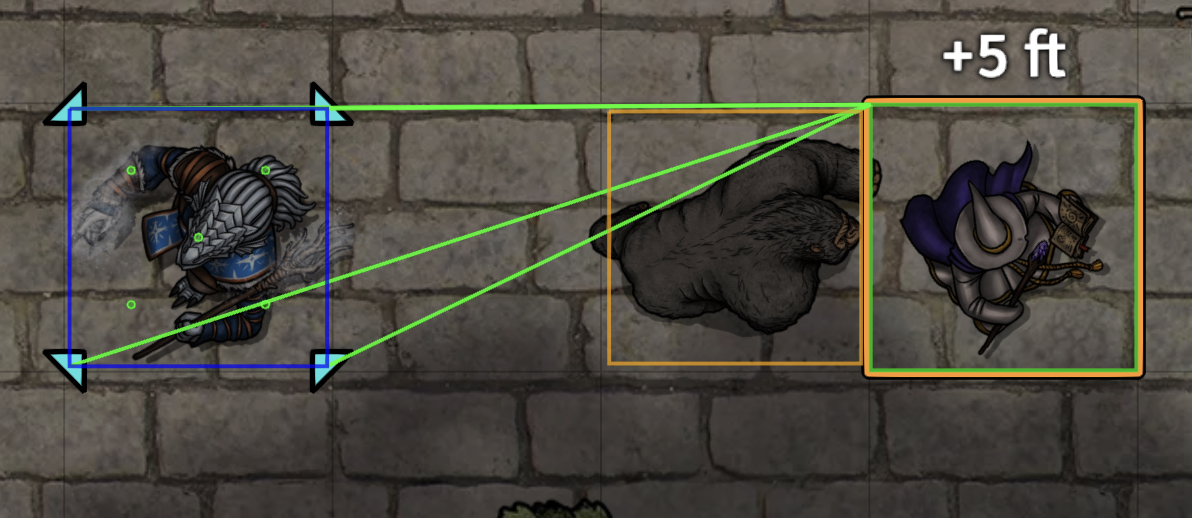
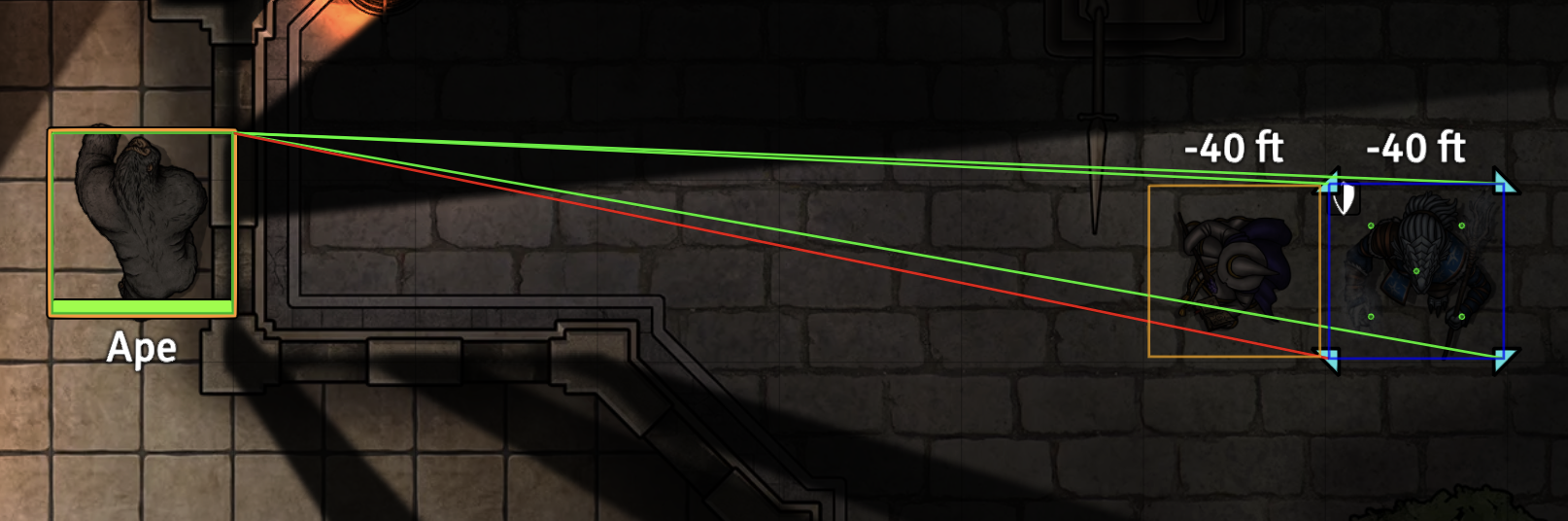
system.identifier(e.g."sharpshooter"/"spell-sniper"). - (Optional) A token hover helper can display cover icons and/or a distance label near the hovered token, styled similarly to the core distance ruler and configurable in position and offset.
- (Optional) A debug overlay can draw the evaluated cover segments as colored lines (green for clear, red for blocked) and outline the token shapes used internally (attacker, target and creature occluders).
Settings
- Cover Removal Scope — Choose which tokens are affected when cover is cleared: All Tokens on Scene, Combatants Only, or Player-Owned Tokens Only.
- Clear Cover on Combat Updates — When rounds/turns/initiative change, remove cover according to the selected scope.
- Clear Cover on Token Movement (Combat Only) — When a token moves during active combat, remove cover according to the selected scope.
- Limit Cover from Creatures to Half Cover — When enabled, creature occlusion alone can grant at most Half Cover; creatures never upgrade a target to Three-Quarters Cover by themselves. Walls and other occluders still follow the normal DMG thresholds.
- Apply Cover Only In Combat — Only run automatic cover evaluation while a combat encounter is active on the scene (no cover checks outside of combat).
- Hover Display (Cover & Distance) — Controls the hover helper:
- Disabled — no hover display.
- Cover icons only — show only the cover icon for the hovered target (if any).
- Cover icons and distance — show both cover icon and distance.
- Hover Label Position — Choose where the hover label is anchored relative to the target token (Above, On, or Below the token).
- Hover Label X/Y Offset — Additional horizontal and vertical offsets (in pixels) applied to the hover label position, allowing fine-tuning to avoid overlap with other UI elements.
- Gridless Distance Mode — Controls how distance is measured on gridless scenes for the hover display: Center to center, Source edge to target center, or Edge to edge.
- Gridless Token Shape — Controls how tokens in gridless scenes are approximated for distance and cover:
- Square — treats tokens as square footprints, using virtual sub-cells for larger creatures.
- Circular — treats tokens as circular footprints with octagon sampling for attacker/target and multi-circle layouts for Large and bigger creatures.
- Prone Creature Height Adjustment — Controls how prone creatures are treated when building their 3D prism for cover calculations. You can keep their full height, treat them as one size smaller, or halve their height. When the Wall Height module is active, “Treat as one size smaller” falls back to half height.
- Show Cover Debug Lines — Renders helper segments used during cover evaluation (GM only).
- Creature Heights — Configure the default 3D heights (in feet / grid units) for each size category used when treating tokens as prisms for cover.
Notes & Limitations
- Gridless and hex behaviour for large creatures and Tiny positioning are reasonable approximations where RAW is unclear; feedback and alternative suggestions are welcome.
- Known issue: on hex maps, blocking tokens (occluders) are currently blocked as 3D squares and not by the occupied hex fields themselves, which can lead to faulty behavior.
Compatibility
Midi-QOL
- Works out of the box.
- Simple Cover 5e only mutates dnd5e roll / message data and does not patch Midi-QOL directly.
Ready Set Roll 5e
Simple Cover 5e is partially compatible with Ready Set Roll 5e:
- When the chat log is not open, Ready Set Roll may internally trigger certain rolls twice or in an unexpected order. This can lead to:
- Cover status effects being toggled multiple times on temporary
ActorDeltadocuments, e.g._id [dnd5ecoverHalf00] already exists within the parent collection: ActorDelta[…] effects - Harmless console errors from debug drawings (if enabled), e.g.
Drawing "<id>" does not exist!
- Cover status effects being toggled multiple times on temporary
- These messages only appear in the GM’s browser console and do not crash the game.
- Cover calculation for saving throws (save DC adjustment) is correct.
- Attack rolls:
- Mechanics (hit / miss) work for single-target attacks.
- The AC values shown under Targets on the Ready Set Roll card can sometimes be incorrect, because Simple Cover 5e mutates the dnd5e
messageFlagsduring the attack roll, while Ready Set Roll appears to use its own data built earlier in the activity workflow.
Wall Height
- When the Wall Height module is active, simplecover5e uses its per-token LOS height for 3D cover evaluation and ignores this module’s default creature height settings.
- Walls with Wall Height bounds (
top/bottom) are treated as 3D barriers: a cover line is only blocked if the 3D line between attacker and target passes through the wall’s height range. - For 3D LOS checks, the attacker’s ray starts at about 70% of their height (approximate eye level) and aims at 50% of the target’s height, so low walls tend to grant partial cover instead of behaving like unrealistic full-height barriers.
Integration & API (Library Mode)
Simple Cover 5e exposes a small API that other modules can use to query cover without relying on Active Effects or automatic roll mutation. The API is available via the module entry:
const sc = game.modules.get("simplecover5e")?.api;
API Surface
api.getCover({ attacker, target, scene?, debug? })
Compute cover between a single attacker and target. Returns an object like:
const { cover } = sc.getCover({ attacker, target });
// cover is "none", "half", or "threeQuarters"
api.getCoverForTargets({ attacker, targets?, scene?, debug? })
Convenience helper to compute cover for an attacker against multiple targets (or the current user’s selected targets if targets is omitted). Returns an array of { target, result } pairs.
api.getLibraryMode() / api.setLibraryMode(enabled)
Query or toggle a “library mode” flag. When library mode is enabled, Simple Cover 5e will still provide cover calculations via the API, but will not automatically apply Active Effects or mutate roll configuration on its own. The setting is stored as a world setting and is intentionally not shown in the UI; it is meant to be controlled by integrating modules (or GMs via console).
Ready Hook
Consumers can also subscribe to a dedicated hook to safely attach to the API regardless of module load order:
Hooks.on("simplecover5eReady", (api) => {
// e.g. enable library mode and use the API
api.setLibraryMode(true);
});
This pattern allows other modules (such as automation/conditions modules) to reuse Simple Cover 5e’s cover engine while retaining full control over how bonuses are applied, how workflows are modified, and how any UI indicators are displayed.