Quality-of-life roll automation for Foundry VTT's D&D 5e system.
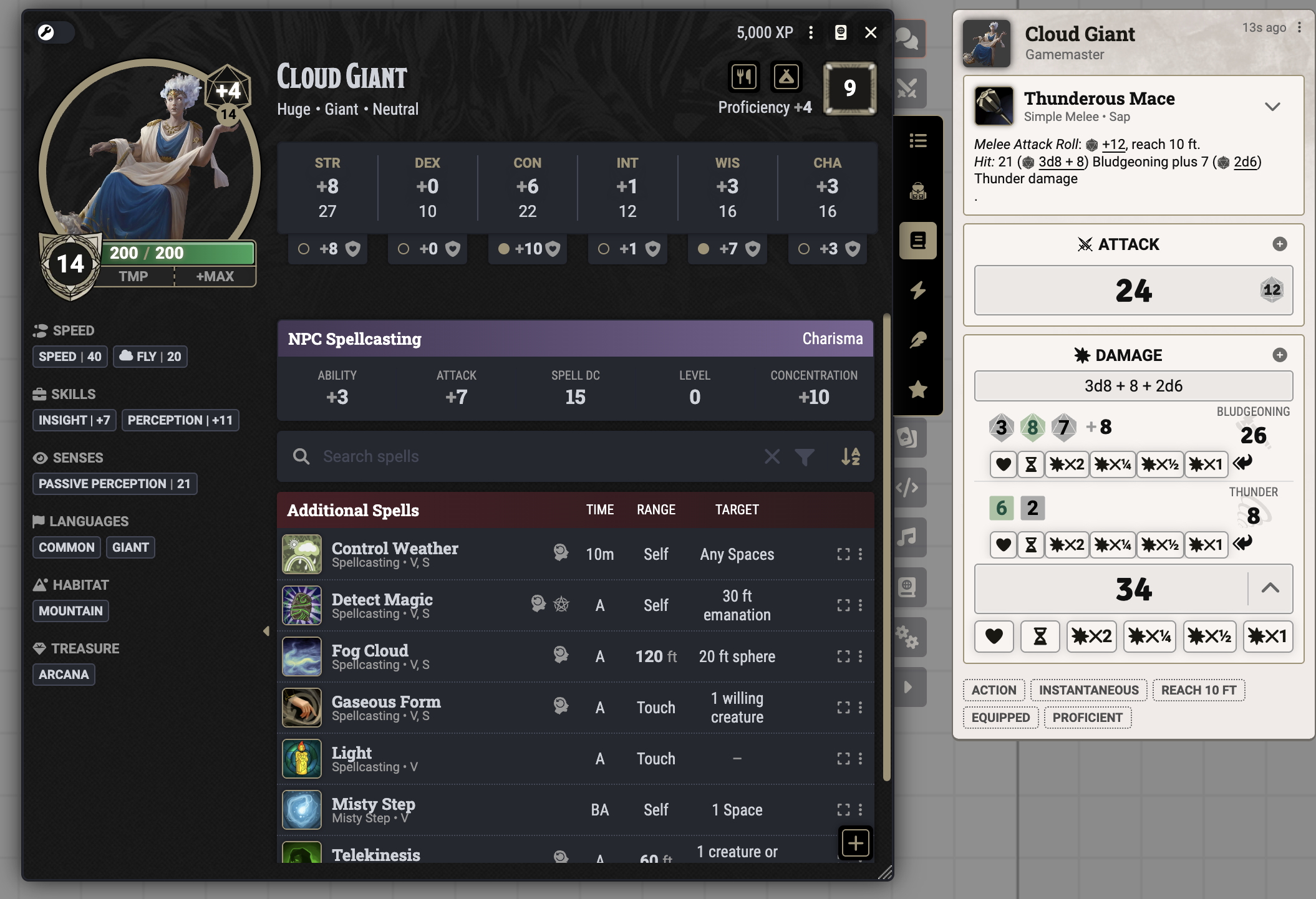
Quick rolls drop straight into chat — attack, damage split by type, and per-target apply buttons in one card.
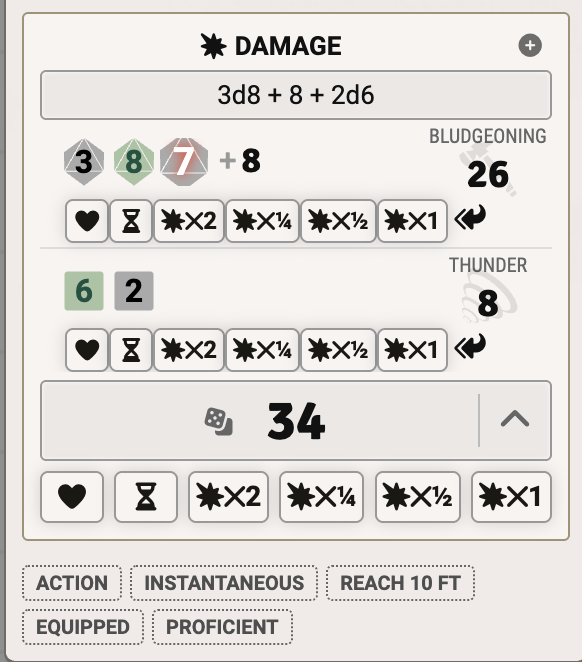 Damage splits by type — apply fire here, cold there, independently. |
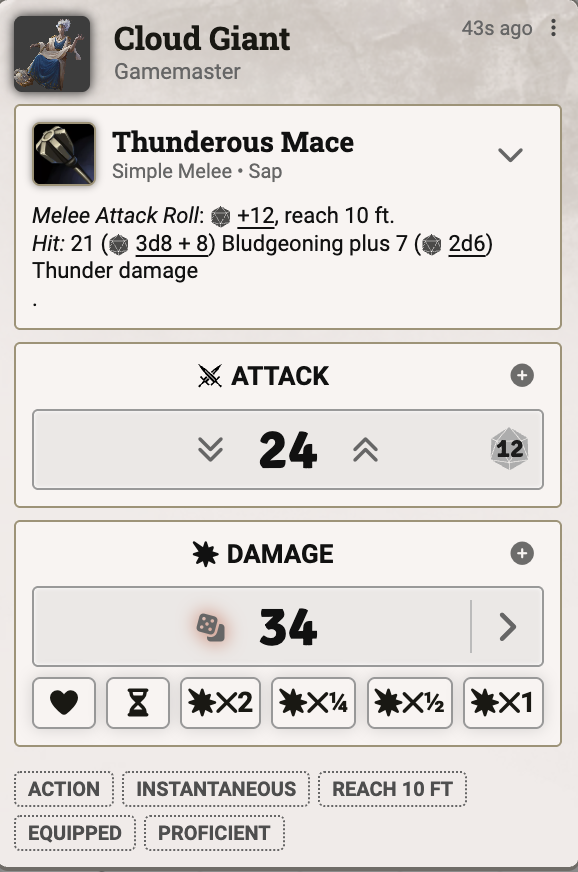 Collapsed default: one click to roll, one click to apply. |
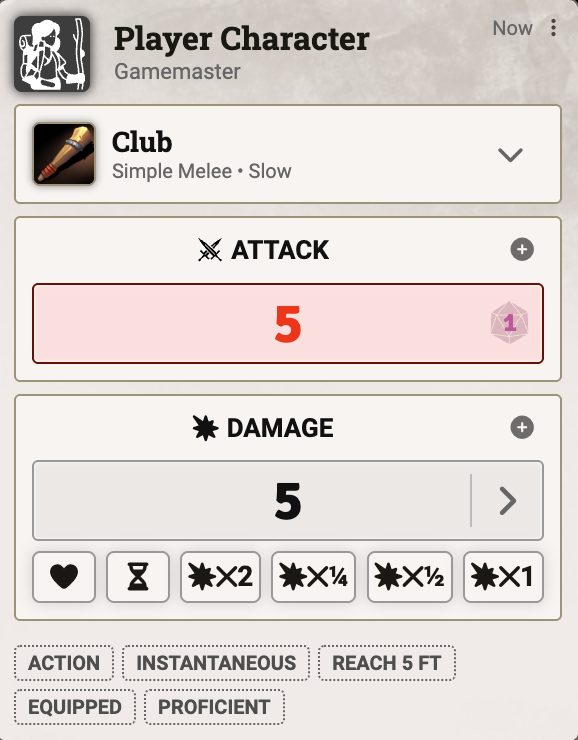 Works for PCs and NPCs alike. |
What it does
RSReforged removes clicks from D&D 5e rolls in Foundry VTT.
- One-click rolls. Skill checks, saves, attacks, and damage go to chat without the usual dnd5e dialog.
- Damage split by type. If an attack deals fire and cold, apply each to different tokens.
- Edit rolls after they land. Turn a flat roll into advantage, promote a hit to a crit, or add a Bless die you forgot.
Compatibility
| Minimum | Verified | |
|---|---|---|
| Foundry VTT | 14 | 14.539 |
| dnd5e system | 5.3.0 | 5.3.0 |
RSReforged does not work on Foundry v13 or dnd5e 5.0–5.2. If you're on those versions, stay on upstream RSR v3.5.0 until you upgrade.
RSReforged also conflicts with other modules that overhaul the dnd5e roll pipeline, most notably Midi-QOL. They will fight each other in unpredictable ways. Pick one.
Install
In Foundry's Add-on Modules → Install Module dialog, paste this into the Manifest URL field:
https://raw.githubusercontent.com/arrowedisgaming/RSReforged/master/module.json
Click Install. Foundry downloads the latest release and adds RSReforged to your module list.
Features
Quick rolls
Skill checks, ability checks, saving throws, tool checks, and item activities all roll straight to chat without the standard dnd5e dialog. Each category can be toggled independently in the module settings. The dnd5e Skip Dialog modifier still bypasses RSReforged when you want the full dialog for a one-off roll.
Hold the Advantage or Disadvantage modifier while clicking to roll in that mode, including any extra dice from features like Elven Accuracy. The chat card highlights the kept die.
Always roll two dice
A setting shows two d20s on every roll (three with Elven Accuracy), even without advantage or disadvantage. Hold a modifier to designate which die is kept.
Edit rolls after they land
Upgrade a quick roll after it's been made: turn a flat roll into advantage or disadvantage, promote a hit to a critical, or change which die is kept. The chat card updates in place and shows the new state next to the old.
Apply damage per target
Each damage and healing field in a quick-roll chat card has its own apply button (overlay on hover, or always-on per setting). Apply each damage type to selected or targeted tokens independently. Useful for "this 1d8 is fire and that 1d4 is cold and only one of them resists."
Add a bonus after the roll
A + icon on every rolled card opens a dialog to add a bonus to the check, save, attack, or damage after it's rolled. You can type a custom formula (e.g. 1d4, +2, 1d6 + @prof), or pick a pre-defined bonus you've registered on an Active Effect.
See Setting up pre-defined bonuses below for how to register them.
Clickable dice in chat
With this feature enabled, you can click any die shown in a chat tooltip:
- Left-click a die in a roll you made to reroll that die in place. The chat card recalculates.
- Right-click a die (GM only, when Allow GM Dice Fudging is on) to set its value via a prompt. Useful for narrative course-correction.
Three settings gate the feature:
- Enable Interactive Dice (Master Switch) — kill switch for the whole feature
- Allow Players to Reroll Their Own Dice — players can left-click their own dice
- Allow GM Dice Fudging — GM gets the right-click "set value" option
Configuration
All settings live under Configure Settings → Module Settings → RSReforged. The ones worth knowing:
- Quick Roll for {Skills, Abilities, Tools, Activities} — toggle each category independently
- Always Roll Multiple Dice — show two d20s on every roll, not just advantage or disadvantage
- Hide Final Result — hide the rolled total until the GM reveals it (good for blind checks)
- Manual Damage Mode — require an explicit click to roll damage, instead of auto-rolling on hit
- Apply Damage Options — selected vs. targeted tokens, with priority modes
- Confirm Retroactive {Advantage, Crits} — gate retroactive edits behind a confirm dialog
Setting up pre-defined bonuses
This is optional. Use it when you want Bless, Bardic Inspiration, Guidance, and similar to appear as one-click options in the Bonus Manager instead of typing the formula each time.
Add an Active Effect change on the actor (or on an item that grants the effect) with:
| Field | Value |
|---|---|
| Attribute Key | flags.rsreforged.bonus |
| Change Mode | Custom |
| Effect Value | A semicolon-delimited string (see below) |
Effect Value format:
<formula>; type:<roll-type[,roll-type...]>; consume:<origin|item-id|item-name>; once
| Token | Meaning |
|---|---|
<formula> |
A Roll formula. May reference @actor.system.* etc. |
type:check |
Ability, skill, tool, and initiative checks |
type:save |
Saves, including death saves and concentration |
type:attack, type:damage, type:initiative |
That roll type only |
type:any (default) |
Any roll type |
consume:origin |
Consume one charge of the originating item when applied |
consume:<id-or-name> |
Consume one charge of a different item |
once |
Delete the effect after a single use |
Examples:
- Bless:
1d4; type:check, save, attack(no consumption, since Bless is a duration spell) - Bardic Inspiration (d8):
1d8; type:any; consume:origin; once - Guidance:
1d4; type:check; consume:origin; once
Known issues
- Typed damage splitting (separate visual chips for
1d8[fire] + 1d4[cold]) isn't in the current release. It was intended to ship when the fork started, but the implementation file was missing from the source PR. It may land in a future release. - See the issue tracker for everything else.
Contributing
Issues and PRs welcome at github.com/arrowedisgaming/RSReforged. If a fix is also relevant upstream, consider opening it against MangoFVTT/fvtt-ready-set-roll-5e too. Keeping the codebases close benefits everyone.
Credits
RSReforged is a maintained fork of Ready Set Roll for D&D5e by MangoFVTT, itself a rewrite of Better Rolls for 5e by RedReign. The fork started in early 2026 to keep the module working on Foundry v14 and dnd5e 5.3; the compatibility work came from PR #619 by maxobremer. Huge thanks to all three.
A read-only snapshot of the upstream v3.5.0 source is kept at docs/upstream-v3.5.0-snapshot/ for reference and diffing.
License
RSReforged is licensed under GPL-3.0, inherited from upstream RSR. Any derivative works must remain GPL-3.0. See LICENSE for the full text.