Origin Vault
Your Foundry VTT assets finally have a home worthy of them.
Read the full Origin Vault guide on Patreon
As your map collection grows, and all those tokens, BGM tracks, sound effects, images, and videos start piling up on your drive, one question becomes more and more painful:
How do you actually find what you need, quickly?
“Where was that stone bridge map again?”
“What was that BGM called... forest? dusk forest? Something with forest?”
“Do I really have to click into another folder, then another subfolder, then back out again?”
“I know the good part of this track is somewhere in the middle, but how do I skip ahead quickly?”
If any of that sounds familiar, Origin Vault was built for you.
Origin Vault is a full visual asset library built directly into Foundry VTT. It is not just a small tweak to the file picker. It is a complete workspace for browsing, previewing, organizing, searching, tagging, importing, and using your assets without leaving Foundry.
Whether you have five hundred images, thousands of maps, or a huge collection of BGM and ambient sounds, OV helps you find the right asset fast.
What it does
For maps — hover to browse freely. Instead of squinting at tiny or blurry thumbnails, you can preview maps in detail through OV’s built-in scene renderer. For Foundry scenes, OV can render backgrounds and tiles directly, so you can inspect a scene before importing or activating it.
For layered scenes — OV supports level-based preview. Complex maps with basements, rooftops, towers, bridges, and multiple floors can be checked level by level, with an Overview mode to understand the whole structure at a glance.
For images, videos, and ambient audio — drag assets directly from OV onto the canvas. Images and videos can become tiles, while audio can become ambient sound sources. OV also provides quick controls for things like sound radius and volume, so placing audio during prep or play is much faster.
For items — preview and import compendium items smoothly, without digging through pack after pack just to check what something is.
For file picking — OV can replace the default Foundry file picker, letting you choose assets from your organized library instead of navigating raw paths. And if you need the default picker for a special case, you can switch back anytime.
For finding things — deep search cuts across your library, and tag filters help you narrow results instantly. If you cannot remember the exact filename, fuzzy search can still help you get there.
For organizing — virtual folders let you reorganize freely without moving the real files on disk. Drag a map into another category, batch-edit multiple assets, add tags, write notes, rate favorites, and build the library structure that actually fits the way you prep.
Under the hood
Multi-library support. Split your assets by campaign, asset type, creator, system, or whatever structure makes sense to you. Libraries can have names, descriptions, and color labels, and you can switch between them freely.
Upload with auto-optimization. Drag files in from your computer, or paste copied images directly into OV. PNG and JPEG files can be converted to WebP to reduce storage usage while keeping the result practical for Foundry VTT.
Built-in file browser. Browse server directories without leaving OV, including Data folders, module folders, and S3 sources. See something useful? Bring it into your library.
Hover preview and Quick Look. Hover for an instant high-resolution popup. Press Space for a larger preview. Videos can autoplay, and audio files show waveforms so you do not have to guess what a track is from its filename.
Windowed and fullscreen modes. Keep OV pinned to the side while building a scene, or open it fullscreen when it is time for serious library organization.
Thumbnail generation. OV generates thumbnails for supported assets, including images, videos, audio, and scenes, making large libraries much easier to browse visually.
Format support: PNG, JPG, WebP, GIF, video files, audio files, scene assets, and more.
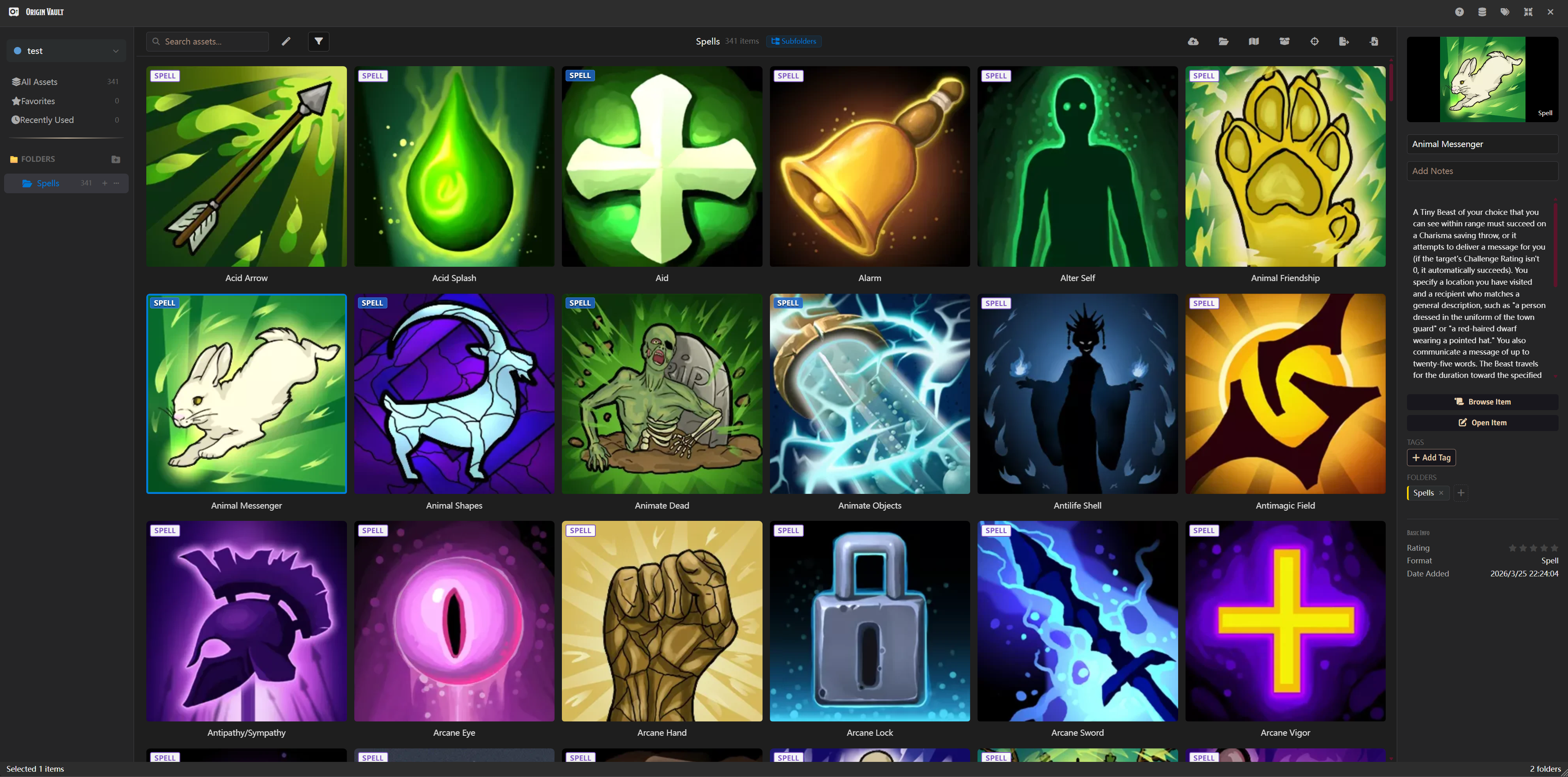
The assets shown in this image are for demonstration purposes only and do not constitute actual included content.
Credits
All animations, audio, artwork, videos, and background assets featured in this video are created by The Kinemancer. Kin is a brilliant artist — check out his work at thekinemancer.com.
All maps shown are courtesy of MAD. Seriously good maps — see the full collection on Patreon.