Noise cancellation for Modular A/V: removes background noise from your microphone in your browser, with RNNoise, Speex or GTCRN.
Requires Modular A/V (modular-av). Each player turns it on for themselves; it is off until they do.
Setting it up
- Install and enable it in your world along with Modular A/V and a service module (LiveKit, P2P or Jitsi).
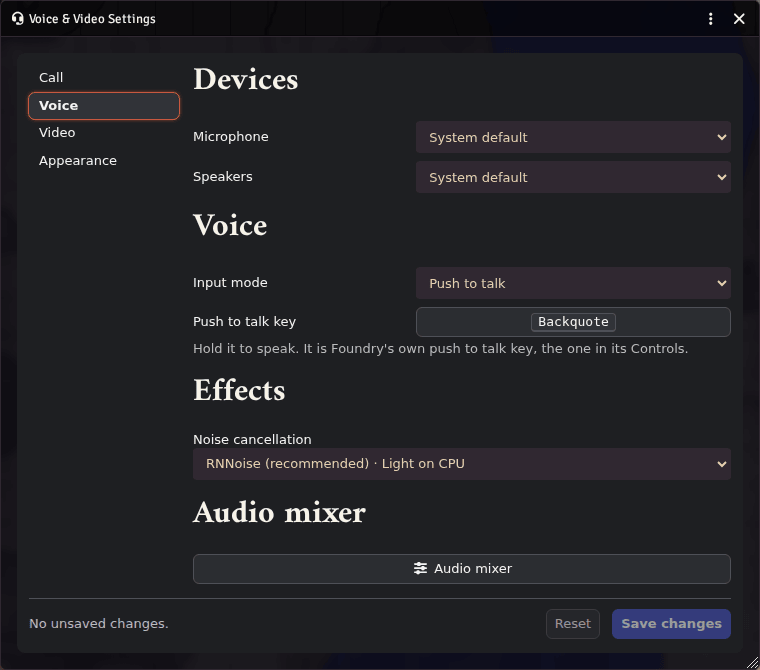
- Each player picks a model under Noise cancellation: in the voice panel, in Voice & Video Settings (Voice tab) or in the audio mixer.
What it does
- Three models, one running at a time:
- RNNoise: recommended, light (about 2% of a CPU core).
- Speex: the lightest (under 1%).
- GTCRN: removes the most noise, medium load (about 5%); it may crackle on a slow computer.
- Works with every service: LiveKit, P2P and Jitsi.
- In the audio mixer it runs before the voice gate, so the gate hears your cleaned voice.
- Your browser's own noise suppression is turned off while a model runs, since the two would fight each other. Its echo cancellation and gain control stay on.
- If a model stops working, you are heard without it, and the dock says so.
Good to know
- Requires Foundry v14 and Modular A/V. Tested in Chromium browsers.
- Network: none. The models' files come with the module, and no audio leaves your browser for them. A model's files load only when a player picks it.
- Storage: the chosen model with the player's Foundry user (so it follows them across devices).
- License: MIT. It bundles
@sapphi-red/web-noise-suppressor(MIT) with its builds of RNNoise and SpeexDSP (BSD-3-Clause) and GTCRN (MIT). The notices are in the module's THIRD-PARTY-NOTICES.md.