Camera background for Modular A/V: blurs or replaces your camera's background in your browser, with MediaPipe's selfie segmentation.
Requires Modular A/V (modular-av), and Chrome, Edge or another Chromium browser. Each player turns it on for themselves.
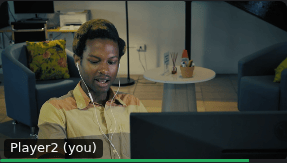
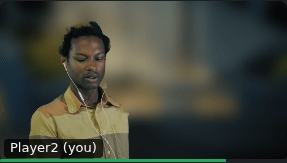
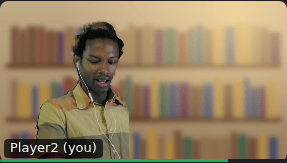
As it is, blurred, and replaced.
Setting it up
- Install and enable it in your world along with Modular A/V and a service module (LiveKit, P2P or Jitsi).
- Each player turns it on under Camera background: in the voice panel or in Voice & Video Settings (Video tab).
What it does
- Blur, with a strength from light to strong.
- Replace, with one of its own images (a study, a forest, a night sky), Foundry's backgrounds, or an image you choose: from Foundry's files if you may browse them, or by its address.
- Quality: Standard (the default) or High, which is cleaner around hair and takes a little more of your graphics card. High needs graphics acceleration in your browser; without it, Standard is used.
- It runs in a background thread and on your graphics card, so your page stays as responsive as without it.
- Your camera is never sent without it. While the effect starts, if it stops (a hidden tab may pause it), or if it can't run, your camera is kept off and the dock says why. Turn the effect off to send your camera as it is.
- In Firefox or Safari it isn't offered, and your camera works without it.
Good to know
- Requires Foundry v14 and Modular A/V. Chrome, Edge or another Chromium browser.
- Network: none of its own. Its files come with the module, and your video goes nowhere for it. If a player chooses a background image by its address, their browser loads that image from its server, which sees their IP address and needs to allow it.
- Storage: whether it's on and its quality in the browser (they depend on the device), the blur strength and the chosen image with the player's Foundry user (so they follow them across devices).
- License: MIT. Its worker bundles
@mediapipe/tasks-vision(Apache-2.0), and the module includes MediaPipe's WebAssembly runtime and two of its selfie segmentation models, checked against fixed hashes when the module is built. The notices are in the module's THIRD-PARTY-NOTICES.md.
Where the pictures come from
- The person in the screenshots is a Mixkit stock video clip, under the Mixkit Stock Video Free License, played to the browser as its camera. The clip isn't part of the module. Which clip, and how the screenshots are made: docs/images/README.md.
- The three backgrounds the module ships (Study, the bookshelf in the third screenshot, plus Forest and Night sky) are simple vector images (SVG) made for this module. They were made using a short script that draws them from rectangles, shapes and gradients. No image-generation model and no other artist's work was used. They are under the MIT license, like the rest of the module.