
A reverb for your voice in Modular A/V: a hall, a cave, a cathedral. It runs in your browser, on a send beside your voice, so it rings on after you stop speaking without holding the voice gate open. Requires Modular A/V (modular-av). Each player turns it on and sets it in Modular A/V: Audio mixer.
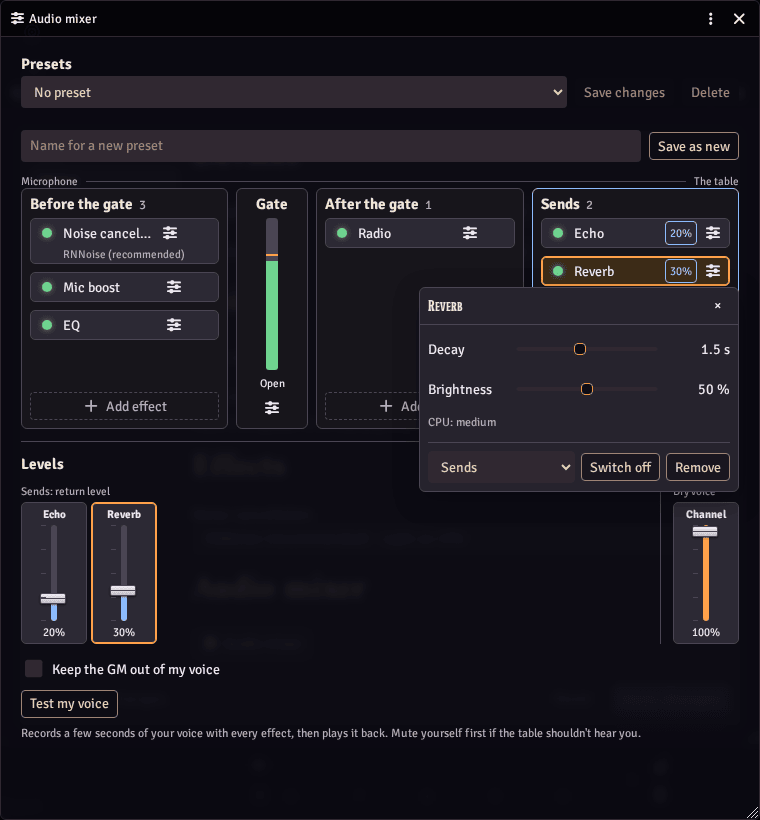
Setting it up
- Install and enable it in your world along with Modular A/V, a service module (LiveKit, P2P or Jitsi) and Modular A/V: Audio mixer.
- Each player opens the mixer (from the dock's voice panel, or the Voice tab of the voice and video settings window), adds Reverb and sets it there. It starts on a send.
What it does
- Decay: how long it rings, 0.3 s to 3 s (starts at 1.5 s).
- Brightness: how bright the ring sounds, 0% to 100% (starts at 50%).
- On a send, the voice gate closes on time and the reverb rings on. The mixer's Cut tails stops it as soon as your microphone closes instead.
- For a scene: with the mixer, a GM can lay a preset with it over everyone's voice or one player's, such as a cathedral for the whole table. Players see a notice and can refuse it.
- It takes about 1% of a CPU core while you speak, and next to nothing in silence.
- If it stops working, you are heard without it, and the mixer says it failed.
Good to know
- Requires Foundry v14, Modular A/V and the audio mixer to turn it on. Without the mixer, only macros and other modules can reach it, through Modular A/V's API. Tested in Chromium browsers.
- Network: none. No audio leaves your browser for it.
- Storage: its two values with the player's Foundry user, so they follow them to any device.
- License: MIT. It bundles no third-party code. It uses the delay lengths of Freeverb (Jezar at Dreampoint, public domain).