
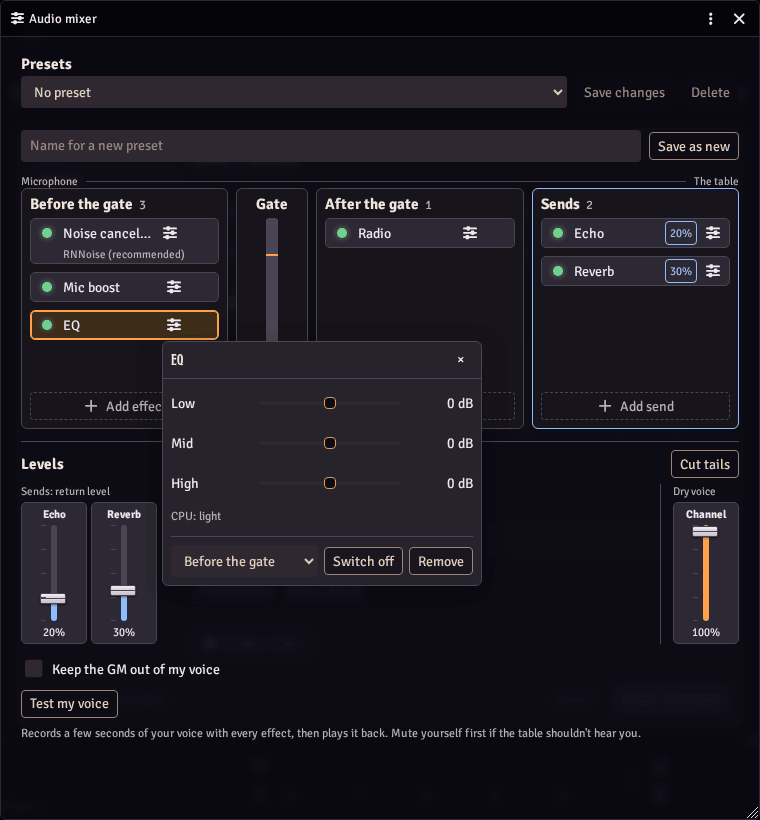
A three band equalizer for your voice in Modular A/V: warm it up, thin it out, or take the edge off a harsh microphone. It runs in your browser, ahead of the voice gate. Requires Modular A/V (modular-av). Each player turns it on and sets it in Modular A/V: Audio mixer.
Setting it up
- Install and enable it in your world along with Modular A/V, a service module (LiveKit, P2P or Jitsi) and Modular A/V: Audio mixer.
- Each player opens the mixer (from the dock's voice panel, or the Voice tab of the voice and video settings window), adds EQ and sets it there. It starts before the voice gate.
What it does
- Low: below 200 Hz, -12 dB to 12 dB (starts at 0 dB).
- Mid: around 1 kHz, -12 dB to 12 dB (starts at 0 dB).
- High: above 4 kHz, -12 dB to 12 dB (starts at 0 dB).
- For a scene: with the mixer, a GM can lay a preset with it over everyone's voice or one player's, such as a muffled voice calling through a door. Players see a notice and can refuse it.
- It uses the browser's own filters, so it takes next to nothing.
- If it stops working, you are heard without it, and the mixer says it failed.
Good to know
- Requires Foundry v14, Modular A/V and the audio mixer to turn it on. Without the mixer, only macros and other modules can reach it, through Modular A/V's API. Tested in Chromium browsers.
- Network: none. No audio leaves your browser for it.
- Storage: its three values with the player's Foundry user, so they follow them to any device.
- License: MIT. It bundles no third-party code.