
A mic boost for your voice in Modular A/V. It raises a quiet microphone, such as a laptop's built-in one, for everyone, and evens out its peaks so a laugh doesn't drown the table. It runs in your browser, ahead of the voice gate, so the gate hears the raised voice. Requires Modular A/V (modular-av). Each player turns it on and sets it in Modular A/V: Audio mixer.
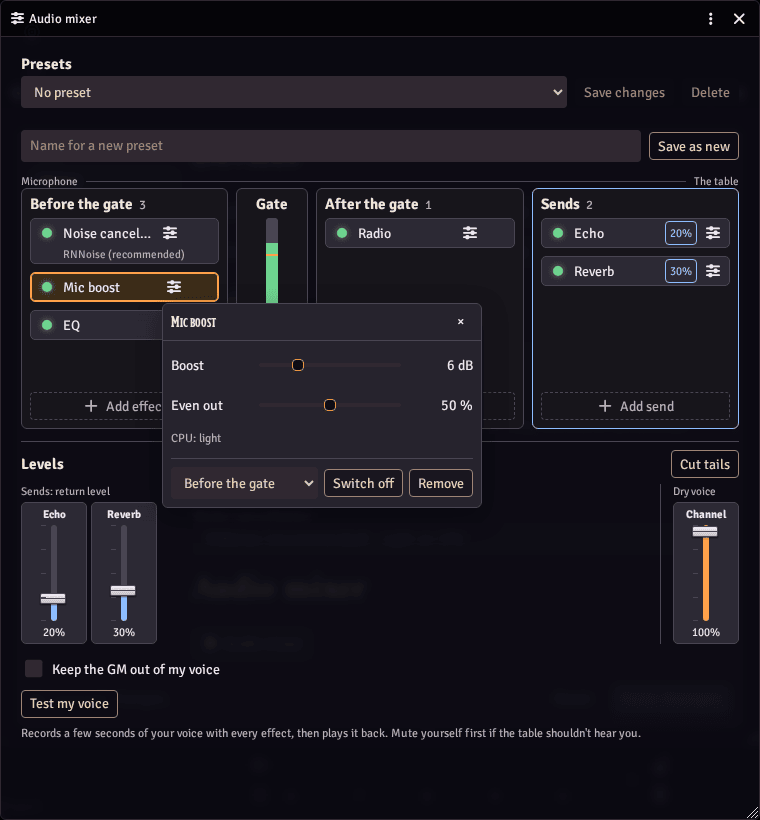
Setting it up
- Install and enable it in your world along with Modular A/V, a service module (LiveKit, P2P or Jitsi) and Modular A/V: Audio mixer.
- Each player opens the mixer (from the dock's voice panel, or the Voice tab of the voice and video settings window), adds Mic boost and sets it there. It starts before the voice gate.
What it does
- Boost: how much louder your voice goes out, 0 dB to 24 dB (starts at 6 dB).
- Even out: how hard loud moments are brought down, which raises the quiet ones, 0% to 100% (starts at 50%).
- A limiter just under full scale comes last, so a boosted shout can't clip.
- A boost raises the room's noise too. Noise cancellation, which runs first, keeps it down.
- To make one other player louder for you alone, use their volume in the dock instead: it goes up to 200%.
- From the GM: with the mixer, a GM can lay a preset with it over one player's voice, such as raising a player whose microphone is too quiet for the table. Players see a notice and can refuse it.
- It uses the browser's own compressor, so it takes next to nothing.
- If it stops working, you are heard without it, and the mixer says it failed.
Good to know
- Requires Foundry v14, Modular A/V and the audio mixer to turn it on. Without the mixer, only macros and other modules can reach it, through Modular A/V's API. Tested in Chromium browsers.
- Network: none. No audio leaves your browser for it.
- Storage: Boost stays in that browser, since it depends on how quiet that computer's microphone is. Even out goes with the player's Foundry user, so it follows them to any device.
- License: MIT. It bundles no third-party code.