
D&D5e Death Token Effects · v1.14.5 · Foundry VTT 14 · D&D5e 6.0.6 · MIT








GitHub · Releases · Issues / Incidencias · Manifest URL
English
See death-saving throw failures on the battlefield. D&D5e Death Token Effects displays a configurable death icon and red token border when a character reaches 0 HP. The icon opacity increases as failed death saving throws accumulate.
Key features
- Progressive overlay opacity for 1, 2, and 3+ failed death saving throws.
- Optional faint indicator at 0 HP with no failures.
- Customizable icon image, tint, opacity, and size; the original token image is never replaced.
- Lower-right visual overlay and configurable red token border.
- Optional automatic Dead status at 3+ failures, with optional removal of Bloodied.
- Optional removal of Dead when the actor is healed above 0 HP; disabled by default.
- Non-interactive graphics and automatic updates when actor data changes.
How it works
HP > 0: no death overlay. 0 HP, 0 failures: hidden by default. 1 failure: low opacity (25% by default). 2 failures: medium opacity (50%). 3+ failures: high opacity (80%) and optional Dead status handling.
The red and blue d20s in the banner are symbolic. The module visualizes failed death saves; it does not roll or modify saving throws.
Requirements and installation
Foundry VTT 14.367+ (verified 14.369) · D&D 5e 6.0.3+ (verified 6.0.6).
- Open Add-on Modules → Install Module in Foundry.
- Find the module, or paste its manifest URL.
- Enable the module in your D&D5e world.
- Adjust Configure Settings → Module Settings → D&D5e Death Token Effects.
Español
Visualiza los fallos de las salvaciones contra muerte en el tablero. D&D5e Death Token Effects muestra un icono de muerte configurable y un borde rojo alrededor del token cuando un personaje llega a 0 puntos de golpe. La opacidad del icono aumenta según los fallos acumulados.
Características
- Opacidad progresiva del icono con 1, 2 y 3 o más fallos de salvación de muerte.
- Indicador tenue opcional con 0 PG y ningún fallo.
- Personalización de imagen, color, opacidad y tamaño sin sustituir la imagen original del token.
- Icono en la esquina inferior derecha y borde rojo configurable.
- Estado Muerto opcional con 3+ fallos y eliminación opcional de Ensangrentado.
- Eliminación opcional de Muerto al curarse por encima de 0 PG; desactivada por defecto.
- Gráficos no interactivos y actualización automática al cambiar los datos del actor.
Funcionamiento
PG > 0: sin icono. 0 PG, 0 fallos: oculto por defecto. 1 fallo: opacidad baja (25% por defecto). 2 fallos: opacidad media (50%). 3 o más fallos: opacidad alta (80%) y gestión opcional del estado Muerto.
Los d20 rojo y azul del banner son ilustrativos. El módulo representa los fallos de salvación de muerte; no efectúa ni modifica tiradas.
Requisitos e instalación
Foundry VTT 14.367+ (verificada 14.369) · D&D 5e 6.0.3+ (verificada 6.0.6).
- En Foundry, abre Add-on Modules → Install Module.
- Busca el módulo o pega su URL del manifiesto.
- Actívalo en tu mundo D&D5e.
- Configúralo en Configure Settings → Module Settings → D&D5e Death Token Effects.
Screenshots / Capturas de pantalla
Click to enlarge / Pulsa para ampliar.
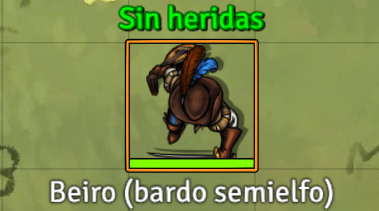
Full HP / Vida completa |
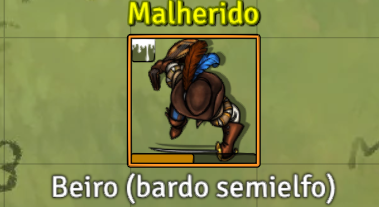
Half HP / Mitad de vida |
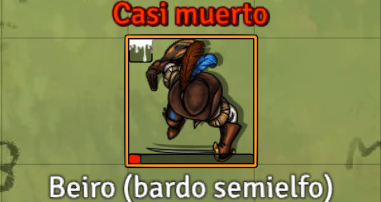
1 HP / 1 PG |
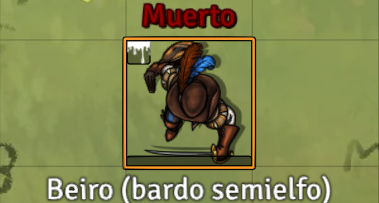
0 HP / 0 PG |
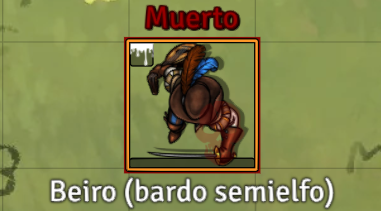
1 failed save / 1 fallo |
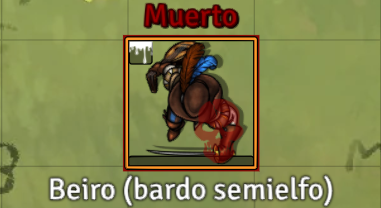
2 failed saves / 2 fallos |
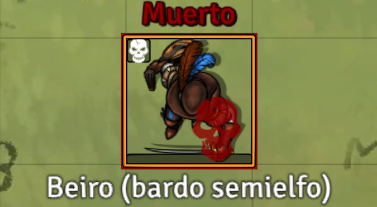
3 failed saves · Dead / 3 fallos · Muerto |
Support / Soporte
GitHub / Repositorio · Issues / Incidencias · Releases / Versiones · MIT License / Licencia MIT