CRUX
Combat Ready User Xperience
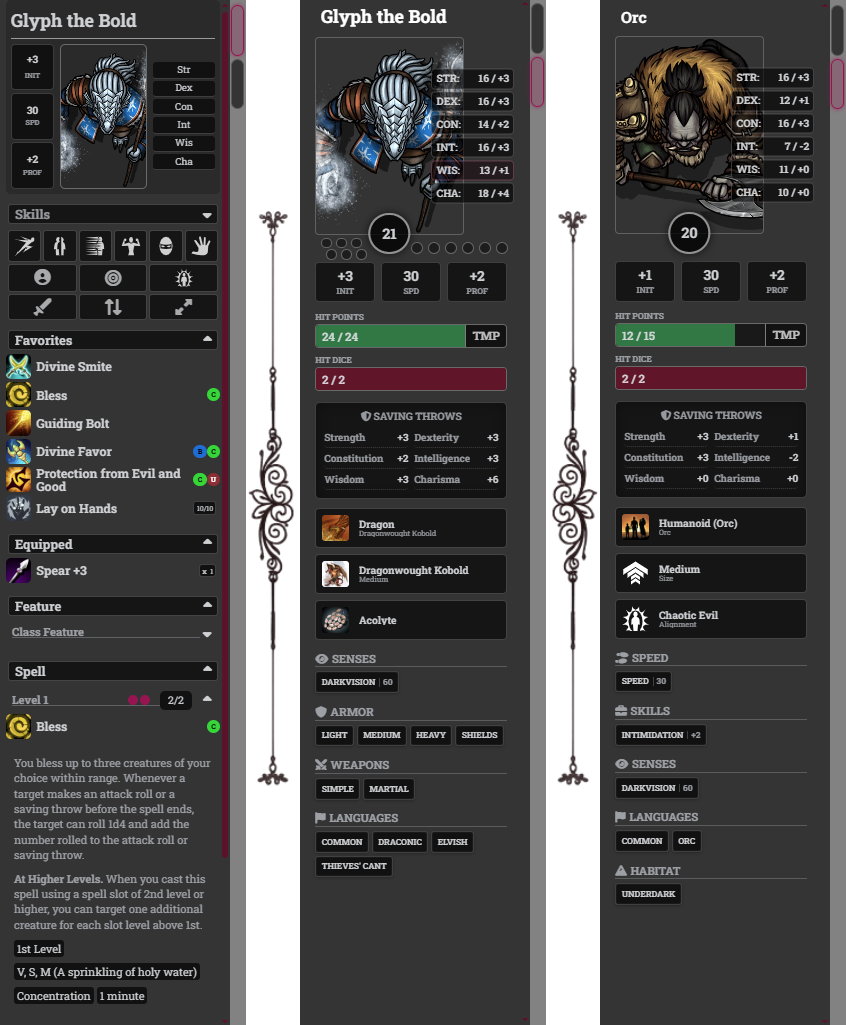
CRUX adds a tabbed left-side play panel to Foundry VTT for dnd5e, giving players quick access to actions, spells, abilities, actor status, token controls, and common combat tools without opening the character sheet.
Designed to complement Foundry's left-side interface, Crux keeps the character's most-used options close at hand during play. The Actions panel handles fast item and combat flow, while the Actor panel provides an alternate character sheet view for the information players usually need at the table.
- Foundry VTT: minimum v13, verified v14
- System: dnd5e
- Optional support: Tidy 5e Sheet sections
- Automation friendly: dnd5e/MidiQOL-style item and activity activation flow
Join the Archive
Follow official Registry releases, participate in Research Division testing, review Field Operations reports, and help shape future Relic Raiding projects.
At a Glance
- Tabbed left-side tray with Actions and Actor panels
- Activatable items, spells, features, and basic dnd5e actions
- Alternate actor sheet view with portrait, vitals, saves, identity, and traits
- PC and NPC actor summaries
- Inline HP and Temp HP editing with Shift-click
- Favorites, equipped items, spell groups, inventory, and passive sections
- Ability and skill rolls without opening the character sheet
- Spell slot, use, quantity, and action-type indicators
- Token tools for targeting, effects, combat, elevation, and turns
- Keybindings for Actions, Actor, and Skills access
- Font, scaling, section, skill list, and tray display customization
- Optional support for Tidy 5e Sheet sections and Taskbar compatibility
Panel Tabs
- Actions panel for the main Crux action, item, spell, and token tool workflow
- Actor panel for common character sheet information without opening the sheet
- Direct keybinding access: Shift+E for Actions, Alt+C for Actor, and Shift+K for Skills
Action Tray
- Sliding left-side tray with manual, automatic, and always-show modes
- Quick access to activatable items, spells, features, abilities, and basic actions
- Favorites, Equipped, Features, Spells, Inventory, and Passive sections
- Expand/collapse controls for sections and groups
Actor Panel
- Alternate character sheet view inside the Crux tray
- Large actor portrait with AC, death saves, exhaustion, and quick stat readouts
- HP, Temp HP, and Hit Dice bars
- Shift-click inline editing for HP and Temp HP
- Saving throw access without opening the character sheet
- Creature type, species/size, background/alignment, and trait summaries
- PC and NPC displays adapt to the selected actor type
dnd5e Actions and Rolls
- Basic action buttons for Dash, Disengage, Dodge, Grapple, Hide, and Shove
- Actor-owned action items are used when present
- Fallback chat cards are created when no matching action item exists
- Ability and skill rolls
- Death saving throws from the downed actor portrait
- dnd5e modifier key behavior for skip-dialog and advantage/disadvantage item use
Resources and Indicators
- Spell slot dots and optional spell slot numbers
- Quantity and uses indicators
- Bonus action, reaction, concentration, ritual, unprepared, and legendary indicators
- Apothecary and pact spell slot support
Token Tools
- Token configuration access
- Target mode toggle
- Drag-and-drop item targeting
- Status effects window
- Add to combat
- Elevation control
- End turn and roll initiative prompts
Customization
- Tray size from 200-300px
- Small, medium, and large icon sizes
- Font family and custom font support
- Global, content, and character-name text size controls
- Health overlay options
- Empty tray icon selection
- Section visibility and default expansion settings
- Skill list placement
- Tidy 5e Sheet section support
- Taskbar compatibility
Installation
- In Foundry VTT's setup screen, go to the Add-on Modules tab.
- Click Install Module.
- Search for CRUX or paste the manifest URL below.
https://github.com/Relic-Repo/crux/releases/latest/download/module.json
Compatibility
- Foundry VTT: minimum v13, verified v14
- System: dnd5e
- Optional modules: Tidy 5e Sheets, MidiQOL-style item workflows, Foundry Taskbar compatibility
CRUX is designed for the dnd5e system and follows the system item/activity use flow where possible so other automation modules can recognize Crux-triggered item use.
Credit
CRUX is a continuation and enhancement of the Action Pack module originally created by Tero Parvinen.
Original module: https://github.com/teroparvinen/foundry-action-pack
Brazilian Portuguese localization review and corrections by Kharmans.
Support
CRUX is free and will remain free. If it helps at your table and you want to support development, you can buy me a coffee on Ko-fi.